

背景
类似预签名的方式,后端生成了签名和policy, 前端使用表单提交。
提示
如果可以,尽量使用简单的方式,比如前端用accessKeyId+accessKeySecret 的方式直接putObject.但这种方法会暴露secret。
也可以通过自己服务后台上传到aliyun oss. 但这种方式会占用自己服务的带宽。
如果使用post Object 的方式,很麻烦,官方文档也的也不好(写的跟si一样)。调试了1天,帮doubao的帮助下才搞定。
后端代码
public AliyunOssSignatureView genSignature() throws Exception { // 步骤1:创建policy。 ObjectMapper mapper = new ObjectMapper(); Map<String, Object> policy = new HashMap<>(); policy.put("expiration", formatISODateTime()); List<Object> conditions = new ArrayList<>(); Map<String, String> bucketCondition = new HashMap<>(); bucketCondition.put("bucket", bucketName); conditions.add(bucketCondition); Map<String, String> signatureVersionCondition = new HashMap<>(); signatureVersionCondition.put("x-oss-signature-version", "OSS4-HMAC-SHA256"); conditions.add(signatureVersionCondition); Map<String, String> credentialCondition = new HashMap<>(); credentialCondition.put("x-oss-credential", accessKeyId + "/" + formatISODate() + "/" + region + "/oss/aliyun_v4_request"); // 替换为实际的 access key id conditions.add(credentialCondition); Map<String, String> dateCondition = new HashMap<>(); dateCondition.put("x-oss-date", formateDateTimeZ()); conditions.add(dateCondition); conditions.add(Arrays.asList("content-length-range", 1L, 1024L*1024*1024*5)); conditions.add(Arrays.asList("eq", "$success_action_status", "201")); // conditions.add(Arrays.asList("starts-with", "$key", "user/eric/")); // conditions.add(Arrays.asList("in", "$content-type", Arrays.asList("image/jpg", "image/png"))); // conditions.add(Arrays.asList("not-in", "$cache-control", Arrays.asList("no-cache"))); policy.put("conditions", conditions); String jsonPolicy = mapper.writeValueAsString(policy); // 步骤2:构造待签名字符串(StringToSign)。 String stringToSign = new String(Base64.encodeBase64(jsonPolicy.getBytes())); // 步骤3:计算SigningKey。 byte[] dateKey = hmacsha256(("aliyun_v4" + accessKeySecret).getBytes(), formatISODate()); byte[] dateRegionKey = hmacsha256(dateKey, region); byte[] dateRegionServiceKey = hmacsha256(dateRegionKey, "oss"); byte[] signingKey = hmacsha256(dateRegionServiceKey, "aliyun_v4_request"); // 步骤4:计算Signature。 byte[] result = hmacsha256(signingKey, stringToSign); String signature = BinaryUtil.toHex(result); log.info("policy:{}, base64 policy:{}, signature:{}", jsonPolicy, stringToSign, signature); return new AliyunOssSignatureView(stringToSign, signature); } public static byte[] hmacsha256(byte[] key, String data) { try { // 初始化HMAC密钥规格,指定算法为HMAC-SHA256并使用提供的密钥。 SecretKeySpec secretKeySpec = new SecretKeySpec(key, "HmacSHA256"); // 获取Mac实例,并通过getInstance方法指定使用HMAC-SHA256算法。 Mac mac = Mac.getInstance("HmacSHA256"); // 使用密钥初始化Mac对象。 mac.init(secretKeySpec); // 执行HMAC计算,通过doFinal方法接收需要计算的数据并返回计算结果的数组。 byte[] hmacBytes = mac.doFinal(data.getBytes()); return hmacBytes; } catch (Exception e) { throw new RuntimeException("Failed to calculate HMAC-SHA256", e); } } /** * 获取ISO格式时间 * 2024-12-03T13:00:00Z * @return current time iso format */ public static String formatISODateTime() { ZonedDateTime utcTime = ZonedDateTime.now(); utcTime = utcTime.plusHours(1); return utcTime.format(DateTimeFormatter.ofPattern("yyyy-MM-dd'T'HH:mm:ss.SSS'Z'")); } public static String formatISODate() { LocalDate utcDate = LocalDate.now(ZoneOffset.UTC); return utcDate.format(DateTimeFormatter.ofPattern("yyyyMMdd")); } public static String formateDateTimeZ() { ZonedDateTime utcTime = ZonedDateTime.now(ZoneOffset.UTC); return utcTime.format(DateTimeFormatter.ofPattern("yyyyMMdd'T'HHmmss'Z'")); }
其中region 一定要注意,是类似cn-beijing 这样的,而不是oss-cn-beijing.
endpoint 是 https://bucketName.oss-cn-beijing.alyuncs.com
上面使用的base64是apache 的。不是java自带的
前端代码
filed的顺序一定不能错,错了就不好使
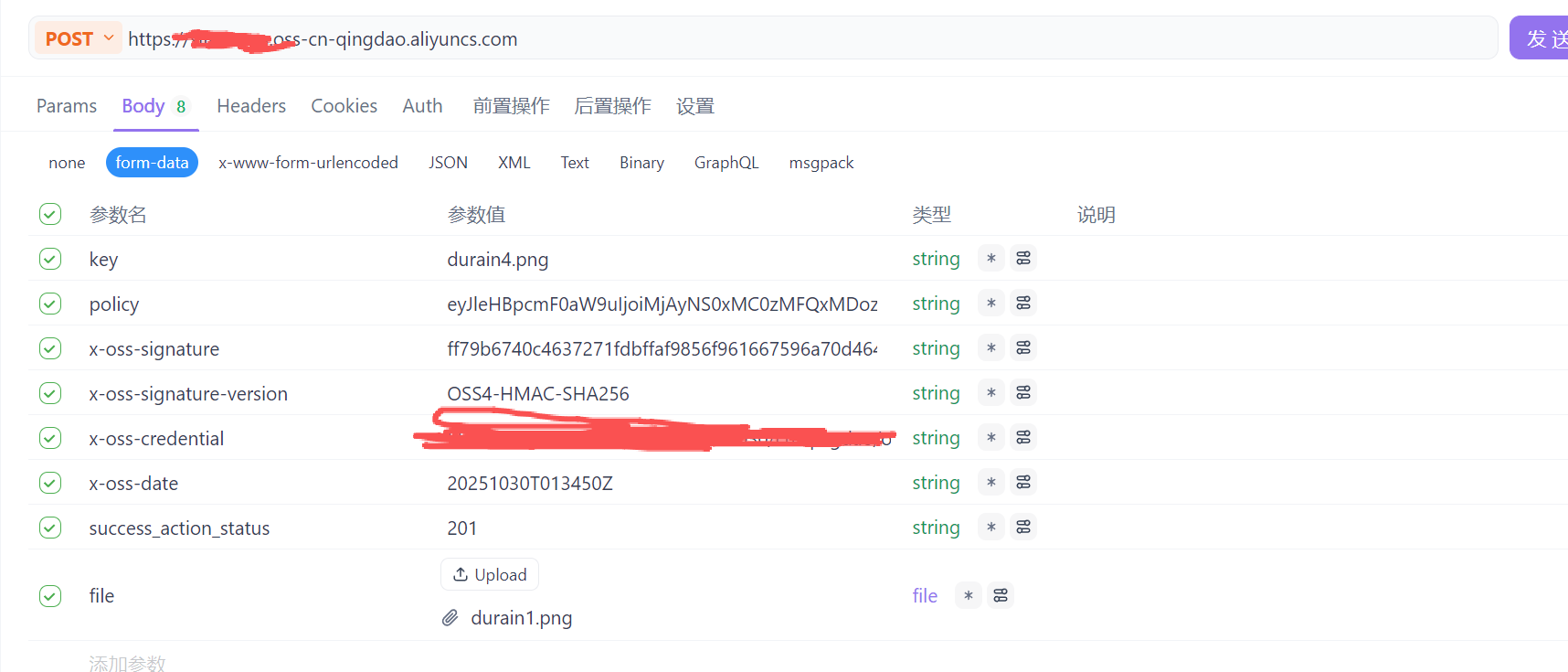
policy 和 x-oss-signature 都是后端生成返回给前端。
key 是上传后的文件名称
前端可以把policy base64 decode一下。在里面取x-oss-signature-version,x-oss-credential, x-oss-date,success_action_status这些值 。
file 是要上传的文件
参考文档
https://help.aliyun.com/zh/oss/developer-reference/postobject
https://help.aliyun.com/zh/oss/developer-reference/signature-version-4-recommend?spm=a2c4g.11186623.0.0.700a713f3JNlJV#79752ac45behk



