

.net中使用efcore作为orm的项目有很多,efcore有很多优点,特别是小型项目里使用linq操作数据库的丝滑。但是有时候我们又不得不面对一些比较恶心的名场面,比如硬编码Dbset<>。众所周知efcontext是基于其类型里定义的Dbset来追踪实体的。所以大部分时候不得不编写大量的public dbset<user> user{get;set;}来让我们在仓储or服务层可以丝滑的调用_context.user.xxx;那么有没有办法避免硬编码呢?有的小伙伴说可以使用反射运行时装配到efcontext,不过反射有一个问题就是运行时确实可以装配进去了,但是开发时你只有使用_context.set<user>来调用对象执行Linq,这就不符合初衷了,那么有没有办法既可以在业务代码层面_context.user.xxx同时又避免写硬编码呢?答案是有的,那就是基于Roslyn+SourceGenerator来实现,用了它不光编译时可以自动把那堆 dbset给你补上,重要的是你的IDE还可以自动化识别到这些变化,香得一匹。接下来我们就讲一下这个实现的原理,注意本文仅限.NET 6+ SDK / VS 2022 及更高版本。
首先我们需要知道.net5的SourceGenerator这到底是个什么玩意儿,简单来讲它就是一个编译期帮你写代码的东西,避免运行时的反射开销比如什么AOP啊,什么胶水代码啊,什么代理类啊,都可以在编译期一次性生成,避免运行时用emit/表达式树等等动态植入的开销。所以我们的问题就变成了,如何让在efcontext中植入dbset。不过这里有不熟悉这个技术的小伙伴可能以为是类似直接在编译前读取.cs代码,然后把新内容硬编码到文件再编译?不过可惜SourceGenerator并不支持对编译的代码进行“魔改”,只能新增代码!! 所以我们只能另辟蹊径通过partial关键字把我们的efcontext拆成多个文件,其中主文件就是你自己的efcontext,而我们要生成的就是SourceGenerator的另外一份efcontext,当两份文件的命名空间和名字一样时,内部的属性函数会被看作是同一个类的。比如你的代码长这样:
public class MySqlEfContext : DbContext { public MySqlEfContext(DbContextOptions<MySqlEfContext> options) : base(options) { } public MySqlEfContext() { } public DbSet<User> User { get; set; } ....//一堆其他的硬编码Dbset }
那么首先要做的修改就是删除你的Dbset,同时在类型定义上添加partial变成:
public partial class MySqlEfContext : DbContext
接着我们就可以基于Roslyn来分析有那些类型可以被植入到代码里把这些类型抽取出来,最后用SourceGenerator来编写一个新的efcontext.g.cs文件然后一同编译即可
首先我们需要创建一个新的类库.csproj。然后修改csproj的xml文件引入如下内容:
<Project Sdk="Microsoft.NET.Sdk"> <PropertyGroup> <TargetFramework>netstandard2.0</TargetFramework> <ImplicitUsings>enable</ImplicitUsings> <LangVersion>11.0</LangVersion> <EnforceExtendedAnalyzerRules>true</EnforceExtendedAnalyzerRules> </PropertyGroup> <ItemGroup> <PackageReference Include="Microsoft.CodeAnalysis.CSharp" Version="4.12.0" PrivateAssets="all" /> <PackageReference Include="Microsoft.CodeAnalysis.Analyzers" Version="3.11.0" PrivateAssets="all" /> </ItemGroup> </Project>
注意这里的TargetFramework必须是netstandard2.0!!!非常重要,否则你的IDE可能不会认识你的编译结果!!!
接着我们需要在efcontext所在的类库中引入这个新的类库,这样当MSBuild编译的时候就会先编译这个类库生成代码,然后再编译efcontext所在的类库,这样efcontext以及你其他业务代码引用_context.xxx.的部分就不会报编译错误了。打开你efcontext所在的.csproj
添加如下内容(这里我的文件夹和项目就叫EfContextGenerator你根据你实际创建的修改即可):
<ItemGroup> <ProjectReference Include="..EfContextGeneratorEfContextGenerator.csproj" OutputItemType="Analyzer" ReferenceOutputAssembly="false" /> </ItemGroup>
这里的OutputItemType="Analyzer" ReferenceOutputAssembly="false"表示这是一个分析器项目,同时不需要编译到程序集中,必须要添加这两个tag否则编译会忽略
最后就是大头戏,在我们的EfContextGenerator项目下创建一个类文件(名字随意你喜好)。并在新添加的类上面继承这个接口:IIncrementalGenerator并同时给类打上特性:[Generator]。接着在IIncrementalGenerator上左键-实现接口。一个基本的框架就搭好了:
[Generator] public class DbsetGenerator : IIncrementalGenerator { public void Initialize(IncrementalGeneratorInitializationContext context) { throw new NotImplementedException(); } }
然后就是搭架子了。作为测试你可以编写一个硬编码的内容,看看你的代码是否可以正常工作,比如编写如下内容(把你的原始efcontext字符串拷贝进来):
public void Initialize(IncrementalGeneratorInitializationContext ctx) { //Debugger.Launch(); ctx.RegisterSourceOutput(ctx.CompilationProvider, (spc, compilation) => { var generated = """ using Domain.DomainBase; using Infrastructure.DataBase.PO; using InfrastructureBase; using Microsoft.Data.SqlClient; using Microsoft.EntityFrameworkCore; using Microsoft.Extensions.Configuration; using System; using System.Reflection; namespace Infrastructure.DataBase { public partial class MySqlEfContext : DbContext { } public DbSet<User> User { get; set; } public DbSet<Permission> Permission { get; set; } public DbSet<Role> Role { get; set; } } """; spc.AddSource("MySqlEfContext.DbSets.g.cs", SourceText.From(generated, Encoding.UTF8)); }); }
保存后理论上你的IDE(我的是vs2022)会自动编译一次,如果你没有触发编译可以右键解决方案编译一次。理论上你的仓储或者服务层原来的那些context.user/role调用不会抛IDE错误:

如果出现这个错误,请回头看我上面的步骤确定每一步都是按照我的方式写的理论上应该可以解决该问题:

如果一切无碍,那么接下来就是通过动态生成generated来替换掉刚才硬编码的部分,由于编译期是没有办法反射的(虽然有办法,但是完全不推荐,太伤脑子了,各种引入各种反模式,最佳实践一定是基于roslyn的AST语法树分析实现),所以这里我们需要分析代码的语法树,从语法树中查询对应的节点是否具备某些我们需要的内容来决定是否读取该类型的名称。这里以我的系统为例。我的所有实体保存到namespace Infrastructure.DataBase.PO这个命名空间中,有两种实体继承,一种是继承领域模型,一种是持久化模型(即某些连接型实体不涉及业务的):
//有领域模型继承领域: namespace Infrastructure.DataBase.PO { public class AppBuildingProject : Domain.Entities.AppBuildingProject { } } //关联表或者领域子实体比如订单明细,只有持久化的部分: namespace Infrastructure.DataBase.PO { public class ApplicationUserPermission : PersistenceObjectBase { public int AppId { get; set; } public int UserId { get; set; } public int PermissionId { get; set; } } }
我们要做的其实就是和平时反射一样,去找特定的命名空间,检查继承的父类,然后抽取名字,最后用模板代码生成刚才那段硬编码的内容,最后大功告成。具体代码我都写了注释,基本上照着看都能明白啥意思,都不是很复杂的内容:
namespace EfContextGenerator { [Generator] public class DbsetGenerator : IIncrementalGenerator { public void Initialize(IncrementalGeneratorInitializationContext ctx) { //Debugger.Launch(); // 拿到整个 Compilation var compilationProvider = ctx.CompilationProvider; ctx.RegisterSourceOutput(compilationProvider, (spc, compilation) => { // 1. 找到“持久层基类”符号 var persistenceBase = compilation .GetTypeByMetadataName("Infrastructure.Data.PersistenceObjectBase"); // 2. 收集所有类型 var allTypes = CollectAllTypes(compilation); var targetNamespace = "Infrastructure.DataBase.PO"; // 3. 过滤出我们关心的两类 var entityTypes = allTypes.Where(t => t.ContainingNamespace.ToDisplayString() == targetNamespace && (InheritsFromDomainEntities(t) || InheritsFrom(t, persistenceBase))).ToList(); // 4. 根据筛选结果,生成 DbSet 属性 var generated = GenerateDbContextPartial(entityTypes, @namespace: "Infrastructure.DataBase", dbContextName: "MySqlEfContext"); spc.AddSource("MySqlEfContext.DbSets.g.cs", SourceText.From(generated, Encoding.UTF8)); }); } /// <summary> /// 遍历全局命名空间,收集所有类型(包括嵌套类型) /// </summary> static List<INamedTypeSymbol> CollectAllTypes(Compilation compilation) { var result = new List<INamedTypeSymbol>(); var stack = new Stack<INamespaceSymbol>(); stack.Push(compilation.GlobalNamespace); while (stack.Count > 0) { var ns = stack.Pop(); foreach (var member in ns.GetMembers()) { if (member is INamespaceSymbol childNs) { stack.Push(childNs); } else if (member is INamedTypeSymbol typeSym) { CollectNested(typeSym, result); } } } return result; } /// <summary> /// 递归收集类型及其所有嵌套类型 /// </summary> static void CollectNested(INamedTypeSymbol sym, List<INamedTypeSymbol> output) { output.Add(sym); foreach (var nested in sym.GetTypeMembers()) CollectNested(nested, output); } /// <summary> /// 判断某类型是否继承自指定基类(任何层级) /// </summary> static bool InheritsFrom(INamedTypeSymbol sym, INamedTypeSymbol baseType) { if (baseType == null) return false; var cur = sym.BaseType; while (cur != null) { if (SymbolEqualityComparer.Default.Equals(cur, baseType)) return true; cur = cur.BaseType; } return false; } /// <summary> /// 判断某类型的继承链里,是否有类型命名空间以 Domain.Entities 开头 /// </summary> static bool InheritsFromDomainEntities(INamedTypeSymbol sym) { var cur = sym.BaseType; while (cur != null) { var ns = cur.ContainingNamespace?.ToDisplayString(); if (ns != null && ns.StartsWith("Domain.Entities", StringComparison.Ordinal)) return true; cur = cur.BaseType; } return false; } /// <summary> /// 根据筛选后的实体列表,拼出 DbContext 部分类的源码 /// </summary> static string GenerateDbContextPartial( List<INamedTypeSymbol> entities, string @namespace, string dbContextName) { var sb = new StringBuilder(); sb.AppendLine("// <auto-generated/>"); sb.AppendLine("using Domain.DomainBase;"); sb.AppendLine("using Infrastructure.DataBase.PO;"); sb.AppendLine("using InfrastructureBase;"); sb.AppendLine("using Microsoft.Data.SqlClient;"); sb.AppendLine("using Microsoft.EntityFrameworkCore;"); sb.AppendLine("using Microsoft.Extensions.Configuration;"); sb.AppendLine("using System;"); sb.AppendLine("using System.Reflection;"); sb.AppendLine($"namespace {@namespace};"); sb.AppendLine(); sb.AppendLine($"public partial class {dbContextName} : DbContext"); sb.AppendLine("{"); foreach (var e in entities) { var name = e.Name; sb.AppendLine($" public DbSet<{name}> {name} {{ get; set; }}"); } sb.AppendLine("}"); return sb.ToString(); } } }
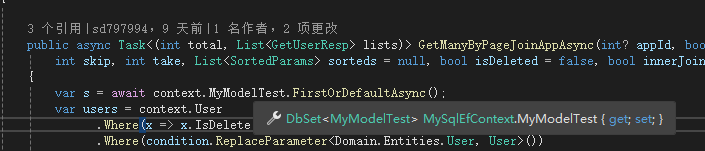
如果你走到这一步那么基本上所有的工作就完成了,剩下的你可以尝试在新建一个实体,立刻就可以被IDE识别到啦:


分享就到这里,剩下的就小伙伴们去尝试吧~



![洛谷 P11345 [KTSC 2023 R2] 基地简化 题解](http://www.itfaba.com/wp-content/themes/kemi/timthumb.php?src=http://www.itfaba.com/wp-content/themes/kemi/img/random/1.jpg&w=218&h=124&zc=1)
