

所谓Profile,就是一组配置环境,各种程序组件的合集。
实际开发中,经常要在不同的环境间切换,比如,开发时应用的是开发场的部署环境;测试时,用的是测试场的部署环境;上线时,用的是产品场的部署环境。传统做法是手动更改配置信息,但实际项目中配置信息比较多,这样做起来很麻烦,还容易出错,而Profile就是来解决这个问题的。
每个Profile都包含一组配置文件和程序组件等,对应有一个部署环境。只要为每个环境提供对应的Profile,当需要切换不同的部署环境时,只要切换到对应的Profile即可。
配置和切换Profile
声明程序组件和配置文件的Profile有以下方式:
- 使用@Profile注解修饰@Component、@Configuration、@ConfigurationProperties等注解修饰的类,这限制了这些类仅对特定的Profile有效
- 通过配置文件名限制Profile。比如application-dev.properties(或application-dev.yml)文件仅对dev Profile有效。application-test.properties(或application-test.yml)文件仅对test Profile有效。
- 在配置文件中使用特定语法限制某些属性对特定的Profile有效。这种特殊的配置文件称为“多Profile配置文件”。
对于@ConfigurationProperties类的必要说明:
- 如果@ConfigurationProperties类是通过@EnableConfigurationProperties注解来启用的,则需要在@EnableConfigurationProperties注解所在的@Configuration类上使用@Profile注解。
- 如果@ConfigurationProperties类是通过@ConfigurationPropertiesScan注解(扫描方式)来启用的,则需要在@ConfigurationProperties类本身上使用@Profile注解。
代码示例:resourcesapplication-default.yml
spring: datasource: # 指定连接deft数据库 url: jdbc:mysql://localhost:3306/deft?serverTimezone=UTC username: root password: 32147 代码示例:resourcesapplication-dev.yml
spring: datasource: # 指定连接dev数据库 url: jdbc:mysql://localhost:3306/dev?serverTimezone=UTC username: root password: 32147 代码示例:resourcesapplication-test.yml
spring: datasource: # 指定连接test数据库 url: jdbc:mysql://localhost:3306/test?serverTimezone=UTC username: root password: 32147 代码示例:resourcesapplication-prod.yml
spring: datasource: # 指定连接prod数据库 url: jdbc:mysql://localhost:3306/prod?serverTimezone=UTC username: root password: 32147 控制器类:
@RestController // 指定当前控制器的Profile为"default" @Profile("default") public class DefaultController { private final DataSource dataSource; @Autowired public DefaultController(DataSource dataSource) { this.dataSource = dataSource; } @GetMapping public Map<String, String> hello() throws SQLException { return Map.of("class", "默认场的控制器","数据库", dataSource.getConnection().getCatalog()); } } 在运行应用时,可通过spring.profiles.active属性指定激活哪个Profile,主要使用如下方式来指定:
- 通过application.properties(或application.yml)指定
- 使用操作系统的SPRING_PROFILES_ACTIVE环境变量指定
- 使用系统属性指定
- 使用命令行参数指定
以上4种方式按加载顺序排列,先加载的属性具有低优先级,因此通过命令行参数指定会覆盖前面几种方式指定的属性。
如果程序没有指定spring.profiles.active属性,则会默认使用default profile。
如果程序中定义了通用的配置文件application.properties(或application.yml),SpringBoot也会加载它,但特定的profile配置文件优先级更高,它会覆盖通用配置文件中的同名属性。
添加活动Profile
除了可以改变激活的Profile,SpringBoot还允许添加额外的活动Profile,新增的活动Profile不会彻底替换原有的Profile,而是对原有的Profile进行追加:当追加的Profile的配置属性与原有的冲突时,追加的配置属性会覆盖原有的属性,否则依然使用原有的Profile设定。
添加新Profile方式:
- 使用spring.profiles.include属性
- 调用SpringApplication的setAdditionalProfiles()方法来添加新的活动Profile
代码示例:resourcesapplication-addition.yml
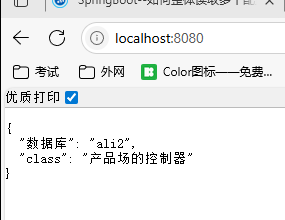
spring: datasource: # 指定连接addition数据库 url: jdbc:mysql://localhost:3306/ali2?serverTimezone=UTC 其他配置文件依然使用上一小节的例子,这里不再展示。
配置如下命令行参数:--spring.profiles.active=prod
主程序代码:
@SpringBootApplication public class App { public static void main(String[] args) { var app = new SpringApplication(App.class); // 添加Profile app.setAdditionalProfiles("addition"); app.run(args); } } 运行结果:
Profile组
有些情况下,我们按不同的功能组定义了多个配置文件,但这些配置文件依然应该属于一个特定的Profile。在这种需求下,可以将他们定义成Profile组。
代码示例:resourcesapplication-prod.yml
spring: datasource: # 指定连接prod数据库 url: jdbc:mysql://localhost:3306/prod?serverTimezone=UTC username: root password: 32147 代码示例:resourcesapplication-banner.yml
# 定义图片Banner的大小 spring: banner: image: height: 20 width: 60 # 设置字符串的色深 bitdepth: 4 代码示例:resourcesapplication-server.yml
server: port: 9090 resourcesapplication.yml文件内容:通过group属性来设定组。
spring: profiles: # 定义Profile组,该组还包括banner和server两个Profile group: prod: - banner - server # 将prod设为活动Profile active: prod 这里同时加载了上面的prod、banner、server三个Profile。
混合复合类型
当SpringBoot从多个配置文件中加载List类型的属性时,后加载的List集合总是完全替换先加载的List集合,比如:先加载的List集合包含2个元素,后加载的List集合包含1个元素,那么这个List属性最终只有一个元素。
当SpringBoot从多个配置文件中加载Map类型的属性时,后加载的Map的key-value对会被添加到先加载的Map中,比如:先加载的Map集合有2个key-value对,后加载的Map集合有1个key-value对,最终这个Map属性会包含3个key-value对。
代码示例:属性处理类
@ConfigurationProperties("crazyit") public class CrazyitProperties { private final List<Book> list = new ArrayList<>(); // Book类包含了title、description属性 private final Map<String, Book> map = new HashMap<>(); public List<Book> getList() { return this.list; } public Map<String, Book> getMap() { return this.map; } } 代码示例:resourcesapplication-prod.yml
spring: datasource: # 指定连接prod数据库 url: jdbc:mysql://localhost:3306/prod?serverTimezone=UTC username: root password: 32147 crazyit: list: - title: a description: b - title: 疯狂Java讲义 description: 北京大学信息科学学院的Java推荐教材 map: prod: title: 产品级 description: 产品级 代码示例:resourcesapplication-banner.properties
crazyit.list[0].title = 疯狂Android讲义 crazyit.list[0].description = 最全面的Adnroid编程图书 crazyit.map["banner"].title = Banner级 crazyit.map["banner"].description = Banner级 代码示例:resourcesapplication-server.yml
crazyit: list: - title: 疯狂Spring Boot终极讲义 description: “此书一出再无书”的Spring Boot map: server: title: 服务器级 description: 服务器级 resourcesapplication.yml文件内容
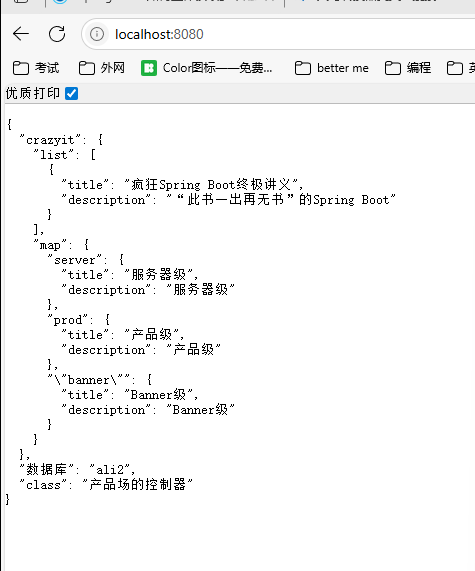
spring: profiles: # 定义Profile组,该组还包括banner和server两个Profile group: prod: - banner - server # 将prod设为活动Profile active: prod 这里同时加载了上面的prod、banner、server三个Profile。加载顺序为prod->banner->server。
控制器类:
@RestController @Profile("prod") public class ProdController { private final DataSource dataSource; private CrazyitProperties crazyitProperties; @Autowired public ProdController(DataSource dataSource, CrazyitProperties crazyitProperties) { this.dataSource = dataSource; this.crazyitProperties = crazyitProperties; } @GetMapping public Map<String, Object> hello() throws SQLException { return Map.of("class", "产品场的控制器","数据库", dataSource.getConnection().getCatalog(), "crazyit", crazyitProperties); } } 运行结果:
根据环境自动更新Profile
SpringBoot允许使用三个减号(---)将一份 *.yml分割成逻辑上的多个片段( *. properties文件使用 #--- 进行分割),每个片段都会被加载成单独的配置。
当分割成多个配置之后,可通过如下属性指定“条件性”生效.
- spring.config.activate.on-profile:指定此行配置以下的配置仅当指定的profile激活时才有效。改属性也支持取反运算符(!),比如“!dev”表示非dev profile时有效
- spring.config.activate.on-cloud-platform:指定此行配置以下的配置仅当处于指定的云平台上时才有效
比如配置片段
myprop=always-set #--- spring.config.activate.on-profile=prod otherprop=prod-value myprop的属性为always-set,总是生效。当prod Profile处于活动时,otherprop=prod-value才生效。
比如配置片段
myprop: always-set --- spring: config: activate: on-cloud-platform: kubernetes otherprop: other-set myprop的属性为always-set,总是生效。当应用被部署在k8s云平台时,otherprop=other-set才生效。
代码示例:resourcesapplication.yml文件内容
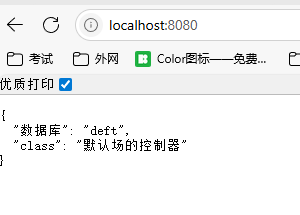
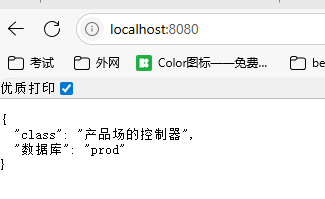
spring: datasource: username: root password: root --- spring: config: activate: on-profile: default datasource: # 指定连接deft数据库 url: jdbc:mysql://localhost:3306/deft?serverTimezone=UTC --- spring: config: activate: on-profile: dev datasource: # 指定连接dev数据库 url: jdbc:mysql://localhost:3306/dev?serverTimezone=UTC --- spring: config: activate: on-profile: prod datasource: # 指定连接prod数据库 url: jdbc:mysql://localhost:3306/prod?serverTimezone=UTC --- spring: config: activate: on-profile: test datasource: # 指定连接test数据库 url: jdbc:mysql://localhost:3306/test?serverTimezone=UTC 不知道活动的profile,运行结果
配置如下命令行参数:--spring.profiles.active=prod 启动后运行结果



![洛谷 P11345 [KTSC 2023 R2] 基地简化 题解](http://www.itfaba.com/wp-content/themes/kemi/timthumb.php?src=http://www.itfaba.com/wp-content/themes/kemi/img/random/1.jpg&w=218&h=124&zc=1)
