

使用UniApp Canvas实现分享海报
一、分享海报
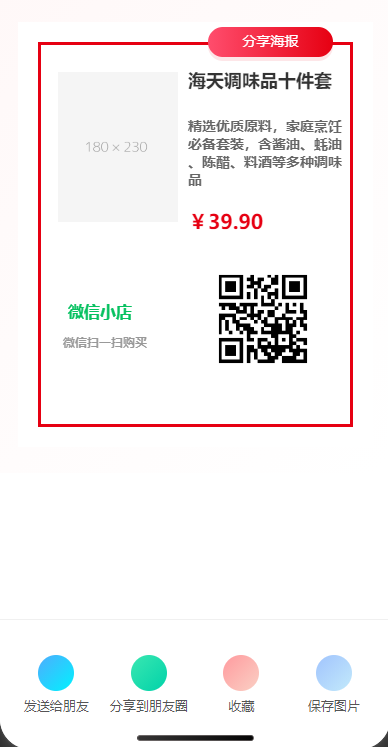
现在使用 Uniapp 中的 canvas 简单实现下商品的分享海报,附上二维码(这个可以附上各种信息例如分享绑定下单等关系),开箱即用。
- 动态生成包含商品信息、用户二维码的分佣海报
- 一键保存到手机相册
- 支持App原生分享和小程序分享
- 打通社交裂变传播路径
注:这里的分享功能用了微信的 showShareImageMenu,会调起朋友分享、朋友圈分享、收藏、保存图片等,会跟页面功能重复,并且使用这个接口记得绑定项目的 appid,否则会报错。
二、技术支持(使用 Uniapp canvas,直接复制进行更改就行)
<template> <view class="container"> <!-- 商品展示区域 --> <view class="product-canvas"> <canvas canvas-id="productCanvas" :style="{ width: canvasWidth + 'px', height: canvasHeight + 'px' }" id="productCanvas" class="canvas" /> <loading v-if="loading"></loading> </view> <!-- 四个功能按钮 --> <view class="functions"> <view class="function-item" @tap="shareToFriend"> <view class="icon-circle icon-share"></view> <text class="function-text">发送给朋友</text> </view> <view class="function-item" @tap="shareToMoments"> <view class="icon-circle icon-moments"></view> <text class="function-text">分享到朋友圈</text> </view> <view class="function-item" @tap="collectProduct"> <view class="icon-circle icon-collect"></view> <text class="function-text">收藏</text> </view> <view class="function-item" @tap="savePoster"> <view class="icon-circle icon-save"></view> <text class="function-text">保存图片</text> </view> </view> <!-- <view class="" @click="close" style=" position: absolute; left: 50%; bottom: 50rpx; transform: translateX(-50%); "> <image src="作为组件底部叉叉" mode="widthFix" style="width: 50rpx; height: auto"></image> </view> --> </view> </template> <script> export default { data() { return { canvasWidth: 355, // px canvasHeight: 425, loading: false, canvasPath: "", product: { name: "海天调味品十件套", desc_text: "精选优质原料,家庭烹饪必备套装,含酱油、蚝油、陈醋、料酒等多种调味品", market_price: 39.9, pic: "https://dummyimage.com/180x230/f5f5f5/999", }, qrcode: "https://api.qrserver.com/v1/create-qr-code/?size=100x100&data=https://shop.example.com", }; }, onLoad() { this.open() }, methods: { open() { this.drawCanvas(); }, close() { this.$emit("update:show", !this.show); }, shareToFriend() { const that = this; // #ifdef APP uni.share({ provider: "weixin", scene: "WXSceneSession", type: 2, imageUrl: that.canvasPath, success(res) { console.log("分享给朋友成功", res); uni.showToast({ title: "已分享给朋友", icon: "success", }); }, fail(err) { console.log("分享给朋友失败", err); uni.showToast({ title: "分享失败,请重试", icon: "none", }); }, }); // #endif // #ifdef MP-WEIXIN uni.showShareImageMenu({ path: that.canvasPath, success() {}, fail(err) { console.log(err) } }); // #endif }, shareToMoments() { const that = this; // #ifdef APP uni.share({ provider: "weixin", scene: "WXSceneTimeline", type: 2, imageUrl: that.canvasPath, success(res) { console.log("分享到朋友圈成功", res); uni.showToast({ title: "已分享到朋友圈", icon: "success", }); }, fail(err) { console.log("分享到朋友圈失败", err); uni.showToast({ title: "分享失败,请重试", icon: "none", }); }, }); // #endif // #ifdef MP-WEIXIN wx.showShareImageMenu({ path: that.canvasPath, success() {}, }); // #endif }, collectProduct() { // #ifdef MP-WEIXIN const that = this; wx.addFileToFavorites({ filePath: that.canvasPath, success: function() { console.log("收藏成功"); uni.showToast({ title: "收藏成功", icon: "success", }); }, fail: function(err) { console.error("收藏失败:", err); uni.showToast({ title: "收藏失败", icon: "error", }); }, }); // #endif }, savePoster() { const that = this; uni.saveImageToPhotosAlbum({ filePath: that.canvasPath, success(res) { uni.showToast({ title: "保存成功", icon: "success", }); }, }); }, async drawCanvas() { this.loading = true; const that = this; const dpr = uni.getSystemInfoSync().pixelRatio; const width = this.canvasWidth; const height = this.canvasHeight; const ctx = uni.createCanvasContext("productCanvas", this); // ctx.canvas.width = width * dpr; // ctx.canvas.height = height * dpr; // ctx.scale(dpr, dpr); const { pic: image, name: title, desc_text: desc, market_price: price, } = this.product; const qrcode = this.qrcode; // 背景白色 + 红色边框 const borderMargin = 20; const borderWidth = 3; ctx.setFillStyle("#fff"); ctx.fillRect(0, 0, width, height); ctx.setStrokeStyle("#e60012"); ctx.setLineWidth(borderWidth); // 边框内缩绘制 ctx.strokeRect( borderMargin + borderWidth / 2, borderMargin + borderWidth / 2, this.canvasWidth - 2 * (borderMargin + borderWidth / 2), this.canvasHeight - 2 * (borderMargin + borderWidth / 2) ); // 徽章 const badgeX = 190; const badgeY = 5; const badgeW = 125; const badgeH = 30; const badgeRadius = 15; // 阴影模拟(底层填充深色模糊) ctx.setFillStyle("rgba(230, 0, 18, 0.1)"); ctx.beginPath(); ctx.moveTo(badgeX + badgeRadius, badgeY + 4); ctx.arcTo( badgeX + badgeW, badgeY + 4, badgeX + badgeW, badgeY + badgeH + 4, badgeRadius ); ctx.arcTo( badgeX + badgeW, badgeY + badgeH + 4, badgeX, badgeY + badgeH + 4, badgeRadius ); ctx.arcTo(badgeX, badgeY + badgeH + 4, badgeX, badgeY + 4, badgeRadius); ctx.arcTo(badgeX, badgeY + 4, badgeX + badgeW, badgeY + 4, badgeRadius); ctx.closePath(); ctx.fill(); // 绘制渐变圆角背景 const gradient = ctx.createLinearGradient(badgeX, 0, badgeX + badgeW, 0); gradient.addColorStop(0, "#ff4d6d"); gradient.addColorStop(1, "#e60012"); ctx.setFillStyle(gradient); ctx.beginPath(); ctx.moveTo(badgeX + badgeRadius, badgeY); ctx.arcTo( badgeX + badgeW, badgeY, badgeX + badgeW, badgeY + badgeH, badgeRadius ); ctx.arcTo( badgeX + badgeW, badgeY + badgeH, badgeX, badgeY + badgeH, badgeRadius ); ctx.arcTo(badgeX, badgeY + badgeH, badgeX, badgeY, badgeRadius); ctx.arcTo(badgeX, badgeY, badgeX + badgeW, badgeY, badgeRadius); ctx.closePath(); ctx.fill(); // 白色文字 ctx.setFontSize(14); ctx.setFillStyle("#fff"); ctx.setTextAlign("center"); ctx.setTextBaseline("middle"); ctx.fillText("分享海报", badgeX + badgeW / 2, badgeY + badgeH / 2); // 商品图 await this.drawImage(ctx, image, 40, 50, 120, 150); // 标题 ctx.setFontSize(18); ctx.setFillStyle("#333"); ctx.setTextAlign("left"); ctx.font = "bold 18px sans-serif"; const titleLines = this.splitText(title, 160, ctx); titleLines.forEach((line, index) => { ctx.fillText(line, 170, 60 + index * 20); }); // 描述(多行) ctx.setFontSize(14); ctx.setFillStyle("#666"); const lines = this.splitText(desc, 160, ctx); lines.forEach((line, index) => { ctx.fillText(line, 170, 85 + titleLines.length * 20 + index * 18); }); // 价格 ctx.setFontSize(20); ctx.setFillStyle("#e60012"); ctx.fillText( "¥" + price.toFixed(2), 170, 110 + titleLines.length * 20 + lines.length * 18 ); // 小店名 ctx.setFontSize(16); ctx.setFillStyle("#07c160"); ctx.fillText( "微信小店", 50, 200 + titleLines.length * 20 + lines.length * 18 ); // 提示 ctx.setFontSize(12); ctx.setFillStyle("#999"); ctx.fillText( "微信扫一扫购买", 45, 230 + titleLines.length * 20 + lines.length * 18 ); // 二维码 await this.drawImage( ctx, qrcode, 200, 160 + titleLines.length * 20 + lines.length * 18, 90, 90 ); ctx.draw(true, () => { setTimeout(() => { uni.canvasToTempFilePath({ destWidth: that.canvasWidth, destHeight: that.canvasHeight, canvasId: "productCanvas", success: (res) => { console.log("临时图片路径:", res.tempFilePath); that.canvasPath = res.tempFilePath; }, }, that ); }, 100); }); }, // 远程图片绘制 drawImage(ctx, src, x, y, w, h) { return new Promise((resolve) => { uni.getImageInfo({ src, success: (res) => { ctx.drawImage(res.path, x, y, w, h); this.loading = false; resolve(); }, fail: () => { console.warn("图片加载失败", src); this.loading = false; resolve(); }, }); }); }, // 文本换行 splitText(text, maxWidth, ctx) { const result = []; let temp = ""; for (let char of text) { const testLine = temp + char; const { width } = ctx.measureText(testLine); if (width > maxWidth) { result.push(temp); temp = char; } else { temp = testLine; } } if (temp) result.push(temp); return result; }, }, }; </script> <style scoped> .container { height: 100vh; width: 100%; display: flex; flex-direction: column; justify-content: space-between; } /* 商品展示区域 - Canvas */ .product-canvas { width: 100%; background: linear-gradient(135deg, #fff8f8, #fff); position: relative; display: flex; flex-direction: column; justify-content: center; align-items: center; padding: 50rpx 0; } .canvas { width: 315px; height: 425px; } .canvas-content { width: 90%; height: 85%; background: #fff; border: 3px solid #e60012; border-radius: 12px; box-shadow: 0 8px 20px rgba(230, 0, 18, 0.1); padding: 20rpx; position: relative; } .badge { position: absolute; top: -16px; right: 20px; background: linear-gradient(to right, #ff4d6d, #e60012); color: white; padding: 8px 16px; border-radius: 20px; font-weight: bold; font-size: 14px; box-shadow: 0 4px 10px rgba(230, 0, 18, 0.3); } .product-info { display: flex; height: 100%; } .product-image { flex: 1; background: #f9f9f9; border-radius: 8px; display: flex; justify-content: center; align-items: center; overflow: hidden; } .product-image img { width: 100%; height: 100%; object-fit: contain; } .product-details { flex: 1; padding: 20rpx; display: flex; flex-direction: column; justify-content: space-between; } .product-title { font-size: 32rpx; font-weight: bold; color: #333; margin-bottom: 10px; } .product-desc { font-size: 14px; color: #666; line-height: 1.5; } .price { margin: 15px 0; color: #e60012; font-weight: bold; font-size: 38rpx; } .qrcode-section { display: flex; align-items: center; justify-content: space-between; margin-top: 20px; padding-top: 15px; border-top: 1px dashed #eee; } .qrcode { width: 100px; height: 100px; background: #f5f5f5; display: flex; justify-content: center; align-items: center; margin-bottom: 8px; } .qrcode-hint { color: #999; font-size: 12px; } .wx-store { color: #07c160; font-weight: bold; font-size: 15px; margin-top: 5px; } /* 功能区样式 */ .functions { display: flex; flex-direction: row; background-color: #fff; padding: 25px 10px; border-top: 1px solid #f0f0f0; } .function-item { flex: 1; display: flex; flex-direction: column; align-items: center; padding: 10px 0; transition: all 0.3s; } .function-item:active { background-color: #f9f9f9; transform: translateY(2px); } .icon-circle { width: 70rpx; height: 70rpx; border-radius: 50%; display: flex; justify-content: center; align-items: center; margin-bottom: 12rpx; } .icon-share { background: linear-gradient(135deg, #4facfe 0%, #00f2fe 100%); } .icon-moments { background: linear-gradient(135deg, #3ae7b1 0%, #00d2a9 100%); } .icon-collect { background: linear-gradient(135deg, #ff9a9e 0%, #fad0c4 100%); } .icon-save { background: linear-gradient(135deg, #a1c4fd 0%, #c2e9fb 100%); } .function-text { font-size: 26rpx; color: #555; } </style> 三、性能优化与注意事项
1. 使用问题
- Canvas 问题:这里的 canvas 宽高使用固定的px格式,这里没做过多的适配,需要各位自己进行适配,并且绘制的时候 canvas 的背景设置的是白色,因为要作为图片进行保存,如果对其分装为组件的时候要注意层级关系并且白色背景跟 mask 背景和组件背景要做好适配兼容。还有 canvas 顶部的徽章在真机可能没有那么好看,自己再进行优化吧。
- 模糊问题:使用
pixelRatio适配高分屏,上面没做,注释了 - 文字溢出:这里的文字有做分割,如果过长可能还需进行优化
2. 性能优化建议
- 预加载网络图片
- 对绘制操作进行节流控制
- 使用离屏Canvas处理复杂图形
四、效果展示


五、扩展思路
- 动态模板:配置不同风格的海报模板
- 海报审核:对接内容安全API
- 数据分析:跟踪海报分享转化率
- 裂变激励:如有是有自己的一些模式的话,可以分享后给予佣金奖励



![洛谷 P11345 [KTSC 2023 R2] 基地简化 题解](http://www.itfaba.com/wp-content/themes/kemi/timthumb.php?src=http://www.itfaba.com/wp-content/themes/kemi/img/random/2.jpg&w=218&h=124&zc=1)
