

大家好,今日要分享的是使用仓颉语言开发动态广场页面,也比较像朋友圈页面:
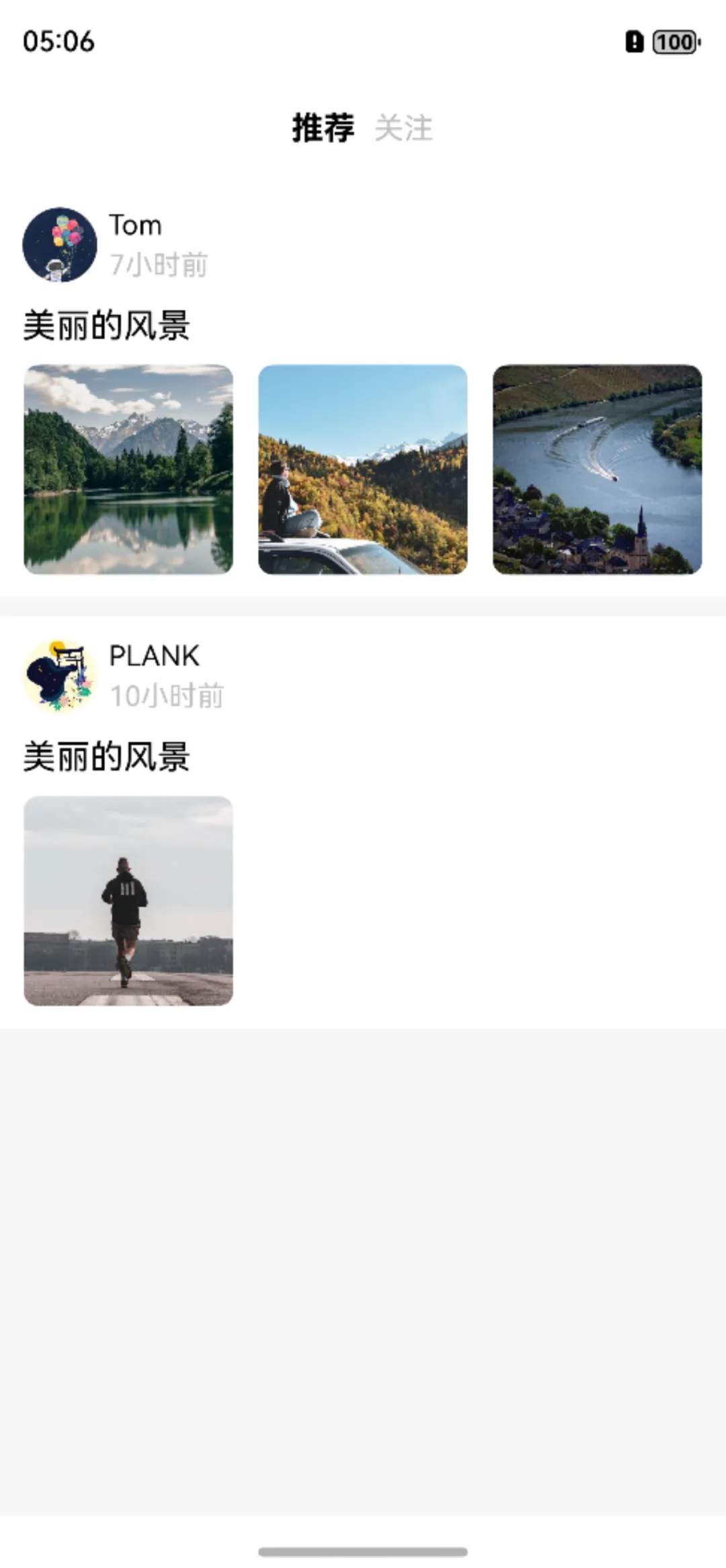
整个页面分为两部分,分别是导航栏和状态列表,导航栏比较简单,我们可以先写下导航栏的具体代码和页面的基本结构:
Column{ Row(10){ Text('推荐') .fontColor(Color.BLACK) .fontSize(17) .fontWeight(FontWeight.Bold) Text('关注') .fontColor(Color.GRAY) .fontSize(16) } .width(100.percent) .height(60) .justifyContent(FlexAlign.Center) List(space:10){ } .width(100.percent) .layoutWeight(1) .backgroundColor(Color(247, 247, 247)) } .width(100.percent) .height(100.percent)这样的话导航栏和列表容器撑满了整个页面,接下来的工作就是开发状态列表。
这里的内容也分为个人信息、状态内容和图片列表几部分,整个的布局方式是纵向的,要注意其中个人信息部分头像和名字时间是横向布局,这个比较简单。还有图片列表,我使用的方案是Grid,这样能够快速适配不同数量的图片。
话不多说,来看看代码怎么实现。对于状态列表,我们首先要定义数据结构:
public class RowItem{ private let name: String; private let time: String; private let cover: CJResource; private let content: String; private let images : ArrayList<CJResource>; public RowItem(name:String, time:String,cover:CJResource,content:String,images:ArrayList<CJResource>){ this.name = name this.content = content this.time = time this.images = images this.cover = cover } public func getName():String{ return this.name } public func getContent():String{ return this.content } public func getTime():String{ return this.time } public func getCover():CJResource{ return this.cover } public func getImages():ArrayList<CJResource>{ return this.images } }我们今天不涉及网络请求,直接在本地定义数组:
@State var rowList:ArrayList<RowItem> = ArrayList<RowItem>( RowItem('Tom','7小时前',@r(app.media.icon1),'美丽的风景',ArrayList<CJResource>([@r(app.media.fj1),@r(app.media.fj2),@r(app.media.fj3)])), RowItem('PLANK','10小时前',@r(app.media.icon2),'晨跑,空气很清新,顺便用个早餐',ArrayList<CJResource>([@r(app.media.cp1)])) )最后在List容器中循环遍历实现列表:
List(space:10){ ForEach(rowList, itemGeneratorFunc: {item: RowItem, index: Int64 => ListItem{ Column(10){ Row(6){ Image(item.getCover()) .width(40) .height(40) .borderRadius(20) Column(4){ Text(item.getName()) .fontColor(Color.BLACK) .fontSize(15) Text(item.getTime()) .fontColor(Color.GRAY) .fontSize(15) } .alignItems(HorizontalAlign.Start) } Text('美丽的风景') .fontSize(18) .fontColor(Color.BLACK) .margin(top:3) Grid { ForEach(item.getImages(), itemGeneratorFunc: {img:CJResource,tag:Int64 => GridItem{ Image(img) .width(112) .height(112) .borderRadius(8) .onClick({e => imglist = item.getImages() dialogController.open() }) } }) } .width(100.percent) .columnsTemplate('1fr 1fr 1fr') .columnsGap(12) .rowsGap(12) .backgroundColor(0xFFFFFF) } .padding(12) .alignItems(HorizontalAlign.Start) .backgroundColor(Color.WHITE) } }) } .width(100.percent) .layoutWeight(1) .backgroundColor(Color(247, 247, 247))今天的内容就是这样,感谢阅读。##HarmonyOS语言##仓颉##休闲娱乐#



![洛谷 P11345 [KTSC 2023 R2] 基地简化 题解](http://www.itfaba.com/wp-content/themes/kemi/timthumb.php?src=http://www.itfaba.com/wp-content/themes/kemi/img/random/2.jpg&w=218&h=124&zc=1)
