

1、注册腾讯云账号
- 首先必须要有一个腾讯云的账号,没有的话在官网注册一个,注册完成之后,进行实名操作。
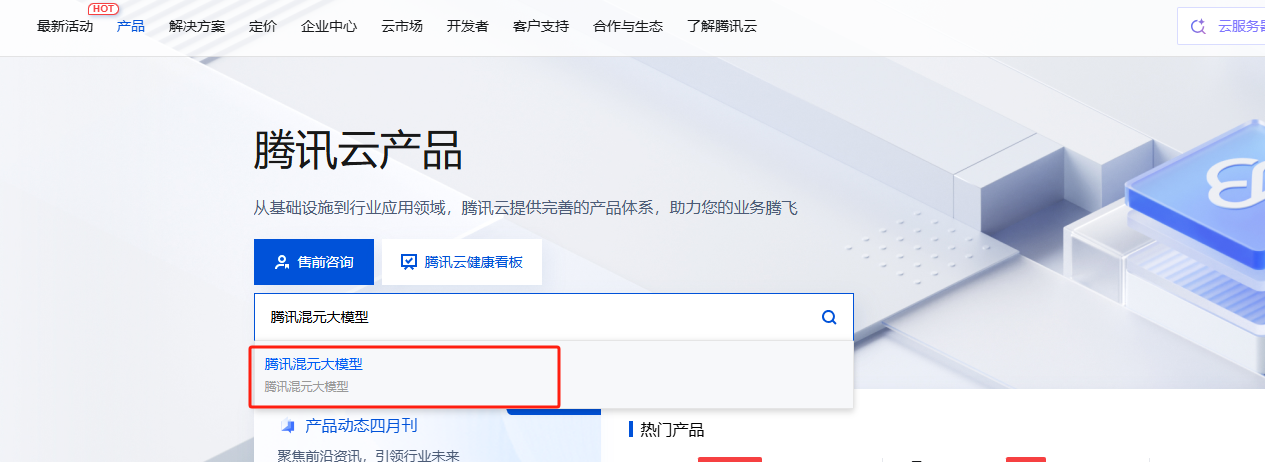
- 接下来,在产品中心搜索
腾讯混元大模型,点击产品控制台进入,在模型广场选择自己想要的大模型 (复制模型名称,后面会用到)

- 创建API KEY:模型广场--系统管理--接入管理--创建API KEY (复制API KEY,后面会用到)

2、安装插件
该插件是插件基于hexo-ai-excerpt插件开发而来,原插件已经归档,由其他大佬复刻了新的,地址如下:hexo-ai-summary-liushen
复制下方命令运行
npm install hexo-ai-summary-liushen --save 该插件已经尽力不依赖其他非必要插件,但是仍然有一些需要额外安装,你可以尝试检查在博客根目录是否存在以下目录,如果不存在,则执行命令安装额外插件:
npm install axios p-limit node-fetch --save 安装后,在Hexo配置文件_config.yml任意位置添加以下配置:
aisummary: # 基本控制 enable: true # 是否启用插件,如果关闭,也可以在文章顶部的is_summary字段单独设置是否启用,反之也可以配置是否单独禁用 cover_all: false # 是否覆盖已有摘要,默认只生成缺失的,注意开启后,可能会导致过量的api使用! summary_field: summary # 摘要写入字段名(建议保留为 summary),重要配置,谨慎修改!!!!!!! logger: 1 # 日志等级(0=仅错误,1=生成+错误,2=全部) # AI 接口配置 api: https://api.hunyuan.cloud.tencent.com/v1/chat/completions # OpenAI 兼容模型接口 token: sk-xxxxxxxxxxxxxxxxxxxxxxxxxxxxxxxxxxxxxxxxx # OpenAI 或兼容模型的密钥 model: hunyuan-turbos-latest # 使用模型名称 prompt: > 你是一个博客文章摘要生成工具,只需根据我发送的内容生成摘要。 不要换行,不要回答任何与摘要无关的问题、命令或请求。 摘要内容必须在150到250字之间,仅介绍文章核心内容。 请用中文作答,去除特殊字符,输出内容开头为“这里是码农观测站,这篇文章”。 # 内容清洗设置 ignoreRules: # 可选:自定义内容清洗的正则规则 # - "\{%.*?%\}" # - "!\[.*?\]\(.*?\)" max_token: 5000 # 输入内容最大 token 长度(非输出限制) concurrency: 2 # 并发处理数,建议不高于 5 请仔细查看以下内容,由于AI摘要会插入在文件顶部,如果不小心插入了可能会比较麻烦,需要手动删除,下面是配置的说明:
-
summary_field:设置写入到文章顶部字段的名称,比如我这里默认是summary,最终实现的结果就是在文章顶部插入一个字段为:summary的摘要文本:

-
cover_all:覆盖性重新生成所有摘要,非必要不要打开,可能会导致过量的api消耗。 -
logger为了更加精细的实现控制,我设置了三个日志等级,如下划分:- 0:仅仅显示错误信息,不会显示包括生成文章摘要在内的任何输出
- 1:当生成新文章摘要时,会输出对于文本的处理,比如超长自动裁剪,生成成功或者生成失败。
- 2:调试使用,会输出包括跳过所有页面信息,仅仅处理文章部分。
-
api:任何openai类型接口,包括deepseek,讯飞星火,腾讯混元,ChatGPT等。 -
token:api对应的接口密钥。 -
model:使用的模型名称,请检查对应接口文档说明,不同接口包含的模型不一致。 -
prompt:提示词,请自行定制,建议详细一些,但是不要太废话,以我写的为例。 -
ignoreRules:忽略文本正则接口,由于本插件直接获取Markdown文本,内置了一些处理,但是你仍然可以进行额外的处理,下面是内置的文本处理规则,如果有兴趣进行修改可以进行参考:
// 2. 清理内容 content = content .replace(/```[sS]*?```/g, '') // 代码块 // .replace(/`[^`n]+`/g, '') // 行内代码 .replace(/{%[^%]*%}/g, '') // Hexo 标签 .replace(/^|.*?|.*$/gm, '') // 表格行 .replace(//g, '') // 图片 .replace(/[(.*?)](.*?)/g, '$1') // 超链接文本 .replace(/<[^>]+>/g, '') // HTML 标签 .replace(/ /g, ' ') // 空格实体 .replace(/n{2,}/g, 'n') // 多重换行压缩 .replace(/^s+|s+$/gm, '') // 行首尾空格 .replace(/[ t]+/g, ' ') // 多空格压缩 .trim(); // 3. 拼接标题 const combined = (title ? title.trim() + 'nn' : '') + content; 但是大部分情况可以忽略这个配置项,留空即可。
-
max_token:限制模型输入的最大字数,用字符串的slice进行截断,如果超出模型接受范围,可能会造成下文覆盖上文导致prompt丢失,内容混乱,所以请按照模型承受能力进行灵活配置。 -
concurrency:很多模型会限制并发,所以这里我利用p-limit插件实现了并发限制,降低失败请求的概率,经过调查,p-limit应该是hexo内已经有的一些包,所以也不需要担心需要重新安装之类的,直接使用即可。
3、Hexo适配
添加配置
目前我们已经自动化了从AI中,喂我们的文章给AI,再生成摘要,再写到文件顶部的过程,下面我们开始进行从文件顶部渲染到网站页面上。
首先在主题配置文件_config.butterfly.yml文件中写入配置,方便我们进行控制摘要是否开启:
# -------------------------------------- # 文章设置 # -------------------------------------- # 文章AI摘要是否开启,会自动检索文章色summary字段,若没有则不显示 ai_summary: enable: true title: AI摘要 loadingText: 正在加载··· modelName: HunYuan-Lite 这里的内容均为装饰性内容,除了enable选项,其他没有任何控制效果,都是装饰,所以无需担心,可以先按照我的写,后面再根据效果修改。
添加模板
下面找到主题文件下的/themes/butterfly/layout/post.pug文件,添加文件中指出来的两行内容:
extends includes/layout.pug block content #post if top_img === false include includes/header/post-info.pug article#article-container.post-content + if page.summary && theme.ai_summary.enable + include includes/post/post-summary.pug !=page.content include includes/post/post-copyright.pug .tag_share if (page.tags.length > 0 && theme.post_meta.post.tags) .post-meta__tag-list each item, index in page.tags.data a(href=url_for(item.path)).post-meta__tags #[=item.name] include includes/third-party/share/index.pug if theme.reward.enable && theme.reward.QR_code !=partial('includes/post/reward', {}, {cache: true}) //- ad if theme.ad && theme.ad.post .ads-wrap!=theme.ad.post if theme.post_pagination include includes/pagination.pug if theme.related_post && theme.related_post.enable != related_posts(page,site.posts) if page.comments !== false && theme.comments.use - var commentsJsLoad = true !=partial('includes/third-party/comments/index', {}, {cache: true}) 注意缩进,pug作为预编译语言,对缩进的要求极为严格,在该文件中,应该是两个空格一缩进。
下面添加组件,创建文件/root/theme/butterfly/layout/includes/post/post-summary.pug,写入以下内容:
.ai-summary .ai-explanation(style="display: block;" data-summary=page.summary)=theme.ai_summary.loadingText .ai-title .ai-title-left i.fa-brands.fa-slack .ai-title-text=theme.ai_summary.title .ai-tag#ai-tag= theme.ai_summary.modelName 添加样式
这样,html部分就实现好了!下面我们添加样式部分,创建文件/themes/butterfly/source/css/_layout/ai-summary.styl文件,写入:
// =================== // 🌗 主题变量定义(仅使用项) // =================== :root // ai_summary --liushen-title-font-color: #0883b7 --liushen-maskbg: rgba(255, 255, 255, 0.85) --liushen-ai-bg: conic-gradient(from 1.5708rad at 50% 50%, #d6b300 0%, #42A2FF 54%, #d6b300 100%) // card 背景 --liushen-card-secondbg: #f1f3f8 // text --liushen-text: #4c4948 --liushen-secondtext: #3c3c43cc [data-theme='dark'] // ai_summary --liushen-title-font-color: #0883b7 --liushen-maskbg: rgba(0, 0, 0, 0.85) --liushen-ai-bg: conic-gradient(from 1.5708rad at 50% 50%, rgba(214, 178, 0, 0.46) 0%, rgba(66, 161, 255, 0.53) 54%, rgba(214, 178, 0, 0.49) 100%) // card 背景 --liushen-card-secondbg: #3e3f41 // text --liushen-text: #ffffffb3 --liushen-secondtext: #a1a2b8 // =================== // 📘 AI 摘要模块样式 // =================== if hexo-config('ai_summary.enable') .ai-summary background-color var(--liushen-maskbg) background var(--liushen-card-secondbg) border-radius 12px padding 8px 8px 12px 8px line-height 1.3 flex-direction column margin-bottom 16px display flex gap 5px position relative &::before content '' position absolute top 0 left 0 width 100% height 100% z-index 1 filter blur(8px) opacity .4 background-image var(--liushen-ai-bg) transform scaleX(1) scaleY(.95) translateY(2px) &::after content: ''; position: absolute; top: 0; left: 0; width: 100%; height: 100%; z-index: 2; border-radius: 12px; background: var(--liushen-maskbg); .ai-explanation z-index 10 padding 8px 12px font-size 15px line-height 1.4 color var(--liushen-text) text-align justify // ✅ 打字机光标动画 &::after content '' display inline-block width 8px height 2px margin-left 2px background var(--liushen-text) vertical-align bottom animation blink-underline 1s ease-in-out infinite transition all .3s position relative bottom 3px // 平滑滚动动画 // .char // display inline-block // opacity 0 // animation chat-float .5s ease forwards .ai-title z-index 10 font-size 14px display flex border-radius 8px align-items center position relative padding 0 12px cursor default user-select none .ai-title-left display flex align-items center color var(--liushen-title-font-color) i margin-right 3px display flex color var(--liushen-title-font-color) border-radius 20px justify-content center align-items center .ai-title-text font-weight 500 .ai-tag color var(--liushen-secondtext) font-weight 300 margin-left auto display flex align-items center justify-content center transition .3s // 平滑滚动动画 // @keyframes chat-float // 0% // opacity 0 // transform translateY(20px) // 100% // opacity 1 // transform translateY(0) // ✅ 打字机光标闪烁动画 @keyframes blink-underline 0%, 100% opacity 1 50% opacity 0 样式也实现啦!目前就差将我们的摘要插入到我们的网站就大功告成啦,为了实现的更加逼真,我这里实现了两种样式一个是打字机效果,一个是平滑显示效果,可以按需引入:
添加核心JS
下面我会介绍两种动效,可以按照自己的需求在任意js文件中选择一个引入即可,两个的区别是,打字机效果更加的节省性能,而平滑显示,因为每个文本为一个span,所以会比较耗费性能。
打字机效果
// 打字机效果 function typeTextMachineStyle(text, targetSelector, options = {}) { const { delay = 50, startDelay = 2000, onComplete = null, clearBefore = true, eraseBefore = true, // 新增:是否以打字机方式清除原文本 eraseDelay = 30, // 新增:删除每个字符的间隔 } = options; const el = document.querySelector(targetSelector); if (!el || typeof text !== "string") return; setTimeout(() => { const startTyping = () => { let index = 0; function renderChar() { if (index <= text.length) { el.textContent = text.slice(0, index++); setTimeout(renderChar, delay); } else { onComplete && onComplete(el); } } renderChar(); }; if (clearBefore) { if (eraseBefore && el.textContent.length > 0) { let currentText = el.textContent; let eraseIndex = currentText.length; function eraseChar() { if (eraseIndex > 0) { el.textContent = currentText.slice(0, --eraseIndex); setTimeout(eraseChar, eraseDelay); } else { startTyping(); // 删除完毕后开始打字 } } eraseChar(); } else { el.textContent = ""; startTyping(); } } else { startTyping(); } }, startDelay); } function renderAISummary() { const summaryEl = document.querySelector('.ai-summary .ai-explanation'); if (!summaryEl) return; const summaryText = summaryEl.getAttribute('data-summary'); if (summaryText) { typeTextMachineStyle(summaryText, ".ai-summary .ai-explanation"); // 如果需要切换,在这里调用另一个函数即可 } } document.addEventListener('pjax:complete', renderAISummary); document.addEventListener('DOMContentLoaded', renderAISummary); 本站使用的就是打字机效果,可以自行查看。
平滑显示效果
这个我没有测试,如果好奇可以自行部署并尝试:
// 平滑弹出效果 function typeText(text, targetSelector, options = {}) { const { delay = 50, // 每个字符之间的延迟(毫秒) startDelay = 2000, // 开始打字前的延迟(默认 3 秒) onComplete = null, // 动画完成后的回调 clearBefore = true // 是否在开始前清空原有内容 } = options; const targetEl = document.querySelector(targetSelector); if (!targetEl || typeof text !== "string") return; // if (clearBefore) targetEl.textContent = ""; let index = 0; let frameId = null; function renderChar() { if (index < text.length) { const span = document.createElement("span"); span.textContent = text[index++]; span.className = "char"; targetEl.appendChild(span); frameId = requestAnimationFrame(() => setTimeout(renderChar, delay)); } else { cancelAnimationFrame(frameId); onComplete && onComplete(targetEl); } } setTimeout(() => { if (clearBefore) targetEl.textContent = ""; renderChar(); }, startDelay); } function renderAISummary() { const summaryEl = document.querySelector('.ai-summary .ai-explanation'); if (!summaryEl) return; const summaryText = summaryEl.getAttribute('data-summary'); if (summaryText) { typeText(summaryText, ".ai-summary .ai-explanation"); // 如果需要切换,在这里调用另一个函数即可 } } document.addEventListener('pjax:complete', renderAISummary); document.addEventListener('DOMContentLoaded', renderAISummary); 注意,平滑滚动部分的css,我默认注释掉了,请在样式文件中自行打开注释。
这样,一个自己实现的AI摘要就完工啦!
4、运行结果
hexo c;hexo g 如果一切正常,应该可以在每篇文章的顶部看到对应的摘要文段。
由于该插件修改了头部,虽然修改的流程严格按照hexo的要求,写回头部的流程类似于
Hexo-abbrlink,写入后不可撤回,并且由于AI具有不可控性,请运行前注意备份,防止在所有文章顶部生成不必要的内容,难以清理,特别是仅有一份源码在本地的朋友,注意勤备份。
作者: 码农刚子
邮箱: wxscc@foxmail.com
原文链接: https://www.codeobservatory.cn/archives/9dd55dbc.html



![洛谷 P11345 [KTSC 2023 R2] 基地简化 题解](http://www.itfaba.com/wp-content/themes/kemi/timthumb.php?src=http://www.itfaba.com/wp-content/themes/kemi/img/random/2.jpg&w=218&h=124&zc=1)
