

搜索界面使用Flutter自带的SearchDelegate组件实现,通过魔改实现如下效果:
- 搜素建议
- 搜索结果,支持刷新和加载更多
- IOS中文输入拼音问题
界面预览
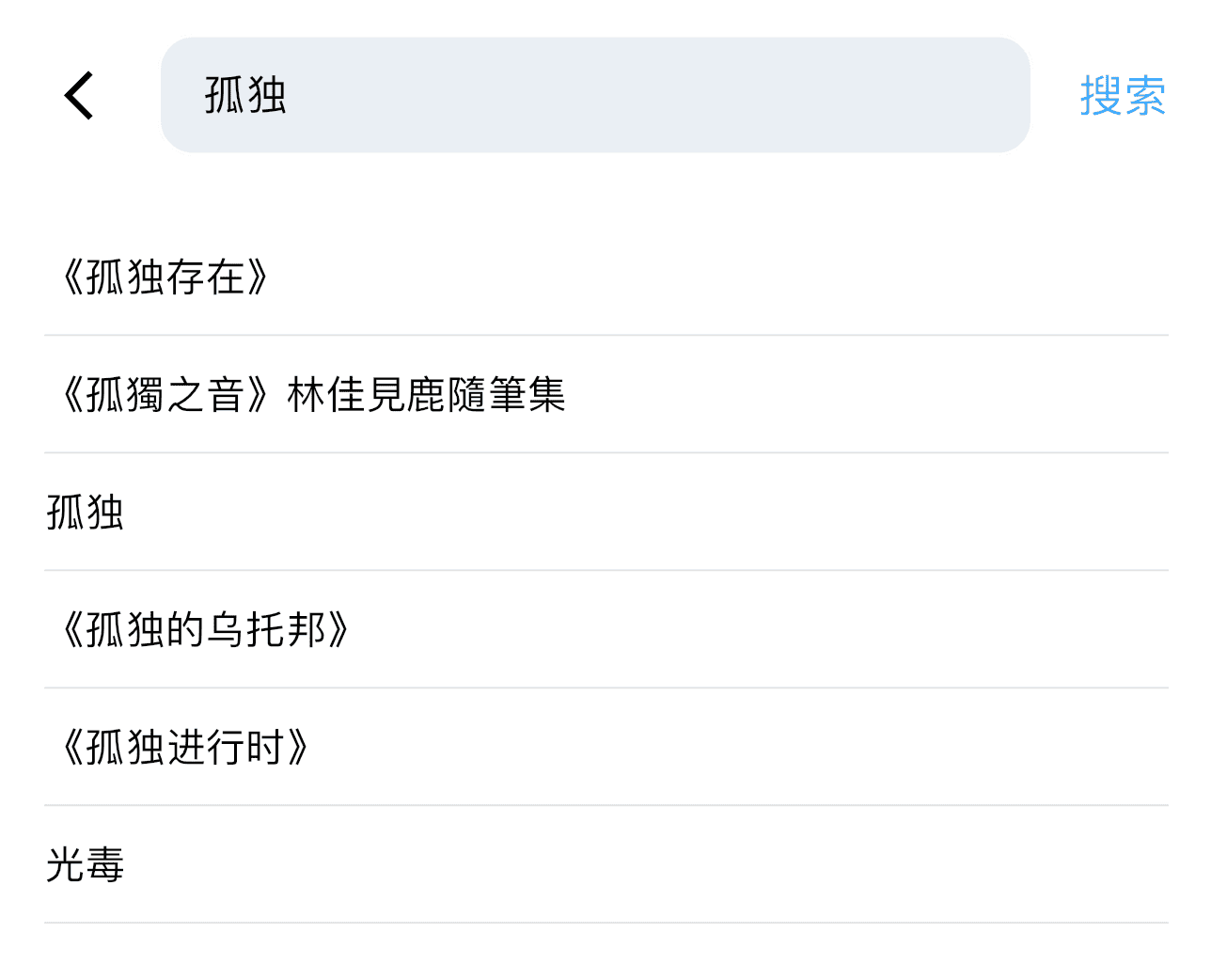


拷贝源码
将SearchDelegate的源码拷贝一份,修改内容如下:
import 'package:flutter/material.dart'; import 'package:flutter/services.dart'; /// 修改此处为 showMySearch Future<T?> showMySearch<T>({ required BuildContext context, required MySearchDelegate<T> delegate, String? query = '', bool useRootNavigator = false, }) { delegate.query = query ?? delegate.query; delegate._currentBody = _SearchBody.suggestions; return Navigator.of(context, rootNavigator: useRootNavigator) .push(_SearchPageRoute<T>( delegate: delegate, )); } /// https://juejin.cn/post/7090374603951833118 abstract class MySearchDelegate<T> { MySearchDelegate({ this.searchFieldLabel, this.searchFieldStyle, this.searchFieldDecorationTheme, this.keyboardType, this.textInputAction = TextInputAction.search, }) : assert(searchFieldStyle == null || searchFieldDecorationTheme == null); Widget buildSuggestions(BuildContext context); Widget buildResults(BuildContext context); Widget? buildLeading(BuildContext context); bool? automaticallyImplyLeading; double? leadingWidth; List<Widget>? buildActions(BuildContext context); PreferredSizeWidget? buildBottom(BuildContext context) => null; Widget? buildFlexibleSpace(BuildContext context) => null; ThemeData appBarTheme(BuildContext context) { final ThemeData theme = Theme.of(context); final ColorScheme colorScheme = theme.colorScheme; return theme.copyWith( appBarTheme: AppBarTheme( systemOverlayStyle: colorScheme.brightness == Brightness.dark ? SystemUiOverlayStyle.light : SystemUiOverlayStyle.dark, backgroundColor: colorScheme.brightness == Brightness.dark ? Colors.grey[900] : Colors.white, iconTheme: theme.primaryIconTheme.copyWith(color: Colors.grey), titleTextStyle: theme.textTheme.titleLarge, toolbarTextStyle: theme.textTheme.bodyMedium, ), inputDecorationTheme: searchFieldDecorationTheme ?? InputDecorationTheme( hintStyle: searchFieldStyle ?? theme.inputDecorationTheme.hintStyle, border: InputBorder.none, ), ); } String get query => _queryTextController.completeText; set query(String value) { _queryTextController.completeText = value; // 更新实际搜索内容 _queryTextController.text = value; // 更新输入框内容 if (_queryTextController.text.isNotEmpty) { _queryTextController.selection = TextSelection.fromPosition( TextPosition(offset: _queryTextController.text.length)); } } void showResults(BuildContext context) { _focusNode?.unfocus(); _currentBody = _SearchBody.results; } void showSuggestions(BuildContext context) { assert(_focusNode != null, '_focusNode must be set by route before showSuggestions is called.'); _focusNode!.requestFocus(); _currentBody = _SearchBody.suggestions; } void close(BuildContext context, T result) { _currentBody = null; _focusNode?.unfocus(); Navigator.of(context) ..popUntil((Route<dynamic> route) => route == _route) ..pop(result); } final String? searchFieldLabel; final TextStyle? searchFieldStyle; final InputDecorationTheme? searchFieldDecorationTheme; final TextInputType? keyboardType; final TextInputAction textInputAction; Animation<double> get transitionAnimation => _proxyAnimation; FocusNode? _focusNode; final ChinaTextEditController _queryTextController = ChinaTextEditController(); final ProxyAnimation _proxyAnimation = ProxyAnimation(kAlwaysDismissedAnimation); final ValueNotifier<_SearchBody?> _currentBodyNotifier = ValueNotifier<_SearchBody?>(null); _SearchBody? get _currentBody => _currentBodyNotifier.value; set _currentBody(_SearchBody? value) { _currentBodyNotifier.value = value; } _SearchPageRoute<T>? _route; /// Releases the resources. @mustCallSuper void dispose() { _currentBodyNotifier.dispose(); _focusNode?.dispose(); _queryTextController.dispose(); _proxyAnimation.parent = null; } } /// search page. enum _SearchBody { suggestions, results, } class _SearchPageRoute<T> extends PageRoute<T> { _SearchPageRoute({ required this.delegate, }) { assert( delegate._route == null, 'The ${delegate.runtimeType} instance is currently used by another active ' 'search. Please close that search by calling close() on the MySearchDelegate ' 'before opening another search with the same delegate instance.', ); delegate._route = this; } final MySearchDelegate<T> delegate; @override Color? get barrierColor => null; @override String? get barrierLabel => null; @override Duration get transitionDuration => const Duration(milliseconds: 300); @override bool get maintainState => false; @override Widget buildTransitions( BuildContext context, Animation<double> animation, Animation<double> secondaryAnimation, Widget child, ) { return FadeTransition( opacity: animation, child: child, ); } @override Animation<double> createAnimation() { final Animation<double> animation = super.createAnimation(); delegate._proxyAnimation.parent = animation; return animation; } @override Widget buildPage( BuildContext context, Animation<double> animation, Animation<double> secondaryAnimation, ) { return _SearchPage<T>( delegate: delegate, animation: animation, ); } @override void didComplete(T? result) { super.didComplete(result); assert(delegate._route == this); delegate._route = null; delegate._currentBody = null; } } class _SearchPage<T> extends StatefulWidget { const _SearchPage({ required this.delegate, required this.animation, }); final MySearchDelegate<T> delegate; final Animation<double> animation; @override State<StatefulWidget> createState() => _SearchPageState<T>(); } class _SearchPageState<T> extends State<_SearchPage<T>> { // This node is owned, but not hosted by, the search page. Hosting is done by // the text field. FocusNode focusNode = FocusNode(); @override void initState() { super.initState(); widget.delegate._queryTextController.addListener(_onQueryChanged); widget.animation.addStatusListener(_onAnimationStatusChanged); widget.delegate._currentBodyNotifier.addListener(_onSearchBodyChanged); focusNode.addListener(_onFocusChanged); widget.delegate._focusNode = focusNode; } @override void dispose() { super.dispose(); widget.delegate._queryTextController.removeListener(_onQueryChanged); widget.animation.removeStatusListener(_onAnimationStatusChanged); widget.delegate._currentBodyNotifier.removeListener(_onSearchBodyChanged); widget.delegate._focusNode = null; focusNode.dispose(); } void _onAnimationStatusChanged(AnimationStatus status) { if (status != AnimationStatus.completed) { return; } widget.animation.removeStatusListener(_onAnimationStatusChanged); if (widget.delegate._currentBody == _SearchBody.suggestions) { focusNode.requestFocus(); } } @override void didUpdateWidget(_SearchPage<T> oldWidget) { super.didUpdateWidget(oldWidget); if (widget.delegate != oldWidget.delegate) { oldWidget.delegate._queryTextController.removeListener(_onQueryChanged); widget.delegate._queryTextController.addListener(_onQueryChanged); oldWidget.delegate._currentBodyNotifier .removeListener(_onSearchBodyChanged); widget.delegate._currentBodyNotifier.addListener(_onSearchBodyChanged); oldWidget.delegate._focusNode = null; widget.delegate._focusNode = focusNode; } } void _onFocusChanged() { if (focusNode.hasFocus && widget.delegate._currentBody != _SearchBody.suggestions) { widget.delegate.showSuggestions(context); } } void _onQueryChanged() { setState(() { // rebuild ourselves because query changed. }); } void _onSearchBodyChanged() { setState(() { // rebuild ourselves because search body changed. }); } @override Widget build(BuildContext context) { assert(debugCheckHasMaterialLocalizations(context)); final ThemeData theme = widget.delegate.appBarTheme(context); final String searchFieldLabel = widget.delegate.searchFieldLabel ?? MaterialLocalizations.of(context).searchFieldLabel; Widget? body; switch (widget.delegate._currentBody) { case _SearchBody.suggestions: body = KeyedSubtree( key: const ValueKey<_SearchBody>(_SearchBody.suggestions), child: widget.delegate.buildSuggestions(context), ); case _SearchBody.results: body = KeyedSubtree( key: const ValueKey<_SearchBody>(_SearchBody.results), child: widget.delegate.buildResults(context), ); case null: break; } late final String routeName; switch (theme.platform) { case TargetPlatform.iOS: case TargetPlatform.macOS: routeName = ''; case TargetPlatform.android: case TargetPlatform.fuchsia: case TargetPlatform.linux: case TargetPlatform.windows: routeName = searchFieldLabel; } return Semantics( explicitChildNodes: true, scopesRoute: true, namesRoute: true, label: routeName, child: Theme( data: theme, child: Scaffold( appBar: AppBar( leadingWidth: widget.delegate.leadingWidth, automaticallyImplyLeading: widget.delegate.automaticallyImplyLeading ?? true, leading: widget.delegate.buildLeading(context), title: TextField( controller: widget.delegate._queryTextController, focusNode: focusNode, style: widget.delegate.searchFieldStyle ?? theme.textTheme.titleLarge, textInputAction: widget.delegate.textInputAction, keyboardType: widget.delegate.keyboardType, onSubmitted: (String _) => widget.delegate.showResults(context), decoration: InputDecoration(hintText: searchFieldLabel), ), flexibleSpace: widget.delegate.buildFlexibleSpace(context), actions: widget.delegate.buildActions(context), bottom: widget.delegate.buildBottom(context), ), body: AnimatedSwitcher( duration: const Duration(milliseconds: 300), child: body, ), ), ), ); } } class ChinaTextEditController extends TextEditingController { ///拼音输入完成后的文字 var completeText = ''; @override TextSpan buildTextSpan( {required BuildContext context, TextStyle? style, required bool withComposing}) { ///拼音输入完成 if (!value.composing.isValid || !withComposing) { if (completeText != value.text) { completeText = value.text; WidgetsBinding.instance.addPostFrameCallback((_) { notifyListeners(); }); } return TextSpan(style: style, text: text); } ///返回输入样式,可自定义样式 final TextStyle composingStyle = style?.merge( const TextStyle(decoration: TextDecoration.underline), ) ?? const TextStyle(decoration: TextDecoration.underline); return TextSpan(style: style, children: <TextSpan>[ TextSpan(text: value.composing.textBefore(value.text)), TextSpan( style: composingStyle, text: value.composing.isValid && !value.composing.isCollapsed ? value.composing.textInside(value.text) : "", ), TextSpan(text: value.composing.textAfter(value.text)), ]); } } 实现搜索
创建SearchPage继承MySearchDelegate,修改样式,实现页面。需要重写下面5个方法
- appBarTheme:修改搜索样式
- buildActions:搜索框右侧的方法
- buildLeading:搜索框左侧的返回按钮
- buildResults:搜索结果
- buildSuggestions:搜索建议
import 'package:e_book_clone/pages/search/MySearchDelegate.dart'; import 'package:flutter/src/material/theme_data.dart'; import 'package:flutter/src/widgets/framework.dart'; class Demo extends MySearchDelegate { @override ThemeData appBarTheme(BuildContext context) { // TODO: implement appBarTheme return super.appBarTheme(context); } @override List<Widget>? buildActions(BuildContext context) { // TODO: implement buildActions throw UnimplementedError(); } @override Widget? buildLeading(BuildContext context) { // TODO: implement buildLeading throw UnimplementedError(); } @override Widget buildResults(BuildContext context) { // TODO: implement buildResults throw UnimplementedError(); } @override Widget buildSuggestions(BuildContext context) { // TODO: implement buildSuggestions throw UnimplementedError(); } } 修改样式

@override ThemeData appBarTheme(BuildContext context) { final ThemeData theme = Theme.of(context); final ColorScheme colorScheme = theme.colorScheme; return theme.copyWith( // 使用copyWith,适配全局主题 appBarTheme: AppBarTheme( // AppBar样式修改 systemOverlayStyle: colorScheme.brightness == Brightness.dark ? SystemUiOverlayStyle.light : SystemUiOverlayStyle.dark, surfaceTintColor: Theme.of(context).colorScheme.surface, titleSpacing: 0, // textfield前面的间距 elevation: 0, // 阴影 ), inputDecorationTheme: InputDecorationTheme( isCollapsed: true, hintStyle: TextStyle( // 提示文字颜色 color: Theme.of(ToastUtils.context).colorScheme.inversePrimary), filled: true, // 填充颜色 contentPadding: EdgeInsets.symmetric(vertical: 10.h, horizontal: 15.w), fillColor: Theme.of(context).colorScheme.secondary, // 填充颜色,需要配合 filled enabledBorder: OutlineInputBorder( // testified 边框 borderRadius: BorderRadius.circular(12.r), borderSide: BorderSide( color: Theme.of(context).colorScheme.surface, ), ), focusedBorder: OutlineInputBorder( // testified 边框 borderRadius: BorderRadius.circular(12.r), borderSide: BorderSide( color: Theme.of(context).colorScheme.surface, ), ), ), ); } @override TextStyle? get searchFieldStyle => TextStyle(fontSize: 14.sp); // 字体大小设置,主要是覆盖默认样式 按钮功能
左侧返回按钮,右侧就放了一个搜索文本,点击之后显示搜索结果

@override Widget? buildLeading(BuildContext context) { return IconButton( onPressed: () { close(context, null); }, icon: Icon( color: Theme.of(context).colorScheme.onSurface, Icons.arrow_back_ios_new, size: 20.r, ), ); } @override List<Widget>? buildActions(BuildContext context) { return [ Padding( padding: EdgeInsets.only(right: 15.w, left: 15.w), child: GestureDetector( onTap: () { showResults(context); }, child: Text( '搜索', style: TextStyle( color: Theme.of(context).colorScheme.primary, fontSize: 15.sp), ), ), ) ]; } 搜索建议
当 TextField 输入变化时,就会调用buildSuggestions方法,刷新布局,因此考虑使用FlutterBuilder管理页面和数据。
final SearchViewModel _viewModel = SearchViewModel(); @override Widget buildSuggestions(BuildContext context) { if (query.isEmpty) { // 这里可以展示热门搜索等,有搜索建议时,热门搜索会被替换成搜索建议 return const SizedBox(); } return FutureBuilder( future: _viewModel.getSuggest(query), builder: (BuildContext context, AsyncSnapshot<List<Suggest>> snapshot) { if (snapshot.connectionState == ConnectionState.waiting) { // 数据加载中 return const Center(child: CircularProgressIndicator()); } else if (snapshot.hasError) { // 数据加载错误 return Center(child: Text('Error: ${snapshot.error}')); } else if (snapshot.hasData) { // 数据加载成功,展示结果 final List<Suggest> searchResults = snapshot.data ?? []; return ListView.builder( padding: EdgeInsets.all(15.r), itemCount: searchResults.length, itemBuilder: (context, index) { return GestureDetector( onTap: () { // 更新输入框 query = searchResults[index].text ?? query; showResults(context); }, child: Container( padding: EdgeInsets.symmetric(vertical: 10.h), decoration: BoxDecoration( border: BorderDirectional( bottom: BorderSide( width: 0.6, color: Theme.of(context).colorScheme.surfaceContainer, ), ), ), child: Text('${searchResults[index].text}'), ), ); }); } else { // 数据为空 return const Center(child: Text('No results found')); } }, ); } 实体类代码如下:
class Suggest { Suggest({ this.id, this.url, this.text, this.isHot, this.hotLevel, }); Suggest.fromJson(dynamic json) { id = json['id']; url = json['url']; text = json['text']; isHot = json['is_hot']; hotLevel = json['hot_level']; } String? id; String? url; String? text; bool? isHot; int? hotLevel; } ViewModel代码如下:
class SearchViewModel { Future<List<Suggest>> getSuggest(String keyword) async { if (keyword.isEmpty) { return []; } return await JsonApi.instance().fetchSuggestV3(keyword); } } 搜索结果
我们需要搜索结果页面支持加载更多,这里用到了 SmartRefrsh 组件
flutter pub add pull_to_refresh buildResults方法是通过调用showResults(context);方法刷新页面,因此为了方便数据动态变化,新建search_result_page.dart页面
import 'package:e_book_clone/components/book_tile/book_tile_vertical/my_book_tile_vertical_item.dart'; import 'package:e_book_clone/components/book_tile/book_tile_vertical/my_book_tile_vertical_item_skeleton.dart'; import 'package:e_book_clone/components/my_smart_refresh.dart'; import 'package:e_book_clone/models/book.dart'; import 'package:e_book_clone/models/types.dart'; import 'package:e_book_clone/pages/search/search_vm.dart'; import 'package:e_book_clone/utils/navigator_utils.dart'; import 'package:flutter/material.dart'; import 'package:flutter_screenutil/flutter_screenutil.dart'; import 'package:provider/provider.dart'; import 'package:pull_to_refresh/pull_to_refresh.dart'; class SearchResultPage extends StatefulWidget { final String query; // 请求参数 const SearchResultPage({super.key, required this.query}); @override State<SearchResultPage> createState() => _SearchResultPageState(); } class _SearchResultPageState extends State<SearchResultPage> { final RefreshController _refreshController = RefreshController(); final SearchViewModel _viewModel = SearchViewModel(); void loadOrRefresh(bool loadMore) { _viewModel.getResults(widget.query, loadMore).then((_) { if (loadMore) { _refreshController.loadComplete(); } else { _refreshController.refreshCompleted(); } }); } @override void initState() { super.initState(); loadOrRefresh(false); } @override void dispose() { _viewModel.isDispose = true; _refreshController.dispose(); super.dispose(); } @override Widget build(BuildContext context) { return ChangeNotifierProvider<SearchViewModel>.value( value: _viewModel, builder: (context, child) { return Consumer<SearchViewModel>( builder: (context, vm, child) { List<Book>? searchResult = vm.searchResult; // 下拉刷新和上拉加载组件 return MySmartRefresh( enablePullDown: false, onLoading: () { loadOrRefresh(true); }, controller: _refreshController, child: ListView.builder( padding: EdgeInsets.only(left: 15.w, right: 15.w, top: 15.h), itemCount: searchResult?.length ?? 10, itemBuilder: (context, index) { if (searchResult == null) { // 骨架屏 return MyBookTileVerticalItemSkeleton( width: 80.w, height: 120.h); } // 结果渲染组件 return MyBookTileVerticalItem( book: searchResult[index], width: 80.w, height: 120.h, onTap: (id) { NavigatorUtils.nav2Detail( context, DetailPageType.ebook, searchResult[index]); }, ); }, ), ); }, ); }, ); } } MySmartRefresh组件代码如下,主要是对SmartRefresher做了进一步的封装
import 'package:flutter/material.dart'; import 'package:pull_to_refresh/pull_to_refresh.dart'; class MySmartRefresh extends StatelessWidget { // 启用下拉 final bool? enablePullDown; // 启用上拉 final bool? enablePullUp; // 头布局 final Widget? header; // 尾布局 final Widget? footer; // 刷新事件 final VoidCallback? onRefresh; // 加载事件 final VoidCallback? onLoading; // 刷新组件控制器 final RefreshController controller; final ScrollController? scrollController; // 被刷新的子组件 final Widget child; const MySmartRefresh({ super.key, this.enablePullDown, this.enablePullUp, this.header, this.footer, this.onLoading, this.onRefresh, required this.controller, required this.child, this.scrollController, }); @override Widget build(BuildContext context) { return _refreshView(); } Widget _refreshView() { return SmartRefresher( scrollController: scrollController, controller: controller, enablePullDown: enablePullDown ?? true, enablePullUp: enablePullUp ?? true, header: header ?? const ClassicHeader(), footer: footer ?? const ClassicFooter(), onRefresh: onRefresh, onLoading: onLoading, child: child, ); } } SearchViewModel 代码如下:
import 'package:e_book_clone/http/spider/json_api.dart'; import 'package:e_book_clone/models/book.dart'; import 'package:e_book_clone/models/query_param.dart'; import 'package:e_book_clone/models/suggest.dart'; import 'package:flutter/material.dart'; class SearchViewModel extends ChangeNotifier { int _currPage = 2; bool isDispose = false; List<Book>? _searchResult; List<Book>? get searchResult => _searchResult; Future<List<Suggest>> getSuggest(String keyword) async { if (keyword.isEmpty) { return []; } return await JsonApi.instance().fetchSuggestV3(keyword); } Future getResults(String keyword, bool loadMore, {VoidCallback? callback}) async { if (loadMore) { _currPage++; } else { _currPage = 1; _searchResult?.clear(); } // 请求参数 SearchParam param = SearchParam( page: _currPage, rootKind: null, q: keyword, sort: "defalut", query: SearchParam.ebookSearch, ); // 请求结果 List<Book> res = await JsonApi.instance().fetchEbookSearch(param); // 加载更多,使用addAll if (_searchResult == null) { _searchResult = res; } else { _searchResult!.addAll(res); } if (res.isEmpty && _currPage > 0) { _currPage--; } // 防止Provider被销毁,数据延迟请求去通知报错 if (isDispose) return; notifyListeners(); } } buildResults方法如下:
@override Widget buildResults(BuildContext context) { if (query.isEmpty) { return const SizedBox(); } return SearchResultPage(query: query); } 显示搜索界面
注意调用的是我们自己拷贝修改的MySearchDelegate中的方法
onTap: () { showMySearch(context: context, delegate: SearchPage()); }, 


![洛谷 P11345 [KTSC 2023 R2] 基地简化 题解](http://www.itfaba.com/wp-content/themes/kemi/timthumb.php?src=http://www.itfaba.com/wp-content/themes/kemi/img/random/2.jpg&w=218&h=124&zc=1)
