

夜莺资深用户群有人推荐的一个工具,看了一下真挺好的,也推荐给大家。
需求场景
A 服务调用 B 服务的 HTTP 接口,发现 B 服务返回超时,不确定是网络的问题还是 B 服务的问题,需要排查。
工具简介
就类似 curl,httpstat 也可以请求某个后端,而且可以把各个阶段的耗时都展示出来,包括 DNS 解析、TCP 连接、TLS 握手、Server 处理并等待响应、完成最终传输等,非常直观。上图:
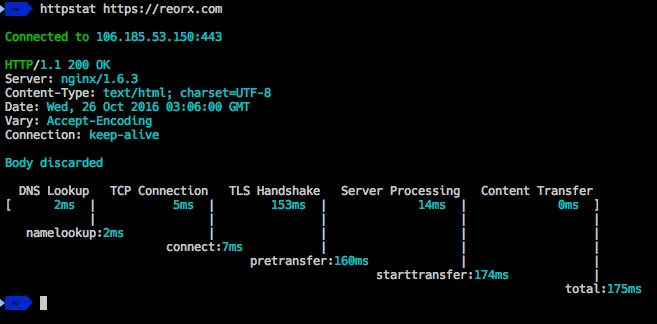
看着不错吧,咱们一起测试一下。这个工具是 go 写的,作者没有提供二进制包,所以需要自己编译。
安装 Go 环境
自己编辑就需要有 Go 环境,我这里给大家简单演示一下。我的电脑是 Mac,M1 芯片,首先下载 go 安装包(https://go.dev/dl/):https://go.dev/dl/go1.22.2.darwin-arm64.tar.gz。一般使用 tar.gz 的文件就好,不用 pkg。
cd /Users/ulric/works/tgz wget https://go.dev/dl/go1.22.2.darwin-arm64.tar.gz tar -zxf go1.22.2.darwin-arm64.tar.gz 操作如上,/Users/ulric/works/tgz/go 这个目录就是 go 的安装目录,然后配置环境变量:
export GOROOT=/Users/ulric/works/tgz/go export GOPATH=/Users/ulric/works/gopath export PATH=$PATH:$GOROOT/bin:$GOPATH/bin GOROOT 是 go 的安装目录,GOPATH 是 go 的工作目录,PATH 是环境变量,这样配置之后,就可以使用 go 命令了。上面的几行命令可以保存在 ~/.bash_profile 或者 ~/.zshrc 里,这样每次打开终端都会自动加载。
验证 go 环境是否正常安装:
% go version go version go1.22.2 darwin/arm64 安装 httpstat
有了 go 环境了,安装 httpstat 就很简单了:
ulric@ulric-flashcat ~ % go install github.com/davecheney/httpstat@latest go: downloading github.com/davecheney/httpstat v1.1.0 go: downloading golang.org/x/sys v0.0.0-20201223074533-0d417f636930 测试 httpstat
安装完成之后,就可以使用了,我们看看 httpstat 有哪些参数可用:
ulric@ulric-flashcat ~ % httpstat --help Usage: httpstat [OPTIONS] URL OPTIONS: -4 resolve IPv4 addresses only -6 resolve IPv6 addresses only -E string client cert file for tls config -H value set HTTP header; repeatable: -H 'Accept: ...' -H 'Range: ...' -I don't read body of request -L follow 30x redirects -O save body as remote filename -X string HTTP method to use (default "GET") -d string the body of a POST or PUT request; from file use @filename -k allow insecure SSL connections -o string output file for body -v print version number ENVIRONMENT: HTTP_PROXY proxy for HTTP requests; complete URL or HOST[:PORT] used for HTTPS requests if HTTPS_PROXY undefined HTTPS_PROXY proxy for HTTPS requests; complete URL or HOST[:PORT] NO_PROXY comma-separated list of hosts to exclude from proxy 很多参数和 curl 都很像。比如我用 curl 测试一个请求:
ulric@ulric-flashcat ~ % curl -X POST -H "Content-Type: application/json" -d '{"service": "tomcat"}' 'https://httpbin.org/post?name=ulric&city=beijing' { "args": { "city": "beijing", "name": "ulric" }, "data": "{"service": "tomcat"}", "files": {}, "form": {}, "headers": { "Accept": "*/*", "Content-Length": "21", "Content-Type": "application/json", "Host": "httpbin.org", "User-Agent": "curl/8.4.0", "X-Amzn-Trace-Id": "Root=1-6655a6c4-4522374c5b8d68143d638049" }, "json": { "service": "tomcat" }, "origin": "123.113.255.104", "url": "https://httpbin.org/post?name=ulric&city=beijing" } 把 curl 换成 httpstat,请求效果如下:
ulric@ulric-flashcat ~ % httpstat -X POST -H "Content-Type: application/json" -d '{"service": "tomcat"}' 'https://httpbin.org/post?name=ulric&city=beijing' Connected to 34.198.16.126:443 HTTP/2.0 200 OK Server: gunicorn/19.9.0 Access-Control-Allow-Credentials: true Access-Control-Allow-Origin: * Content-Length: 529 Content-Type: application/json Date: Tue, 28 May 2024 09:41:44 GMT Body discarded DNS Lookup TCP Connection TLS Handshake Server Processing Content Transfer [ 11ms | 217ms | 446ms | 570ms | 0ms ] | | | | | namelookup:11ms | | | | connect:229ms | | | pretransfer:678ms | | starttransfer:1248ms | total:1248ms 可以看到,httpstat 把请求的各个阶段的耗时都展示出来了,非常直观。
本文作者:秦晓辉,快猫星云联合创始人,开源监控产品 Open-Falcon、Nightingale 创始人,极客时间《运维监控系统实战笔记》作者



![洛谷 P11345 [KTSC 2023 R2] 基地简化 题解](http://www.itfaba.com/wp-content/themes/kemi/timthumb.php?src=http://www.itfaba.com/wp-content/themes/kemi/img/random/1.jpg&w=218&h=124&zc=1)
