

Locust基于python的协程机制,打破了线程进程的限制,可以能够在一台测试机上跑高并发
性能测试基础
1.快慢:衡量系统的处理效率:响应时间
2.多少:衡量系统的处理能力:单位时间内能处理多少个事务(tps)
性能测试根据测试需求最常见的分为下面三类
1 负载测试load testing
不断向服务器加压,值得预定的指标或者部分系统资源达到瓶颈,目的是找到系统最大负载的能力
2 压力测试
通过高负载持续长时间,来验证系统是否稳定
3 并发测试:
同时像服务器提交请求,目的发现系统是否存在事务冲突或者锁升级的现象
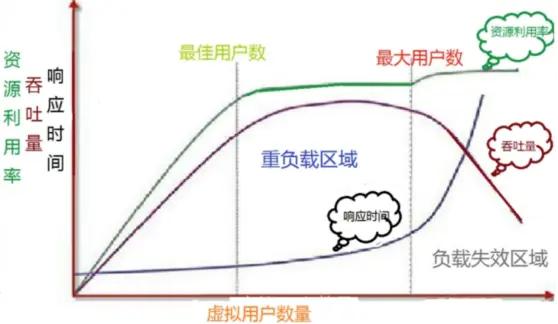
性能负载模型

locust安装
安装存在问题,可以通过豆瓣源下载
pip install locust
locust模板
基本上多数的场景我们都可以基于这个模板read.py去做修改
from locust import HttpUser, TaskSet, task, tag, events # 启动locust时运行 @events.test_start.add_listener def setup(environment, **kwargs): # print("task setup") # 停止locust时运行 @events.test_stop.add_listener def teardown(environment, **kwargs): print("task teardown") class UserBehavor(TaskSet): #虚拟用户启用task运行 def on_start(self): print("start") locusts_spawned.wait() #虚拟用户结束task运行 def on_stop(self): print("stop") @tag('test1') @task(2) def index(self): self.client.get('/yetangjian/p/17320268.html') @task(1) def info(self): self.client.get("/yetangjian/p/17253215.html") class WebsiteUser(HttpUser): def setup(self): print("locust setup") def teardown(self): print("locust teardown") host = "https://www.cnblogs.com" task_set = task(UserBehavor) min_wait = 3000 max_wait = 5000
注:这里我们给了一个webhost,这样我们可以直接在浏览器中打开locust
集合点lr_rendezvous
当然我们可以把集合点操作放入上述模板的setup中去运行起来
locusts_spawned = Semaphore() locusts_spawned.acquire() def on_hatch_complete(**kwargs): """ select_task类的钩子函数 :param kwargs: :return: """ locusts_spawned.release() events.spawning_complete.add_listener(on_hatch_complete) n = 0 class UserBehavor(TaskSet): def login(self): global n n += 1 print(f"第{n}个用户登陆") def on_start(self): self.login() locusts_spawned.wait() @task def test1(self): #catch_response获取返回 with self.client.get("/yetangjian/p/17253215.html",catch_response=True): print("查询结束") class WebsiteUser(HttpUser): host = "https://www.cnblogs.com" task_set = task(UserBehavor) wait_time = between(1,3) if __name__ == '__main__': os.system('locust -f read.py --web-host="127.0.0.1"')
比较常见的用法
在上面两个例子中我们已经看到了一些,例如装饰器events.test_start.add_listener;events.test_stop.add_listener用来在负载测试前后进行一些操作,又例如on_start、on_stop,在task执行前后运行,又例如task,可以用来分配任务的权重
等待时间
# wait between 3.0 and 10.5 seconds after each task #wait_time = between(3.0, 10.5) #固定时间等待 # wait_time = constant(3) #确保每秒运行多少次 constant_throughput(task_runs_per_second) #确保每多少秒运行一次 constant_pacing(wait_time)
同样也可以在User类下发重写wait_time来达到自定义
tag标记
@tag('test1') @task(2) def index(self): self.client.get('/yetangjian/p/17320268.html')
通过对任务打标记,就可以在运行时候执行运行某一些任务:
#只执行标记test1 os.system('locust -f read.py --tags test1 --web-host="127.0.0.1"') #不执行标记过的 os.system('locust -f read.py --exclude-tags --web-host="127.0.0.1"') #除去test1执行所有 os.system('locust -f read.py --exclude-tags test1 --web-host="127.0.0.1"')
自定义失败
#定义响应时间超过0.1就为失败 with self.client.get("/yetangjian/p/17253215.html", catch_response=True) as response: if response.elapsed.total_seconds() > 0.1: response.failure("Request took too long") #定义响应码是200就为失败 with self.client.get("/yetangjian/p/17320268.html", catch_response=True) as response: if response.status_code == 200: response.failure("响应码200,但我定义为失败")

自定义负载形状
自定义一个shape.py通过继承LoadTestShape并重写tick
这个形状类将以100块为单位,20速率的增加用户数,然后在10分钟后停止负载测试(从运行开始的第51秒开始user_count会round到100)
from locust import LoadTestShape class MyCustomShape(LoadTestShape): time_limit = 600 spawn_rate = 20 def tick(self): run_time = self.get_run_time() if run_time < self.time_limit: # User count rounded to nearest hundred. user_count = round(run_time, -2) return (user_count, self.spawn_rate) return None
运行图如下所示

通过命令行去触发
os.system('locust -f read.py,shape.py --web-host="127.0.0.1"')
不同时间阶段的例子
from locust import LoadTestShape class StagesShapeWithCustomUsers(LoadTestShape): stages = [ {"duration": 10, "users": 10, "spawn_rate": 10}, {"duration": 30, "users": 50, "spawn_rate": 10}, {"duration": 60, "users": 100, "spawn_rate": 10}, {"duration": 120, "users": 100, "spawn_rate": 10}] def tick(self): run_time = self.get_run_time() for stage in self.stages: if run_time < stage["duration"]: tick_data = (stage["users"], stage["spawn_rate"]) return tick_data return None



![洛谷 P11345 [KTSC 2023 R2] 基地简化 题解](http://www.itfaba.com/wp-content/themes/kemi/timthumb.php?src=http://www.itfaba.com/wp-content/themes/kemi/img/random/3.jpg&w=218&h=124&zc=1)
