

前言
一个 AI 方向的朋友因为标数据集发了篇 SCI 论文,看着他标了两个多月的数据集这么辛苦,就想着人工智能都能站在围棋巅峰了,难道不能动动小手为自己标数据吗?查了一下还真有一些能够满足此需求的框架,比如 cvat 、 doccano 、 label studio 等,经过简单的对比后发现还是 label studio 最好用。本文首先介绍了 label studio 的安装过程;然后使用 MMDetection 作为后端人脸检测标记框架,并通过 label studio ml 将 MMDetection 模型封装成 label studio 后端服务,实现数据集的自动标记[1];最后参考 label studio ml 示例,为自己的 MMDetection 人脸标记模型设计了一种迭代训练方法,使之能够不断随着标记数据的增加而跟进训练,最终实现了模型自动标记数据集、数据集更新迭代训练模型的闭环。
依赖安装
本项目涉及的源码已开源在 label-studio-demo 中,所使用的软件版本如下,其中 MMDetection 的版本及配置参考 MMDetection 使用示例:从入门到出门 :
| 软件 | 版本 |
|---|---|
| label-studio | 1.6.0 |
| label-studio-ml | 1.0.8 |
| label-studio-tools | 0.0.1 |
本文最终项目目录结构如下:
LabelStudio ├── backend // 后端功能 │ ├── examples // label studio ml 官方示例(非必须) │ ├── mmdetection // mmdetection 人脸检测模型 │ ├── model // label studio ml 生成的后端服务 (自动生成) │ ├── workdir // 模型训练时工作目录 │ | ├── fcos_common_base.pth // 后端模型基础权重文件 │ | └── latest.pth // 后端模型最新权重文件 │ └── runbackend.bat // 生成并启动后端服务的脚本文件 ├── dataset // 实验所用数据集(非必须) ├── label_studio.sqlite3 // label studio 数据库文件 ├── media │ ├── export │ └── upload // 上传的待标记数据集 └── run.bat // 启动 label studio 的脚本文件(非必须) label studio 安装启动
label-studio 是一个开源的多媒体数据标注工具(用来提供基本标注功能的GUI),并且可以很方便的将标注结果导出为多种常见的数据格式。其安装方法主要有以下几种:
- Docker
docker pull heartexlabs/label-studio:latest - pip
pip install label-studio 建议是通过 pip 安装,其配置更清晰方便。环境安装完成后在任意位置打开命令行,使用以下命令启动 label studio :
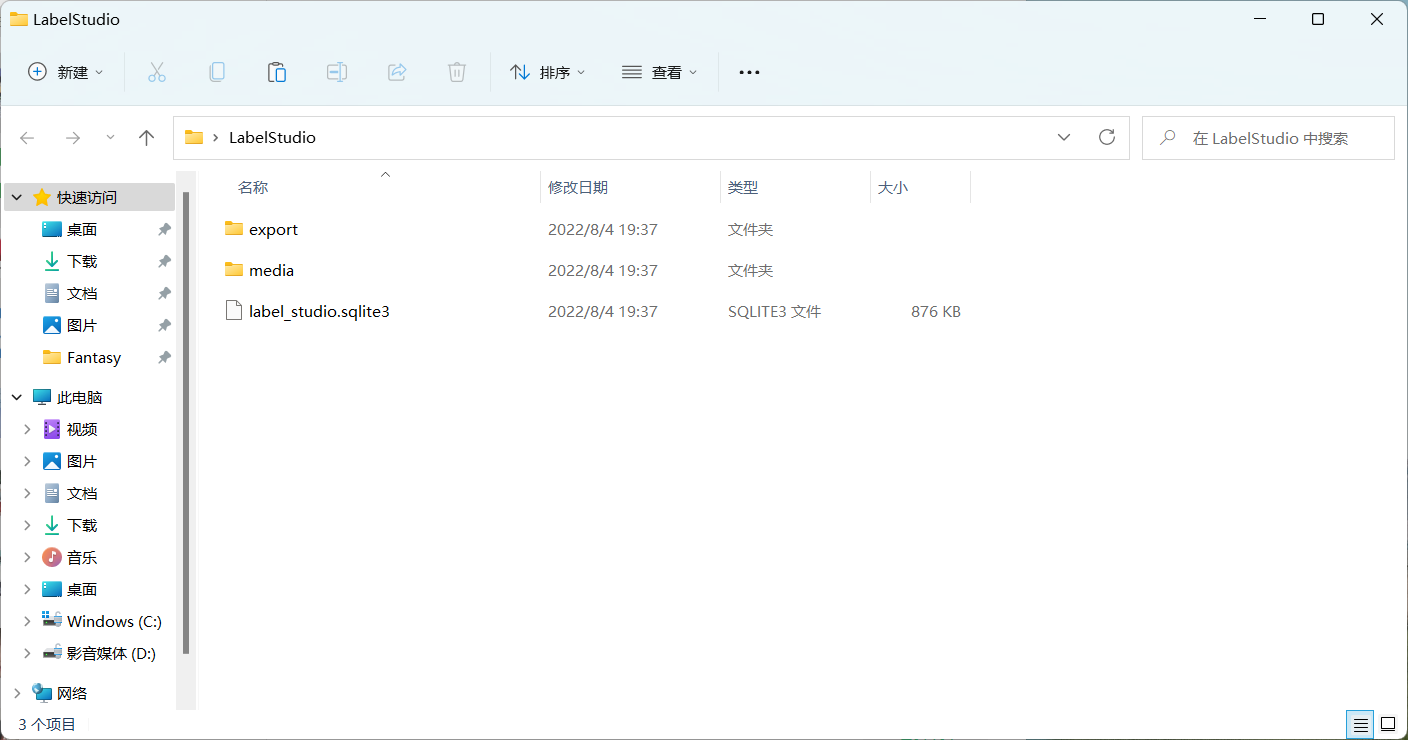
label-studio --data-dir LabelStudio -p 80 其中 --data-dir 用于指定工作目录, -p 用来指定运行端口,运行成功后会当前目录会生成 LabelStudio 目录:
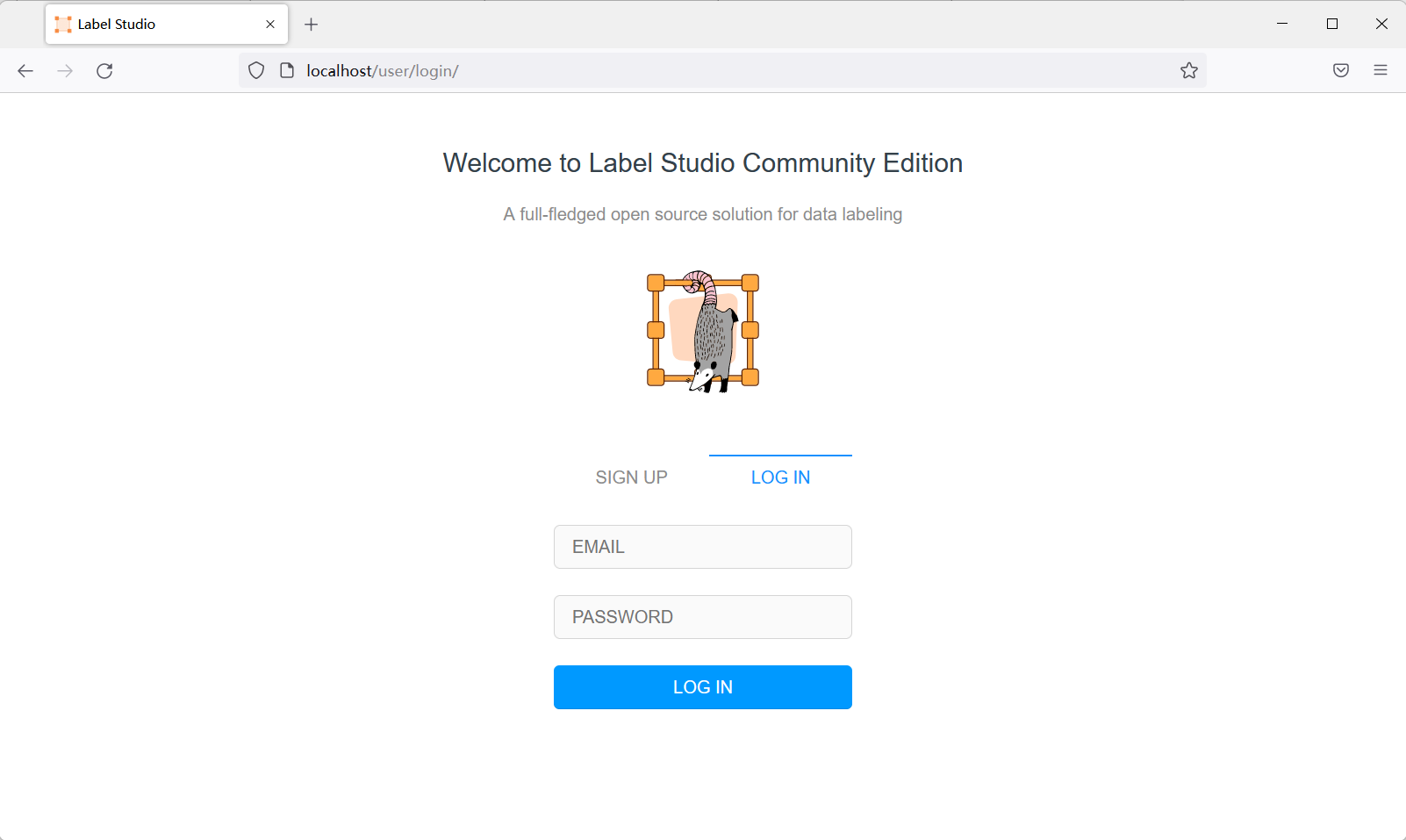
并弹出浏览器打开 label studio 工作界面,创建用户后即可登录使用:

label studio ml 安装
label studio ml 是 label studio 的后端配置,其主要提供了一种能够快速将AI模型封装为 label studio 可使用的预标记服务(提供模型预测服务)。其安装方法有以下几种:
- GitHub 安装
git clone https://github.com/heartexlabs/label-studio-ml-backend cd label-studio-ml-backend pip install -U -e . - pip 安装:
pip install label-studio-ml 仍然建议通过 pip 安装,GitHub 安装可能会有依赖问题。安装完成后使用 label-studio-ml -h 命令检查是否安装成功。
前端配置
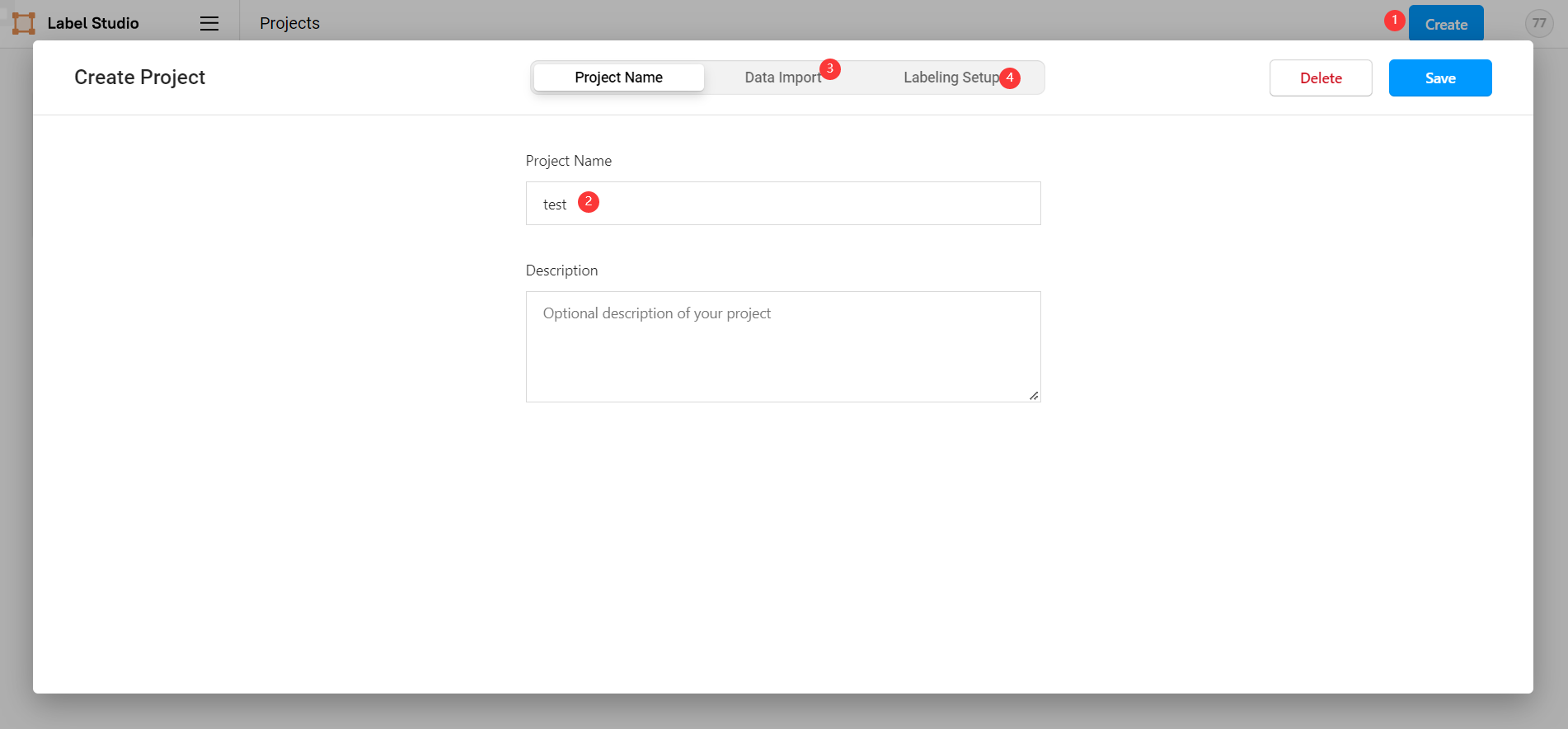
在 label studio 前端主页中选择创建项目:
- 项目基本信息
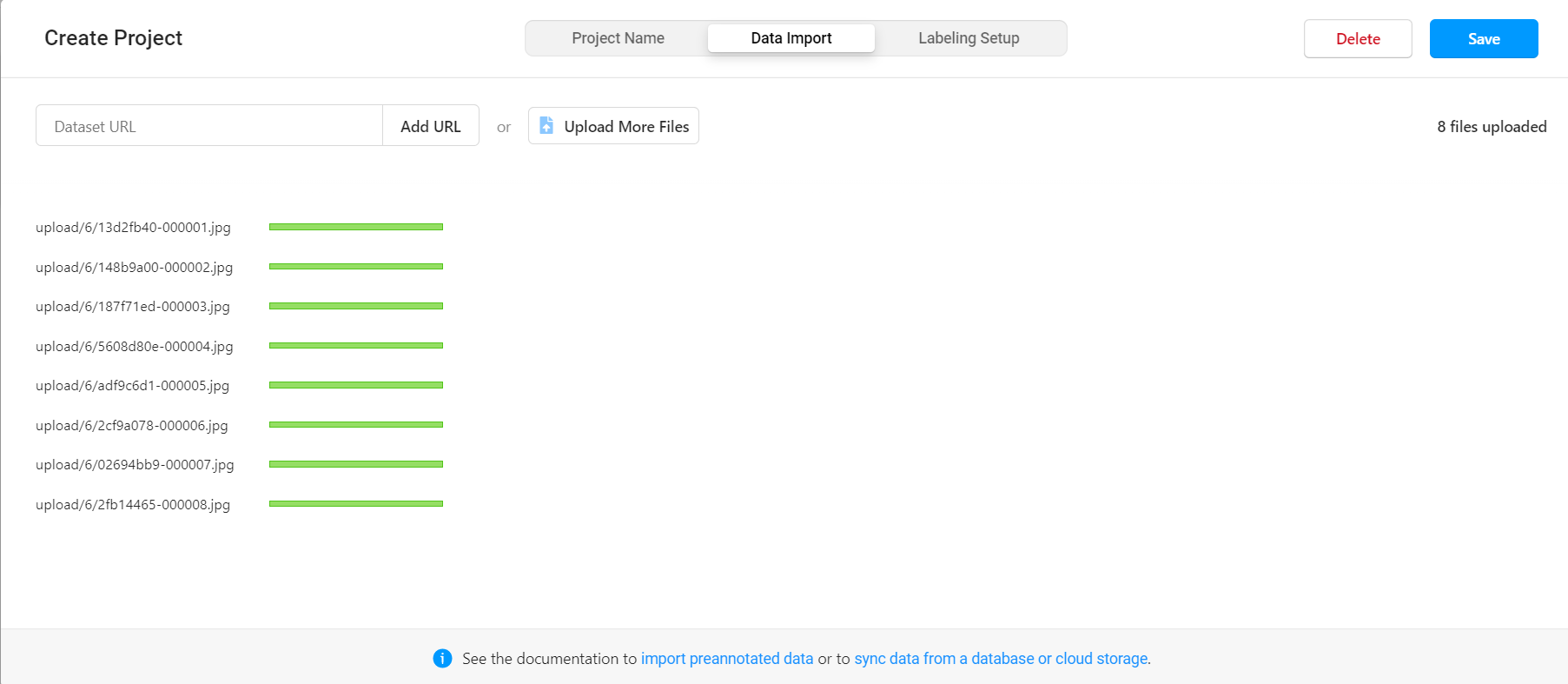
- 导入数据
直接将图片选中拖入数据框即可。
- 选择标记模板
label studio 内置了很多常见的深度学习标记模板,本示例是人脸识别,所以选择 Object Detection with Bounding Boxes 模板,确定后将模板内自带的 Airplane 、 Car 标签删除,然后添加自定义的标签 face (标签的类别数量可以比后端支持的类别多,也可以更少,但是同类别的标签名必须一致)。
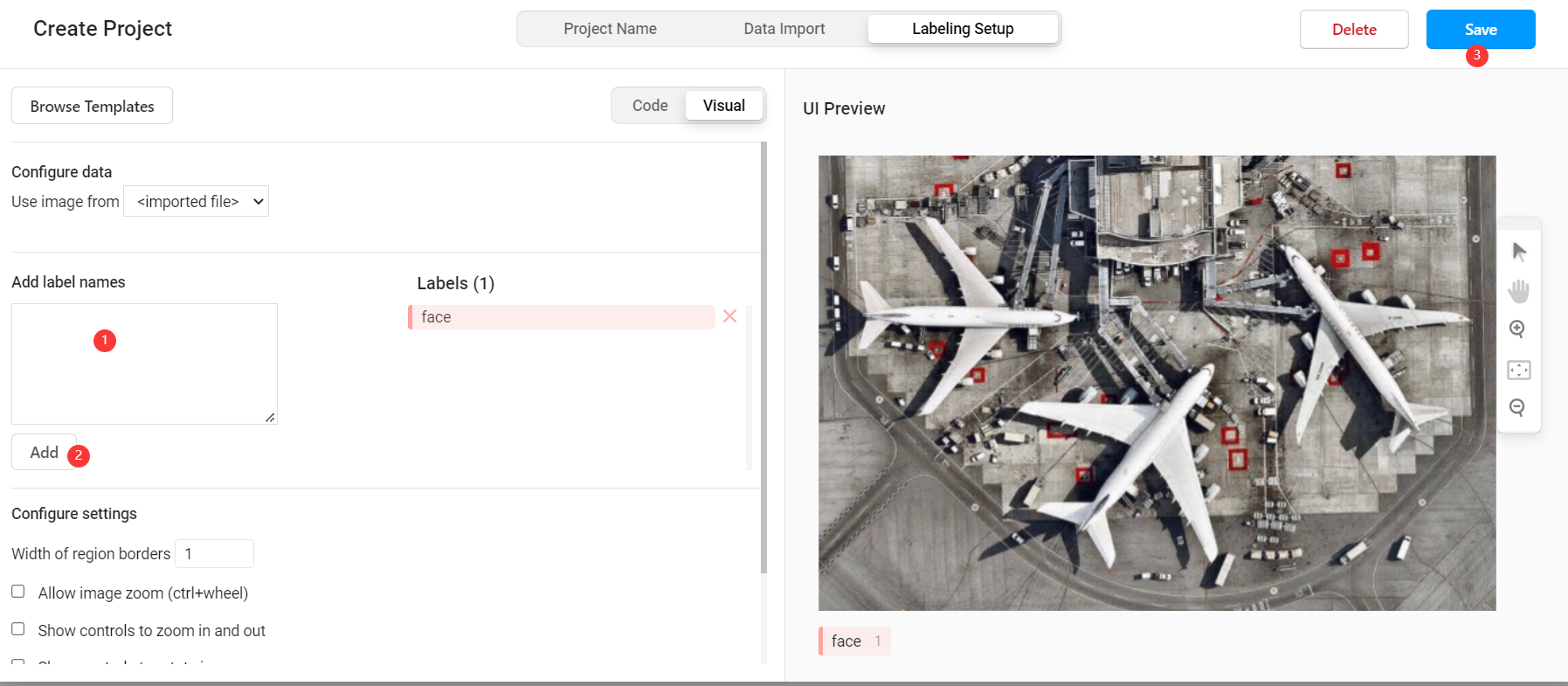
此时我们已经可以通过 label studio 进行普通的图片标记工作,如果要使用其提供的辅助预标记功能,则需要进行后续配置。
后端配置
选取后端模型
在 MMDetection 使用示例:从入门到出门 中,我们已经完成了基于 celeba100 数据集的人脸检测模型的训练,本文将直接使用其中训练的结果模型。
后端服务实现
引入后端模型
在根目录下创建 backend 目录,并将 MMDetection 使用示例:从入门到出门 中的整个项目文件复制其中,此时项目目录为:
. ├── backend │ └── mmdetection // 复制的 mmdetection 文件夹 │ ├── checkpoints │ ├── completion.json │ ├── configs │ ├── conf.yaml │ ├── detect.py │ ├── label_studio_backend.py // 需要自己实现的后端模型 │ ├── mmdet │ ├── model │ ├── test.py │ ├── tools │ └── train.py ├── dataset ├── export ├── label-studio-ml-backend ├── label_studio.sqlite3 ├── media └── run.bat 创建后端模型
label studio 的后端模型有自己固定的写法,只要继承 label_studio_ml.model.LabelStudioMLBase 类并实现其中的接口都可以作为 label studio 的后端服务。在 mmdetection 文件夹下创建 label_studio_backend.py 文件,然后在文件中引入通用配置:
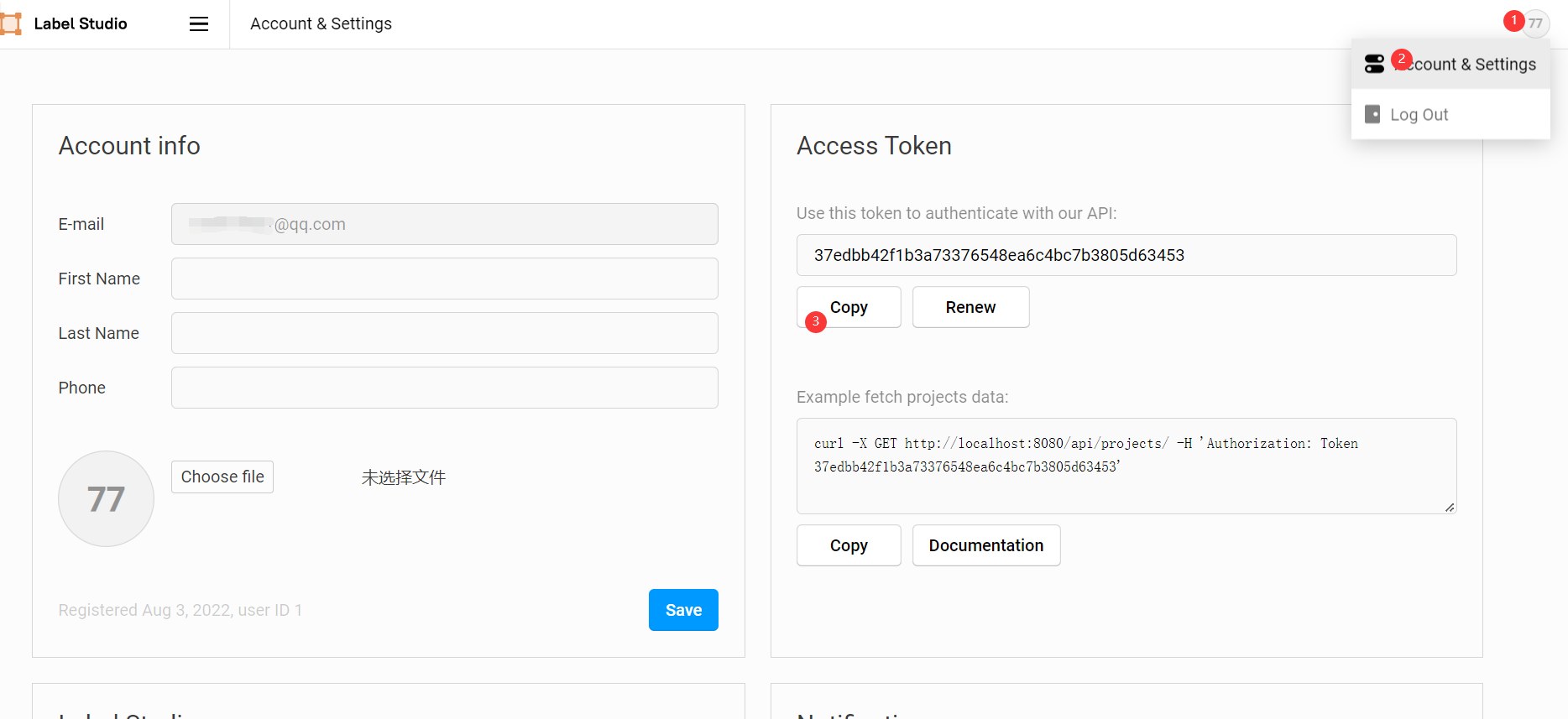
ROOT = os.path.join(os.path.dirname(__file__)) print('=> ROOT = ', ROOT) # label-studio 启动的前端服务地址 os.environ['HOSTNAME'] = 'http://localhost:80' # label-studio 中对应用户的 API_KEY os.environ['API_KEY'] = '37edbb42f1b3a73376548ea6c4bc7b3805d63453' HOSTNAME = get_env('HOSTNAME') API_KEY = get_env('API_KEY') print('=> LABEL STUDIO HOSTNAME = ', HOSTNAME) if not API_KEY: print('=> WARNING! API_KEY is not set') with open(os.path.join(ROOT, "conf.yaml"), errors='ignore') as f: conf = yaml.safe_load(f) 这里的 API_KEY 可以在前端的 Account & Settings 中找到。
然后在 label_studio_backend.py 中创建自己预标记模型的类,使其继承 label_studio_ml.model.LabelStudioMLBase 并实现关键方法,不同方法对应不同功能,后面会陆续实现:
class MyModel(LabelStudioMLBase): def __init__(self, **kwargs): pass def predict(self, tasks, **kwargs): pass def fit(self, completions, batch_size=32, num_epochs=5, **kwargs): pass def gen_train_data(self, project_id): pass 完成其中的 __init__ 方法,以实现模型初始化功能(必须):
def __init__(self, **kwargs): super(MyModel, self).__init__(**kwargs) # 按 mmdetection 的方式加载模型及权重 if self.train_output: self.detector = init_detector(conf['config_file'], self.train_output['model_path'], device=conf['device']) else: self.detector = init_detector(conf['config_file'], conf['checkpoint_file'], device=conf['device']) # 获取后端模型标签列表 self.CLASSES = self.detector.CLASSES # 前端配置的标签列表 self.labels_in_config = set(self.labels_in_config) # 一些项目相关常量 self.from_name, self.to_name, self.value, self.labels_in_config = get_single_tag_keys(self.parsed_label_config, 'RectangleLabels', 'Image') # 前端获取任务属性 完成其中的 predict 方法,以实现预标记模型的标记功能(必须):
def predict(self, tasks, **kwargs): # 获取待标记图片 images = [get_local_path(task['data'][self.value], hostname=HOSTNAME, access_token=API_KEY) for task in tasks] for image_path in images: w, h = get_image_size(image_path) # 推理演示图像 img = mmcv.imread(image_path) # 以 mmdetection 的方法进行推理 result = inference_detector(self.detector, img) # 手动获取标记框位置 bboxes = np.vstack(result) # 手动获取推理结果标签 labels = [np.full(bbox.shape[0], i, dtype=np.int32) for i, bbox in enumerate(result)] labels = np.concatenate(labels) # 推理分数 FCOS算法结果会多出来两个分数极低的检测框,需要将其过滤掉 scores = bboxes[:, -1] score_thr = 0.3 inds = scores > score_thr bboxes = bboxes[inds, :] labels = labels[inds] results = [] # results需要放在list中再返回 for id, bbox in enumerate(bboxes): label = self.CLASSES[labels[id]] if label not in self.labels_in_config: print(label + ' label not found in project config.') continue results.append({ 'id': str(id), # 必须为 str,否则前端不显示 'from_name': self.from_name, 'to_name': self.to_name, 'type': 'rectanglelabels', 'value': { 'rectanglelabels': [label], 'x': bbox[0] / w * 100, # xy 为左上角坐标点 'y': bbox[1] / h * 100, 'width': (bbox[2] - bbox[0]) / w * 100, # width,height 为宽高 'height': (bbox[3] - bbox[1]) / h * 100 }, 'score': float(bbox[4] * 100) }) avgs = bboxes[:, -1] results = [{'result': results, 'score': np.average(avgs) * 100}] return results 完成其中的 gen_train_data 方法,以获取标记完成的数据用来训练(非必须,其实 label studio 自带此类方法,但在实践过程中有各种问题,所以自己写了一遍):
def gen_train_data(self, project_id): import zipfile import glob download_url = f'{HOSTNAME.rstrip("/")}/api/projects/{project_id}/export?export_type=COCO&download_all_tasks=false&download_resources=true' response = requests.get(download_url, headers={'Authorization': f'Token {API_KEY}'}) zip_path = os.path.join(conf['workdir'], "train.zip") train_path = os.path.join(conf['workdir'], "train") with open(zip_path, 'wb') as file: file.write(response.content) # 通过二进制写文件的方式保存获取的内容 file.flush() f = zipfile.ZipFile(zip_path) # 创建压缩包对象 f.extractall(train_path) # 压缩包解压缩 f.close() os.remove(zip_path) if not os.path.exists(os.path.join(train_path, "images", str(project_id))): os.makedirs(os.path.join(train_path, "images", str(project_id))) for img in glob.glob(os.path.join(train_path, "images", "*.jpg")): basename = os.path.basename(img) shutil.move(img, os.path.join(train_path, "images", str(project_id), basename)) return True 完成其中的 fit 方法,以实现预标记模型的自训练功能(非必须):
def fit(self, completions, num_epochs=5, **kwargs): if completions: # 使用方法1获取 project_id image_urls, image_labels = [], [] for completion in completions: project_id = completion['project'] u = completion['data'][self.value] image_urls.append(get_local_path(u, hostname=HOSTNAME, access_token=API_KEY)) image_labels.append(completion['annotations'][0]['result'][0]['value']) elif kwargs.get('data'): # 使用方法2获取 project_id project_id = kwargs['data']['project']['id'] if not self.parsed_label_config: self.load_config(kwargs['data']['project']['label_config']) if self.gen_train_data(project_id): # 使用 mmdetection 的方法训练模型 from tools.mytrain import MyDict, train args = MyDict() args.config = conf['config_file'] data_root = os.path.join(conf['workdir'], "train") args.cfg_options = {} args.cfg_options['data_root'] = data_root args.cfg_options['runner'] = dict(type='EpochBasedRunner', max_epochs=num_epochs) args.cfg_options['data'] = dict( train=dict(img_prefix=data_root, ann_file=data_root + '/result.json'), val=dict(img_prefix=data_root, ann_file=data_root + '/result.json'), test=dict(img_prefix=data_root, ann_file=data_root + '/result.json'), ) args.cfg_options['load_from'] = conf['checkpoint_file'] args.work_dir = os.path.join(data_root, "work_dir") train(args) checkpoint_name = time.strftime("%Y%m%d%H%M%S", time.localtime(time.time())) + ".pth" shutil.copy(os.path.join(args.work_dir, "latest.pth"), os.path.join(conf['workdir'], checkpoint_name)) print("model train complete!") # 权重文件保存至运行环境,将在下次运行 init 初始化时加载 return {'model_path': os.path.join(conf['workdir'], checkpoint_name)} else: raise "gen_train_data error" 上述完整代码如下:
import os import yaml import time import shutil import requests import numpy as np from label_studio_ml.model import LabelStudioMLBase from label_studio_ml.utils import get_image_size, get_single_tag_keys from label_studio_tools.core.utils.io import get_local_path from label_studio_ml.utils import get_env from mmdet.apis import init_detector, inference_detector import mmcv ROOT = os.path.join(os.path.dirname(__file__)) print('=> ROOT = ', ROOT) os.environ['HOSTNAME'] = 'http://localhost:80' os.environ['API_KEY'] = '37edbb42f1b3a73376548ea6c4bc7b3805d63453' HOSTNAME = get_env('HOSTNAME') API_KEY = get_env('API_KEY') print('=> LABEL STUDIO HOSTNAME = ', HOSTNAME) if not API_KEY: print('=> WARNING! API_KEY is not set') with open(os.path.join(ROOT, "conf.yaml"), errors='ignore') as f: conf = yaml.safe_load(f) class MyModel(LabelStudioMLBase): def __init__(self, **kwargs): super(MyModel, self).__init__(**kwargs) # 按 mmdetection 的方式加载模型及权重 if self.train_output: self.detector = init_detector(conf['config_file'], self.train_output['model_path'], device=conf['device']) else: self.detector = init_detector(conf['config_file'], conf['checkpoint_file'], device=conf['device']) # 获取后端模型标签列表 self.CLASSES = self.detector.CLASSES # 前端配置的标签列表 self.labels_in_config = set(self.labels_in_config) # 一些项目相关常量 self.from_name, self.to_name, self.value, self.labels_in_config = get_single_tag_keys(self.parsed_label_config, 'RectangleLabels', 'Image') # 前端获取任务属性 def predict(self, tasks, **kwargs): # 获取待标记图片 images = [get_local_path(task['data'][self.value], hostname=HOSTNAME, access_token=API_KEY) for task in tasks] for image_path in images: w, h = get_image_size(image_path) # 推理演示图像 img = mmcv.imread(image_path) # 以 mmdetection 的方法进行推理 result = inference_detector(self.detector, img) # 手动获取标记框位置 bboxes = np.vstack(result) # 手动获取推理结果标签 labels = [np.full(bbox.shape[0], i, dtype=np.int32) for i, bbox in enumerate(result)] labels = np.concatenate(labels) # 推理分数 FCOS算法结果会多出来两个分数极低的检测框,需要将其过滤掉 scores = bboxes[:, -1] score_thr = 0.3 inds = scores > score_thr bboxes = bboxes[inds, :] labels = labels[inds] results = [] # results需要放在list中再返回 for id, bbox in enumerate(bboxes): label = self.CLASSES[labels[id]] if label not in self.labels_in_config: print(label + ' label not found in project config.') continue results.append({ 'id': str(id), # 必须为 str,否则前端不显示 'from_name': self.from_name, 'to_name': self.to_name, 'type': 'rectanglelabels', 'value': { 'rectanglelabels': [label], 'x': bbox[0] / w * 100, # xy 为左上角坐标点 'y': bbox[1] / h * 100, 'width': (bbox[2] - bbox[0]) / w * 100, # width,height 为宽高 'height': (bbox[3] - bbox[1]) / h * 100 }, 'score': float(bbox[4] * 100) }) avgs = bboxes[:, -1] results = [{'result': results, 'score': np.average(avgs) * 100}] return results def fit(self, completions, num_epochs=5, **kwargs): if completions: # 使用方法1获取 project_id image_urls, image_labels = [], [] for completion in completions: project_id = completion['project'] u = completion['data'][self.value] image_urls.append(get_local_path(u, hostname=HOSTNAME, access_token=API_KEY)) image_labels.append(completion['annotations'][0]['result'][0]['value']) elif kwargs.get('data'): # 使用方法2获取 project_id project_id = kwargs['data']['project']['id'] if not self.parsed_label_config: self.load_config(kwargs['data']['project']['label_config']) if self.gen_train_data(project_id): # 使用 mmdetection 的方法训练模型 from tools.mytrain import MyDict, train args = MyDict() args.config = conf['config_file'] data_root = os.path.join(conf['workdir'], "train") args.cfg_options = {} args.cfg_options['data_root'] = data_root args.cfg_options['runner'] = dict(type='EpochBasedRunner', max_epochs=num_epochs) args.cfg_options['data'] = dict( train=dict(img_prefix=data_root, ann_file=data_root + '/result.json'), val=dict(img_prefix=data_root, ann_file=data_root + '/result.json'), test=dict(img_prefix=data_root, ann_file=data_root + '/result.json'), ) args.cfg_options['load_from'] = conf['checkpoint_file'] args.work_dir = os.path.join(data_root, "work_dir") train(args) checkpoint_name = time.strftime("%Y%m%d%H%M%S", time.localtime(time.time())) + ".pth" shutil.copy(os.path.join(args.work_dir, "latest.pth"), os.path.join(conf['workdir'], checkpoint_name)) print("model train complete!") # 权重文件保存至运行环境,将在下次运行 init 初始化时加载 return {'model_path': os.path.join(conf['workdir'], checkpoint_name)} else: raise "gen_train_data error" def gen_train_data(self, project_id): import zipfile import glob download_url = f'{HOSTNAME.rstrip("/")}/api/projects/{project_id}/export?export_type=COCO&download_all_tasks=false&download_resources=true' response = requests.get(download_url, headers={'Authorization': f'Token {API_KEY}'}) zip_path = os.path.join(conf['workdir'], "train.zip") train_path = os.path.join(conf['workdir'], "train") with open(zip_path, 'wb') as file: file.write(response.content) # 通过二进制写文件的方式保存获取的内容 file.flush() f = zipfile.ZipFile(zip_path) # 创建压缩包对象 f.extractall(train_path) # 压缩包解压缩 f.close() os.remove(zip_path) if not os.path.exists(os.path.join(train_path, "images", str(project_id))): os.makedirs(os.path.join(train_path, "images", str(project_id))) for img in glob.glob(os.path.join(train_path, "images", "*.jpg")): basename = os.path.basename(img) shutil.move(img, os.path.join(train_path, "images", str(project_id), basename)) return True 启动后端服务
以下命令为 window 脚本,皆在 backend 根目录下执行。
- 根据后端模型生成服务代码
label-studio-ml init model --script mmdetection/label_studio_backend.py --force label-studio-ml init 命令提供了一种根据后端模型自动生成后端服务代码的功能, model 为输出目录, --script 指定后端模型路径, --force 表示覆盖生成。该命令执行成功后会在 backend 目录下生成 model 目录。
2. 复制 mmdetection 依赖文件
由于 label-studio-ml 生成的后端服务代码只包含基本的 label_studio_backend.py 中的内容,而我们所用的 mmdetection 框架的执行需要大量额外的依赖,所以需要手动将这些依赖复制到生成的 model 目录中。使用以下命令完成自动复制依赖:
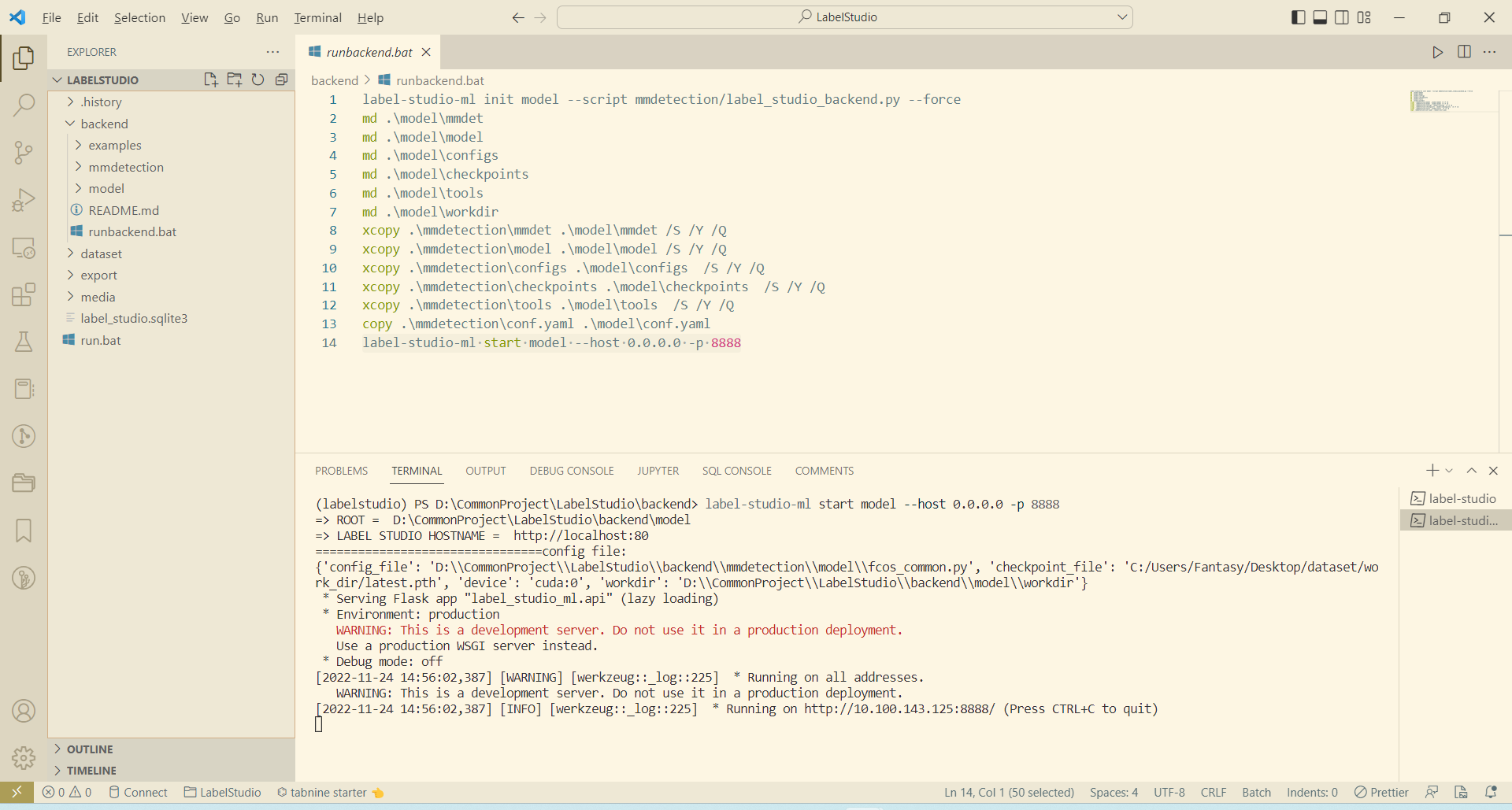
md .modelmmdet md .modelmodel md .modelconfigs md .modelcheckpoints md .modeltools md .modelworkdir xcopy .mmdetectionmmdet .modelmmdet /S /Y /Q xcopy .mmdetectionmodel .modelmodel /S /Y /Q xcopy .mmdetectionconfigs .modelconfigs /S /Y /Q xcopy .mmdetectioncheckpoints .modelcheckpoints /S /Y /Q xcopy .mmdetectiontools .modeltools /S /Y /Q copy .mmdetectionconf.yaml .modelconf.yaml - 启动后端服务
label-studio-ml start model --host 0.0.0.0 -p 8888 启动成功后效果如下:
前端自动标注
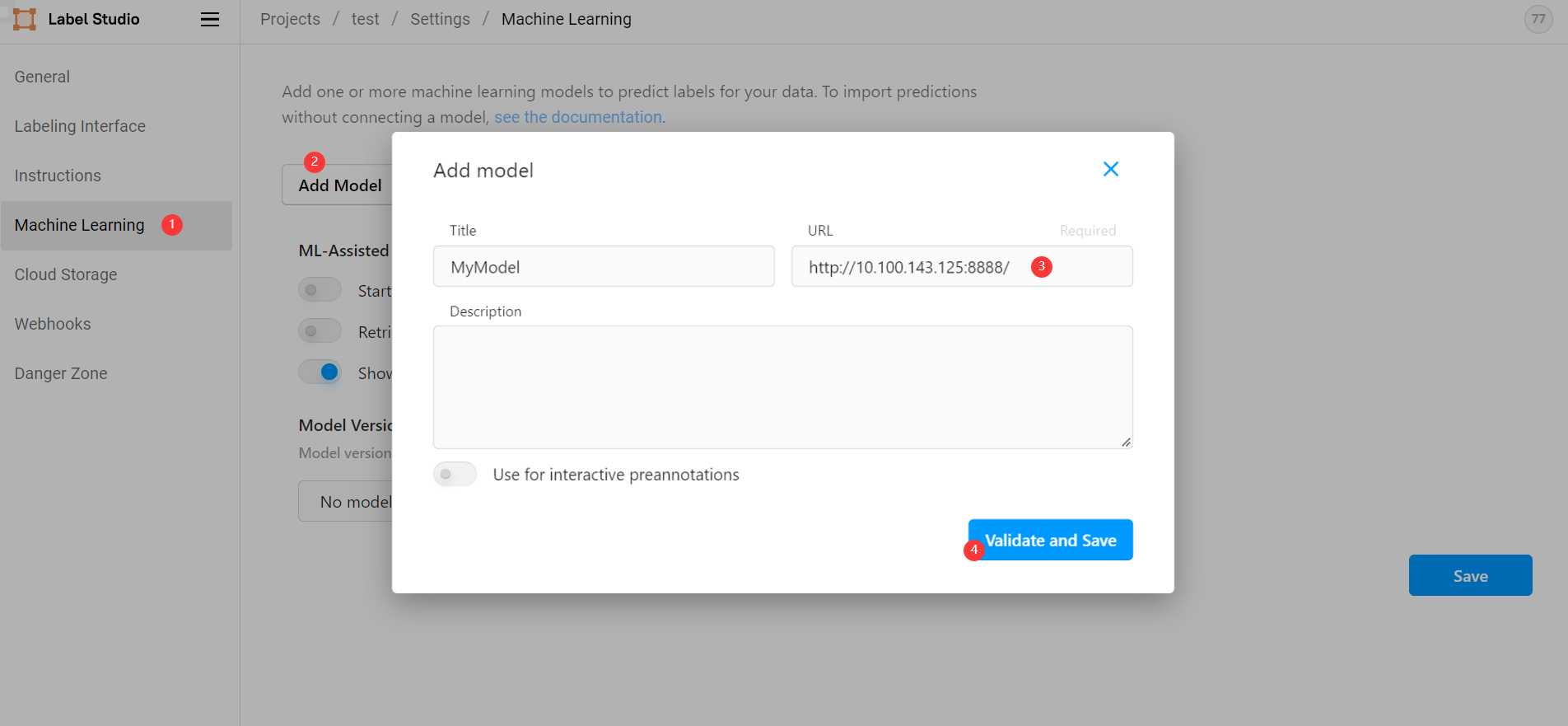
前面我们已经能够从 label studio 前端正常手动标注图片,要想实现自动标注,则需要在前端引入后端服务。在我们创建的项目中依次选择 Settings ->
Machine Learning -> Add model ,然后输入后端地址 http://10.100.143.125:8888/ 点击保存(此地址为命令行打印地址,而非 http://127.0.0.1:8888/ ):
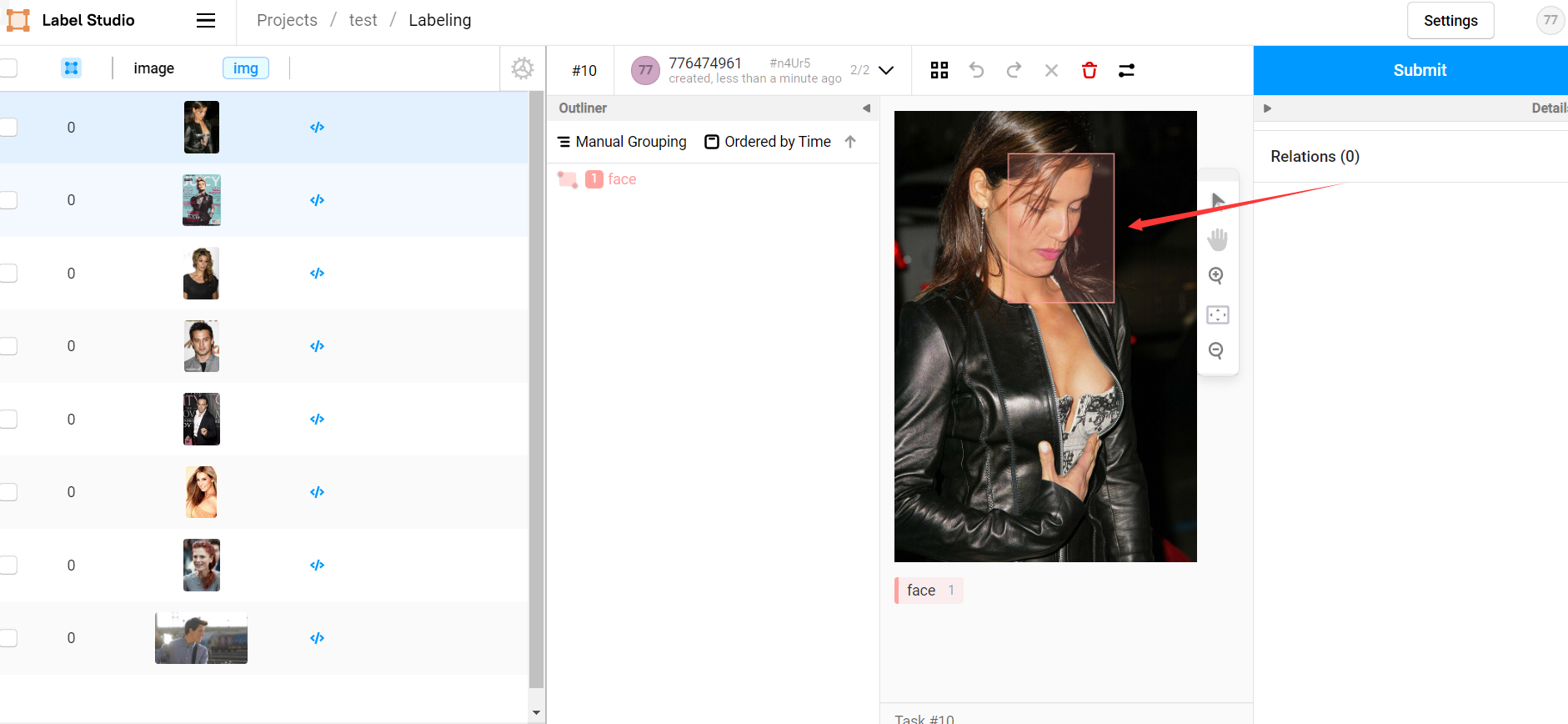
此时我们从前端项目中打开待标记图片,前端会自动请求后端对其进行标记(调用后端的 predict 方法),等待片刻后即可看见预标记结果,我们只需要大致核对无误后点击 submit 即可:
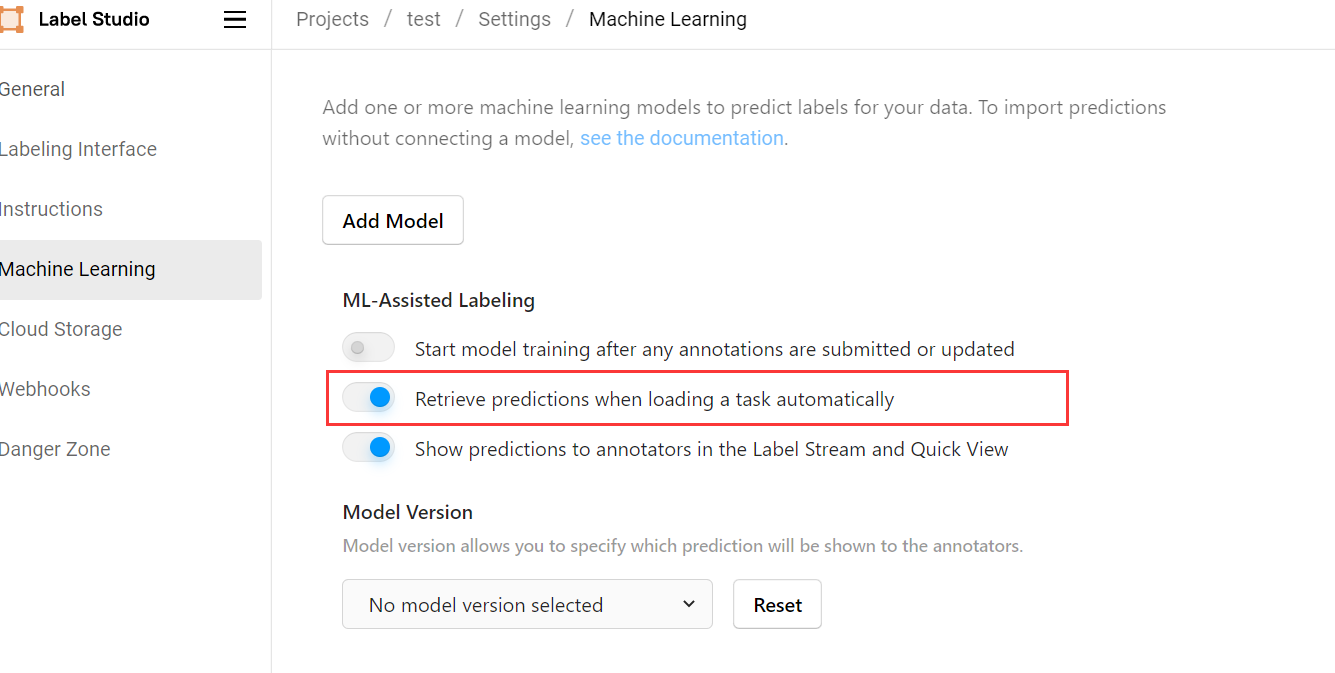
如果觉得每次打开图片都需要等待片刻才会收到后端预测结果比较费时,可以在 Settings -> Machine Learning 设置中选择打开 Retrieve predictions when loading a task automatically ,此后前端会在我们每次打开项目时自动对所有任务进行自动预测,基本能够做到无等待:
后端自动训练
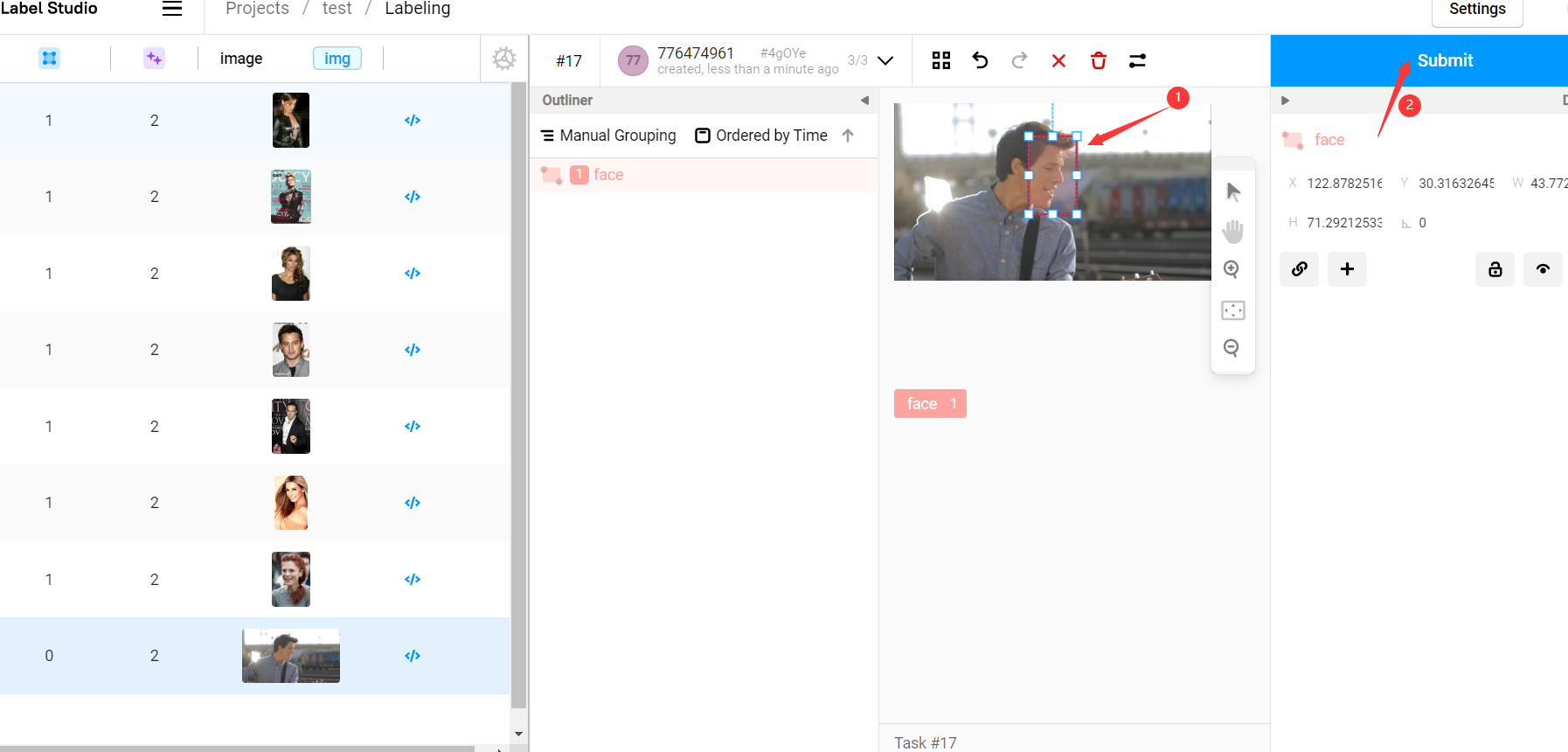
现在所有的图片都已经有了与标注信息,我们先检查所有图片,检查并改进所有标注信息然后点击 submit 提交:
在 Settings -> Machine Learning 中点击后端服务的 Start Training 按钮,即可调用后端模型使用已标记信息进行训练:
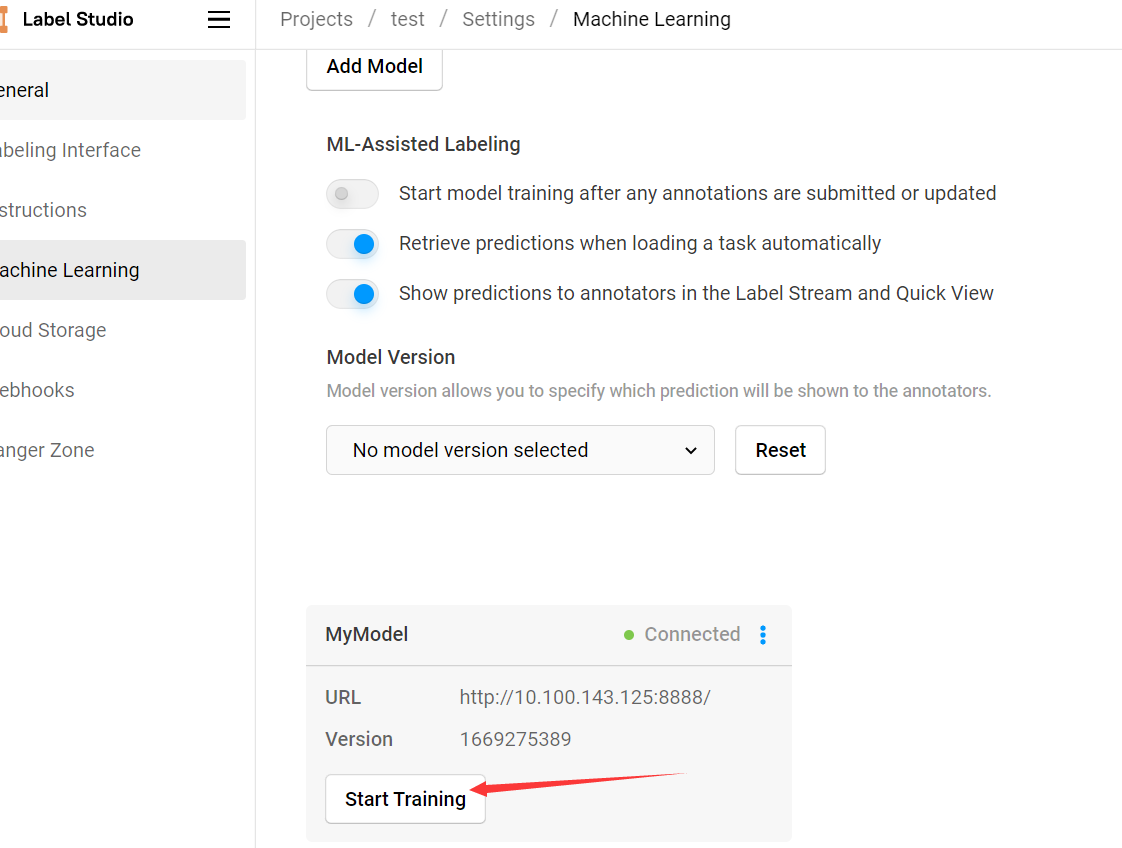
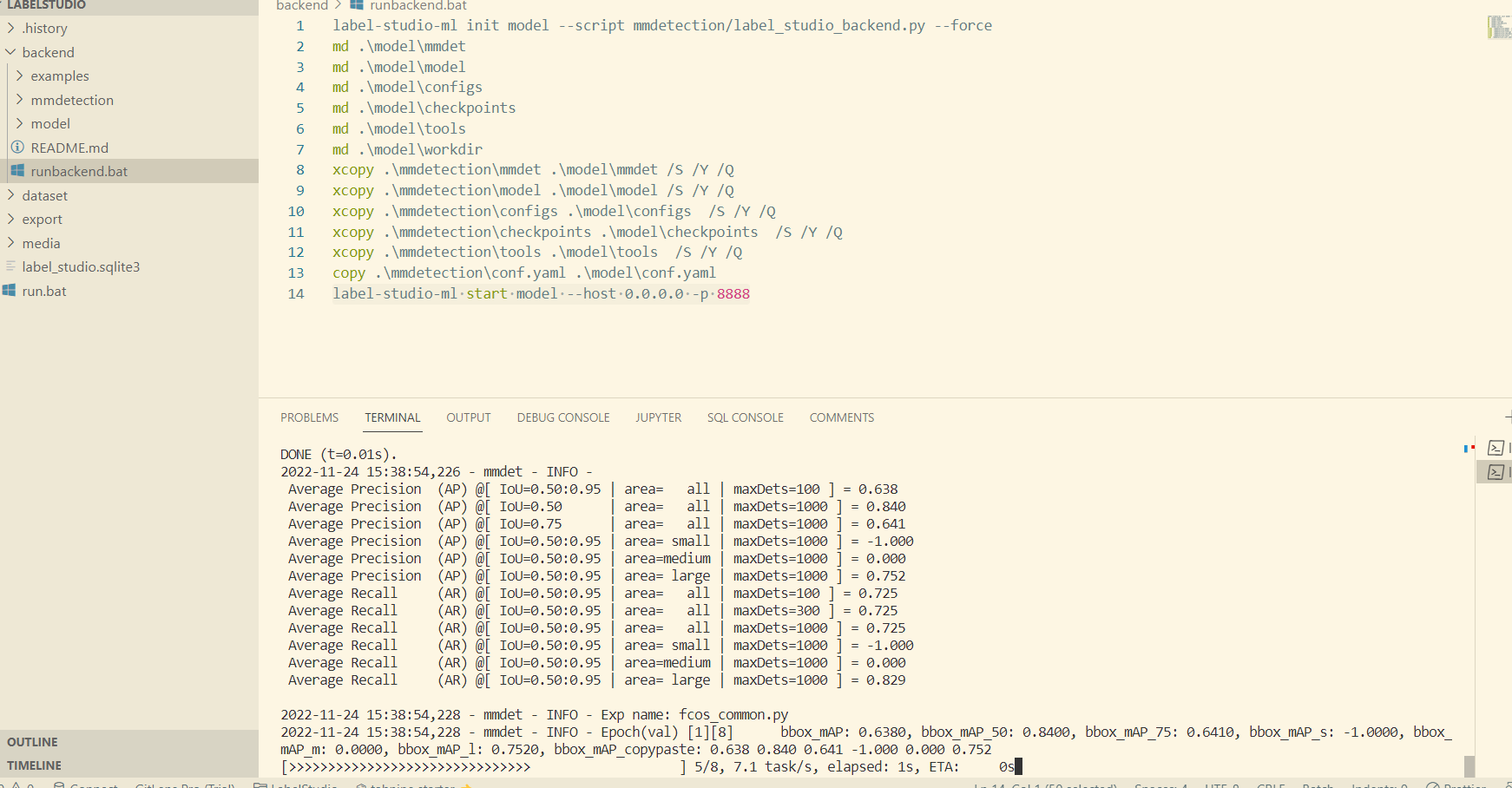
该操作会调用后端模型的 fit 方法对模型进行训练,可以在后端命令行界面看见训练过程,训练完成后的所有新数据集都会使用新的模型进行预测:
也可以 Settings -> Machine Learning 中允许模型自动训练,但训练频率过高会影响程序效率。
部分常见问题
Q: 一种访问权限不允许的方式做了一个访问套接字的尝试。
A: label-studio-ml start 启动时指定端口 -p 8888
Q: Can't connect to ML backend http://127.0.0.1:8888/, health check failed. Make sure it is up and your firewall is properly configured.
A: label-studio-ml start 启动后会打印一个监听地址,label studio 前端添加该地址而非 http://127.0.0.1:8888/ 。
Q: FileNotFoundError: Can't resolve url, neither hostname or project_dir passed: /data/upload/1/db8f065a-000001.jpg
A: 接口返回的是项目的相对地址,无法通过该地址直接读取到图片原件,需要配合 get_local_path 函数使用。
Q: UnicodeEncodeError: 'gbk' codec can't encode character 'xa0' in position 2: illegal multibyte sequence
A: 修改 C:UsersFantasy.condaenvslabelstudiolibjson_init_.py#line 179 为:
for chunk in iterable: fp.write(chunk.replace(u'xa0', u'')) 参考
-
Cai Yichao. label_studio自动预标注功能. CSDN. [2022-01-19] ↩︎



![洛谷 P11345 [KTSC 2023 R2] 基地简化 题解](http://www.itfaba.com/wp-content/themes/kemi/timthumb.php?src=http://www.itfaba.com/wp-content/themes/kemi/img/random/1.jpg&w=218&h=124&zc=1)
