

项目背景
最近我们团队自研了一个基于 React 的 H5 前端框架,领导让我来负责编写框架的使用文档。我选择了 dumi 来搭建文档站点,大部分内容都是手动写 Markdown 来介绍各种功能,包括:初始化、目录结构、生命周期、状态管理、插件系统 等等。
框架里有个很重要的子包,主要负责多个 App 的桥接能力,深度集成了各端环境的监测和桥接逻辑。这个子包对外提供了一个 App 实例对象,里面封装了很多原生能力,比如: 设置导航栏、录音、保存图片到相册 等
这些 API 代码格式都比较统一,领导希望避免在框架源码和文档里重复定义相同的接口,最好能直接从源代码自动生成文档内容。需要提取的信息包括:API支持的App版本、功能描述、开发状态、使用方式,如果是函数的话还要有参数说明和返回值说明。
我的解决方案
经过一番思考,我想到了一个方案:
核心思路:在不改动源代码逻辑的前提下,通过增加注释信息来补充文档需要的元数据
具体实现路径:
- 定义一套规范的注释标签
- 编写解析脚本提取信息,生成 JSON 文件
- 在文档项目中读取 JSON,动态渲染成 API 文档
定义注释规范
我定义了一系列标准的注释标签:
- @appVersion —— 支持该API的App版本
- @description —— API的功能描述
- @apiType —— API类型,默认是函数,可选property(属性)和function(函数)
- @usage —— 使用示例
- @param —— 函数参数说明(只有函数类型需要)
- @returns —— 函数返回值说明(只有函数类型需要)
- @status —— 发布状态
在实际代码中这样使用,完全不会影响原来的业务逻辑:
const app = { /** * @appVersion 1.0.0 * @description 判断设备类型 * @apiType property * @usage app.platform // notInApp | ios | android | HarmonyOS * @status 已上线 */ platform: getPlatform(), /** * @appVersion 1.0.6 * @description 注册事件监听 * @param {Object} options - 配置选项 * @param {string} options.title - 事件名称 * @param {Function} options.callback - 注册事件时的处理函数逻辑 * @param {Function} options.onSuccess - 设置成功的回调函数(可选) * @param {Function} options.onFail - 设置失败的回调函数(可选) * @param {Function} options.onComplete - 无论成功失败都会执行的回调函数(可选) * @usage app.monitor({ eventName: 'onOpenPage', callback: (data)=>{ console.log('端上push消息', data ) } }) * @returns {String} id - 绑定事件的id * @status 已上线 */ monitor: ({ onSuccess, onFail, onComplete, eventName = "", callback = () => { } }) => { let _id = uuid(); // 业务代码省略 return _id; }, } 解析脚本
接下来要写一个解析脚本,把注释内容提取成键值对格式,主要用正则表达式来解析注释:
const fs = require('fs'); const path = require('path'); /** * 解析参数或返回值标签 * @param {string} content - 标签内容 * @param {string} type - 类型 ('param' 或 'returns') * @returns {Object} 解析后的参数或返回值对象 */ function parseParamOrReturn(content, type = 'param') { const match = content.match(/{([^}]+)}s+(w+)(?:.(w+))?s*-?s*(.*)/); if (!match) return null; const paramType = match[1]; const parentName = match[2]; const childName = match[3]; const description = match[4].trim(); const isParam = type === 'param'; if (childName) { // 嵌套参数或返回值 (options.title 或 data.result 格式) return { name: parentName, type: 'Object', description: isParam ? `${parentName} 配置对象` : `${parentName} 返回对象`, required: isParam ? true : undefined, children: [{ name: childName, type: paramType, description: description, required: isParam ? (!paramType.includes('?') && !description.includes('可选')) : undefined }] }; } else { // 普通参数或返回值 return { name: parentName, type: paramType, description: description, required: isParam ? (!paramType.includes('?') && !description.includes('可选')) : undefined }; } } /** * 合并嵌套对象 * @param {Array} items - 参数或返回值数组 * @returns {Array} 合并后的数组 */ function mergeNestedItems(items) { const merged = {}; items.forEach(item => { if (item.children) { // 嵌套对象 if (!merged[item.name]) { merged[item.name] = { ...item }; } else { // 合并子元素 if (!merged[item.name].children) merged[item.name].children = []; merged[item.name].children.push(...item.children); } } else { // 普通参数 if (!merged[item.name]) { merged[item.name] = item; } } }); return Object.values(merged); } /** * 保存标签内容到注解对象 */ function saveTagContent(annotation, tag, content) { // 确保 parameters 和 returns 数组存在 if (!annotation.parameters) annotation.parameters = []; if (!annotation.returns) annotation.returns = []; switch (tag) { case 'appVersion': annotation.appVersion = content; break; case 'sxzVersion': annotation.sxzVersion = content; break; case 'mddVersion': annotation.mddVersion = content; break; case 'description': annotation.description = content; break; case 'status': annotation.status = content; break; case 'usage': annotation.usage = content.trim(); break; case 'apiType': // 解析类型:property 或 method annotation.type = content.toLowerCase(); break; case 'param': const param = parseParamOrReturn(content, 'param'); if (param) { annotation.parameters.push(param); // 合并嵌套对象 annotation.parameters = mergeNestedItems(annotation.parameters); } break; case 'returns': const returnItem = parseParamOrReturn(content, 'returns'); if (returnItem) { annotation.returns.push(returnItem); // 合并嵌套对象 annotation.returns = mergeNestedItems(annotation.returns); } break; } } /** * 解析 JSDoc 注释中的注解信息 - 逐行解析 */ function parseJSDocAnnotation(comment) { if (!comment) return null; const annotation = {}; // 按行分割注释 const lines = comment.split('n'); let currentTag = ''; let currentContent = ''; for (const line of lines) { // 清理行内容,移除 * 和首尾空格,但保留内部的换行意图 const cleanLine = line.replace(/^s**s*/, '').trimRight(); // 跳过空行和注释开始结束标记 if (!cleanLine || cleanLine === '/' || cleanLine === '*/') continue; // 检测标签开始 const tagMatch = cleanLine.match(/^@(w+)s*(.*)$/); if (tagMatch) { // 保存前一个标签的内容 if (currentTag) { saveTagContent(annotation, currentTag, currentContent); } // 开始新标签 currentTag = tagMatch[1]; currentContent = tagMatch[2]; } else if (currentTag) { // 继续当前标签的内容,但保留换行 // 对于 @usage 标签,我们保留原始格式 if (currentTag === 'usage') { currentContent += 'n' + cleanLine; } else { currentContent += ' ' + cleanLine; } } } // 保存最后一个标签的内容 if (currentTag) { saveTagContent(annotation, currentTag, currentContent); } // 确保 parameters 和 returns 数组存在(即使为空) if (!annotation.parameters) annotation.parameters = []; if (!annotation.returns) annotation.returns = []; return Object.keys(annotation).length > 0 ? annotation : null; } /** * 使用 @apiType 标签指定类型 */ function extractAnnotationsFromSource(sourceCode) { const annotations = { properties: {}, methods: {} }; // 使用更简单的逻辑:按行分析 const lines = sourceCode.split('n'); for (let i = 0; i < lines.length; i++) { const line = lines[i].trim(); // 检测 JSDoc 注释开始 if (line.startsWith('/**')) { let jsdocContent = line + 'n'; let j = i + 1; // 收集完整的 JSDoc 注释 while (j < lines.length && !lines[j].trim().startsWith('*/')) { jsdocContent += lines[j] + 'n'; j++; } if (j < lines.length) { jsdocContent += lines[j] + 'n'; // 包含结束的 */ // 查找注释后面的代码行 for (let k = j + 1; k < lines.length; k++) { const codeLine = lines[k].trim(); if (codeLine && !codeLine.startsWith('//') && !codeLine.startsWith('/*')) { // 解析注解 const annotation = parseJSDocAnnotation(jsdocContent); if (annotation) { // 从注解中获取类型(property 或 method) let itemType = annotation.type; let name = null; // 如果没有明确指定类型,默认设为 method if (!itemType) { itemType = 'method'; } // 提取名称 const nameMatch = codeLine.match(/^(w+)s*[:=]/); if (nameMatch) { name = nameMatch[1]; } else { // 如果没有匹配到名称,尝试其他模式 const funcMatch = codeLine.match(/^(?:asyncs+)?(w+)s*(/); if (funcMatch) { name = funcMatch[1]; } } if (name) { if (itemType === 'property') { annotations.properties[name] = annotation; } else if (itemType === 'method') { annotations.methods[name] = annotation; } else { console.warn(`未知的类型: ${itemType},名称: ${name}`); } } else { console.warn(`无法提取名称: ${codeLine.substring(0, 50)}`); } } break; } } i = j; // 跳过已处理的行 } } } return annotations; } /** * 从文件提取注解 */ function extractAnnotationsFromFile(filePath) { if (!fs.existsSync(filePath)) { console.error('文件不存在:', filePath); return { properties: {}, methods: {} }; } const sourceCode = fs.readFileSync(filePath, 'utf-8'); return extractAnnotationsFromSource(sourceCode); } /** * 提取所有文件的注解 */ function extractAllAnnotations(filePaths) { const allAnnotations = {}; filePaths.forEach(filePath => { if (fs.existsSync(filePath)) { const fileName = path.basename(filePath, '.js'); console.log(`n=== 处理文件: ${fileName} ===`); const annotations = extractAnnotationsFromFile(filePath); if (Object.keys(annotations.properties).length > 0 || Object.keys(annotations.methods).length > 0) { allAnnotations[fileName] = { fileName, ...annotations }; } } }); return allAnnotations; } module.exports = { parseJSDocAnnotation, extractAnnotationsFromSource, extractAnnotationsFromFile, extractAllAnnotations }; 集成到构建流程
然后创建一个脚本,指定要解析的源文件,把生成的 JSON 文件 输出到 build 目录里:
const { extractAllAnnotations } = require('./jsdoc-annotations'); const fs = require('fs'); const path = require('path'); /** * 主函数 - 提取注解并生成JSON文件 */ function main() { const filePaths = [ path.join(process.cwd(), './app.js'), path.join(process.cwd(), './xxx.js'), path.join(process.cwd(), './yyy.js'), ].filter(fs.existsSync); if (filePaths.length === 0) { console.error('未找到任何文件,请检查文件路径'); return; } const annotations = extractAllAnnotations(filePaths); const outputPath = path.join(process.cwd(), './build/api-annotations.json'); // 保存为JSON文件 fs.writeFileSync(outputPath, JSON.stringify(annotations, null, 2)); } main(); 在 package.json 里定义构建指令,确保 build 的时候自动运行解析脚本:
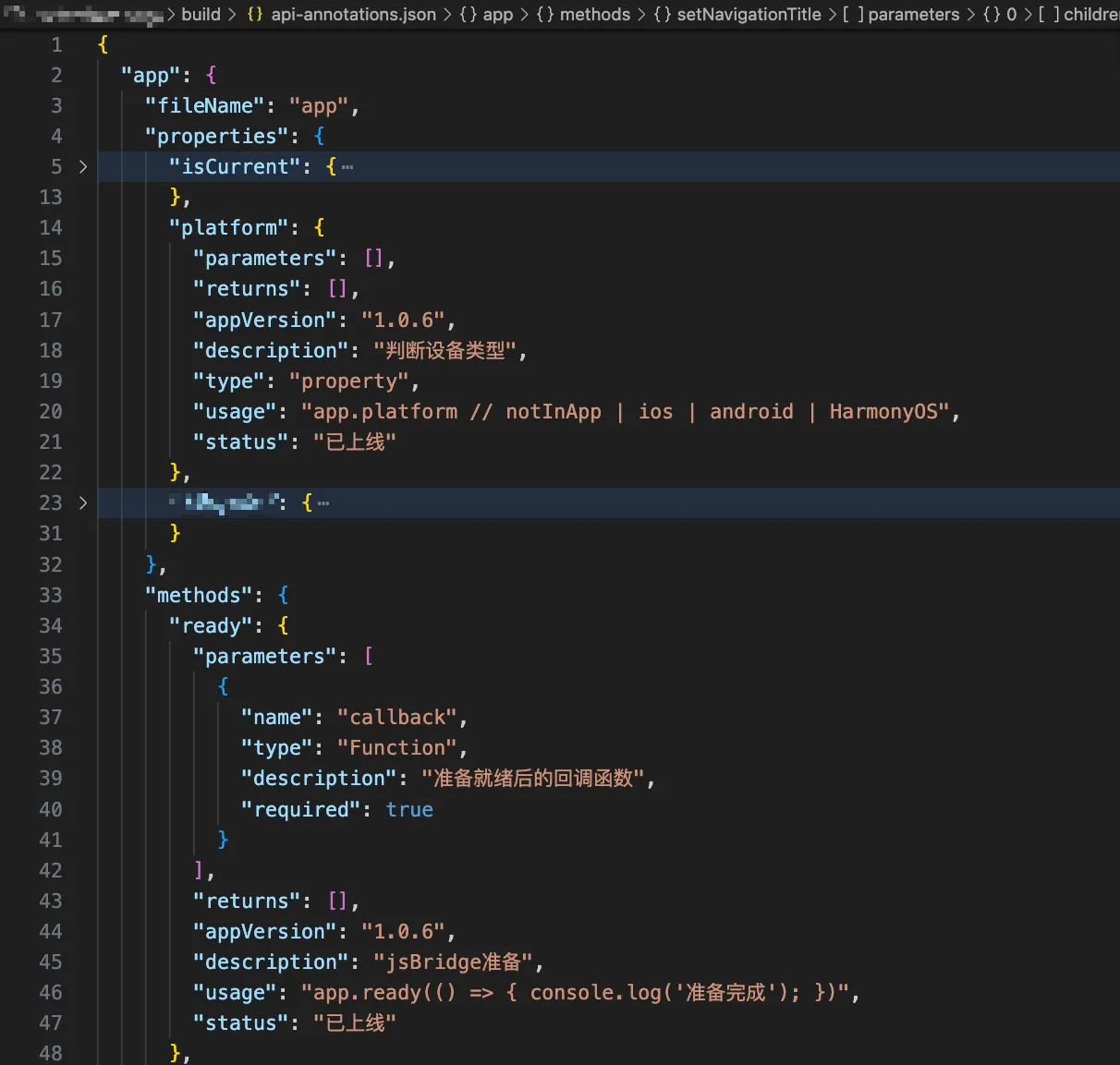
{ "scripts": { "build:annotations": "node scripts/extract-annotations.js", "build": "(cd template/main-app && npm run build) && npm run build:annotations" }, } 执行效果:运行 npm run build 后,会生成结构化的 JSON 文件:
在文档中展示
框架项目和文档项目是分开的,把 JSON 文件生成到 build 文件夹,上传到服务器后提供固定访问路径。
有了结构化的 JSON 数据,生成文档页面就很简单了。在 dumi 文档里,把解析逻辑封装成组件:
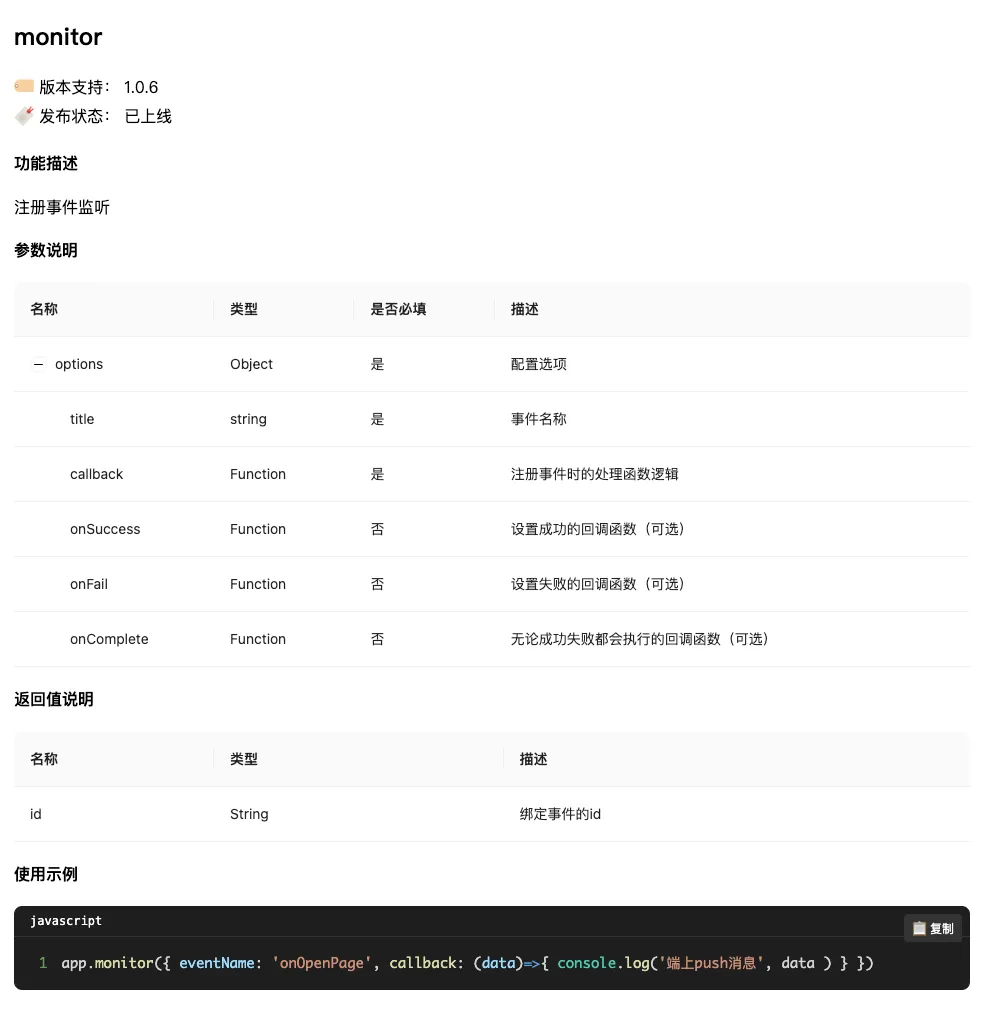
--- title: xxx order: 2 --- ```jsx /** * inline: true */ import JsonToApi from '/components/jsonToApi/index.jsx'; export default () => <JsonToApi type="app" title="xxx" desc="App原生 api 对象"/>; ``` 渲染效果如图所示
在将 JSON 数据解析并渲染到页面的过程中,有两个关键的技术点需要特别关注:
要点一:优雅的代码展示体验
直接使用 dangerouslySetInnerHTML 来呈现代码片段会导致页面样式简陋、缺乏可读性。我们需要借助代码高亮工具来提升展示效果,同时添加便捷的复制功能,让开发者能够轻松复用示例代码。
import React from 'react'; import { Prism as SyntaxHighlighter } from 'react-syntax-highlighter'; import { vscDarkPlus } from 'react-syntax-highlighter/dist/esm/styles/prism'; const CodeBlock = ({ children, language = 'javascript', showLineNumbers = true, highlightLines = [] }) => { const [copied, setCopied] = React.useState(false); // 可靠的复制方法 const copyToClipboard = async (text) => { try { // 方法1: 使用现代 Clipboard API if (navigator.clipboard && window.isSecureContext) { await navigator.clipboard.writeText(text); return true; } else { // 方法2: 使用传统的 document.execCommand(兼容性更好) const textArea = document.createElement('textarea'); textArea.value = text; textArea.style.position = 'fixed'; textArea.style.left = '-999999px'; textArea.style.top = '-999999px'; document.body.appendChild(textArea); textArea.focus(); textArea.select(); const success = document.execCommand('copy'); document.body.removeChild(textArea); return success; } } catch (err) { console.error('复制失败:', err); // 方法3: 备用方案 - 提示用户手动复制 prompt('请手动复制以下代码:', text); return false; } }; const handleCopy = async () => { const text = String(children).replace(/n$/, ''); const success = await copyToClipboard(text); if (success) { setCopied(true); setTimeout(() => setCopied(false), 2000); } }; return ( <div className="code-container" style={{ position: 'relative', margin: '20px 0' }}> {/* 语言标签 */} <div style={{ background: '#1e1e1e', color: '#fff', padding: '8px 16px', borderTopLeftRadius: '8px', borderTopRightRadius: '8px', borderBottom: '1px solid #333', fontSize: '12px', fontFamily: 'monospace', display: 'flex', justifyContent: 'space-between', alignItems: 'center' }}> <span>{language}</span> <button onClick={handleCopy} style={{ position: 'absolute', top: '8px', right: '8px', background: copied ? '#52c41a' : '#333', color: 'white', border: 'none', padding: '4px 8px', borderRadius: '4px', fontSize: '12px', cursor: 'pointer', zIndex: 10, transition: 'all 0.3s' }} > {copied ? '✅ 已复制' : '📋 复制'} </button> </div> {/* 代码区域 */} <SyntaxHighlighter language={language} style={vscDarkPlus} showLineNumbers={showLineNumbers} wrapLines={true} lineProps={(lineNumber) => ({ style: { backgroundColor: highlightLines.includes(lineNumber) ? 'rgba(255,255,255,0.1)' : 'transparent', padding: '2px 0' } })} customStyle={{ margin: 0, borderTopLeftRadius: 0, borderTopRightRadius: 0, borderBottomLeftRadius: '8px', borderBottomRightRadius: '8px', padding: '16px', fontSize: '14px', lineHeight: '1.5', background: '#1e1e1e', border: 'none', borderTop: 'none' }} codeTagProps={{ style: { fontFamily: '"Fira Code", "Monaco", "Consolas", "Courier New", monospace', fontSize: '14px' } }} > {String(children).replace(/n$/, '')} </SyntaxHighlighter> </div> ); }; export default CodeBlock; 要点二:锚点导航方案
由于我们是通过组件方式动态渲染内容,无法直接使用 dumi 内置的锚点导航功能。这就需要我们自主实现一套导航系统,并确保其在不同屏幕尺寸下都能保持良好的可用性,避免出现布局错乱的问题。
import React, { useEffect, useRef } from 'react'; import { Anchor } from 'antd'; export default function readJson(props){ const anchorRef = useRef(null); const anchorWrapperRef = useRef(null); useEffect(() => { // 使用更长的延迟确保 DOM 完全渲染 const timer = setTimeout(() => { const contentElement = document.querySelector('.dumi-default-content'); const anchorElement = anchorRef.current; if (!contentElement || !anchorElement) return; // 创建锚点容器 const anchorWrapper = document.createElement('div'); anchorWrapper.className = 'custom-anchor-wrapper'; Object.assign(anchorWrapper.style, { position: 'sticky', top: '106px', width: '184px', marginInlineStart: '24px', maxHeight: '80vh', overflow: 'auto', overscrollBehavior: 'contain' }); // 插入到内容元素后面 if (contentElement.nextSibling) { contentElement.parentNode.insertBefore(anchorWrapper, contentElement.nextSibling); } else { contentElement.parentNode.appendChild(anchorWrapper); } // 移动锚点 anchorWrapper.appendChild(anchorElement); // 记录锚点容器,用于清理 anchorWrapperRef.current = anchorWrapper; }, 500); // 500ms 延迟,确保 DOM 完全渲染 return <div ref={anchorRef}> <Anchor targetOffset={80} items={[ { key: 'properties', href: '#properties', title: '属性', children: Object.keys(properties).map(item => ({ key: item, href: `#${item}`, title: item })) }, { key: 'methods', href: '#methods', title: '方法', children: Object.keys(methods).map(item => ({ key: item, href: `#${item}`, title: item })) } ]} /> </div> } 当然,在页面功能上我们还可以进一步丰富,比如增加实用的筛选功能。比如快速查看特定 App 版本支持的 API、筛选"已上线"、"开发中"或"已废弃"的接口,这些筛选能力让文档不再是静态的参考手册,而变成了一个API 探索工具,最终呈现效果如下:

通过这套自动化文档方案,我们实现了代码和文档的实时同步,大大减少了维护成本,同时给开发者提供了出色的使用体验。现在开发同学只需要在代码里写好注释,文档就会自动更新,再也不用担心文档落后于代码了。
如果你对前端工程化有兴趣,或者想了解更多前端相关的内容,欢迎查看我的其他文章,这些内容将持续更新,希望能给你带来更多的灵感和技术分享~



![洛谷 P11345 [KTSC 2023 R2] 基地简化 题解](http://www.itfaba.com/wp-content/themes/kemi/timthumb.php?src=http://www.itfaba.com/wp-content/themes/kemi/img/random/3.jpg&w=218&h=124&zc=1)
