

效果如下图
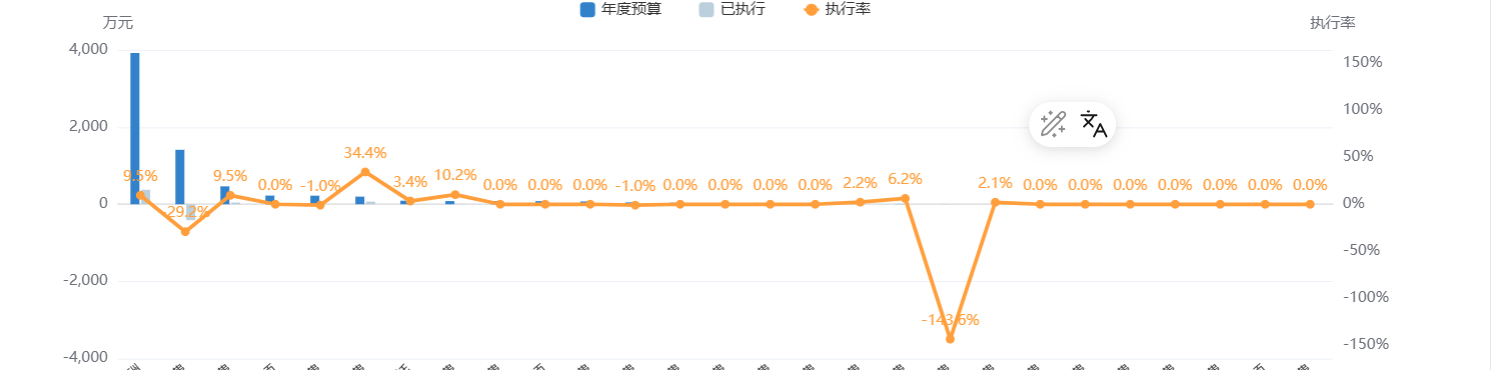
项目中遇到这个需求,需要支持负数情况下两侧0刻度对齐,且空白地方不能过多,且刻度值不要使用计算出来的随机数,使用整数
如果只是0刻度对齐正常设置:alignTicks:true 即可,版本需要5.3.0 才可,不过我的是5.4.3版本,却不生效,没找到原因,于是自己手写了适配,设置了min和max
这是我Y轴的配置
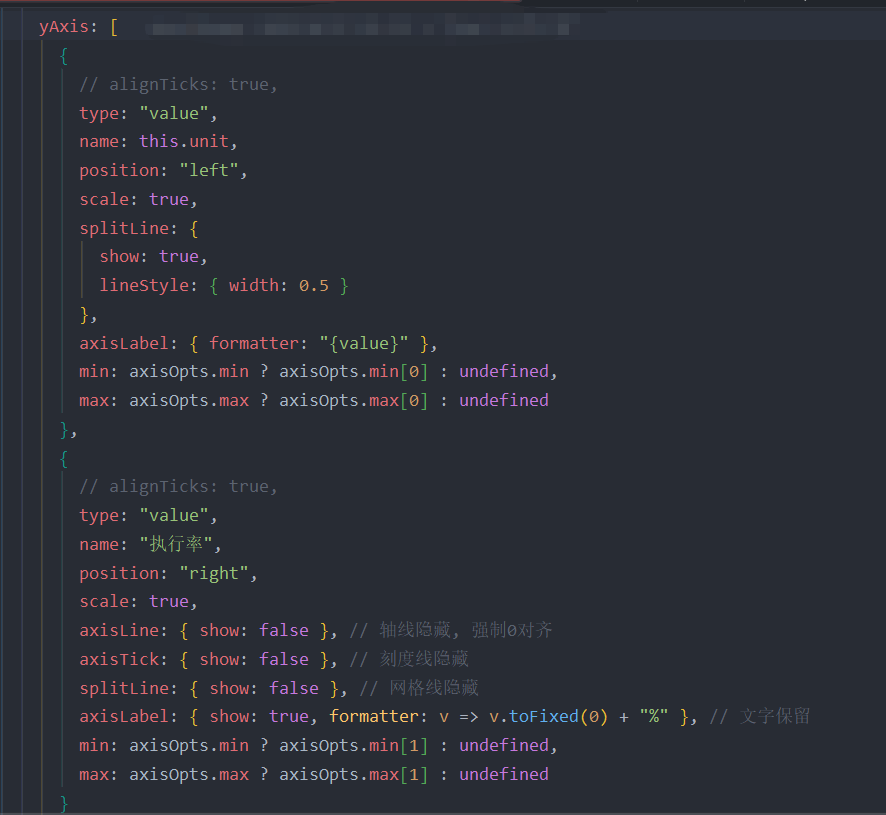
下面是获取左侧和右侧最大值,和最小值方法
const axisOpts = {}; if (hasNegative) { // 左侧数据 const max0 = Math.max(...amountList); const min0 = Math.min(...amountList); // 右侧数据 const max1 = Math.max(...rateList); const min1 = Math.min(...rateList); // 计算比例 const range0 = max0 - min0; const range1 = max1 - min1; let ratio = 1; if (range1 !== 0) { ratio = range0 / range1; } // 计算左侧轴的临时范围,强制包含0 const Lmin = Math.min(min0, ratio * min1, 0); const Lmax = Math.max(max0, ratio * max1, 0); // 整齐化左侧轴的范围 const Lmin_nice = this.roundToNiceNumber(Lmin, false);
const Lmax_nice = this.roundToNiceNumber(Lmax, true); // 计算右侧轴的范围 const Rmin_nice = Lmin_nice / ratio; const Rmax_nice = Lmax_nice / ratio; // 设置坐标轴选项 axisOpts.min = [Lmin_nice, Rmin_nice]; axisOpts.max = [Lmax_nice, Rmax_nice]; }
roundToNiceNumber(value, isMax) { if (value === 0) return 0; const absValue = Math.abs(value); const sign = value > 0 ? 1 : -1; // 计算数量级 const exponent = Math.floor(Math.log10(absValue)); const fraction = absValue / Math.pow(10, exponent); // 整齐的分数:1, 2, 5, 10 改为了 1,2,4,5,6,8 const breakpoints = [1, 2, 3, 4, 5, 6, 8, 9, 10]; const niceFraction = breakpoints.find(v => v >= fraction) || 10; let niceValue = niceFraction * Math.pow(10, exponent) * sign; // 根据是最大值还是最小值调整 if (isMax) { if (value > 0) { // 对于最大值,向上取整到niceValue的整数倍 niceValue = Math.ceil(value / niceValue) * niceValue; } else { // 对于负数的最大值,向下取整(因为负数越大,绝对值越小) niceValue = Math.floor(value / niceValue) * niceValue; } } else { if (value > 0) { // 对于正数的最小值,向下取整 niceValue = Math.floor(value / niceValue) * niceValue; } else { // 对于负数的最小值,向上取整 niceValue = Math.ceil(value / niceValue) * niceValue; } } return niceValue; },
上面是配置的计算min,max设置值的方法



![洛谷 P11345 [KTSC 2023 R2] 基地简化 题解](http://www.itfaba.com/wp-content/themes/kemi/timthumb.php?src=http://www.itfaba.com/wp-content/themes/kemi/img/random/1.jpg&w=218&h=124&zc=1)
