

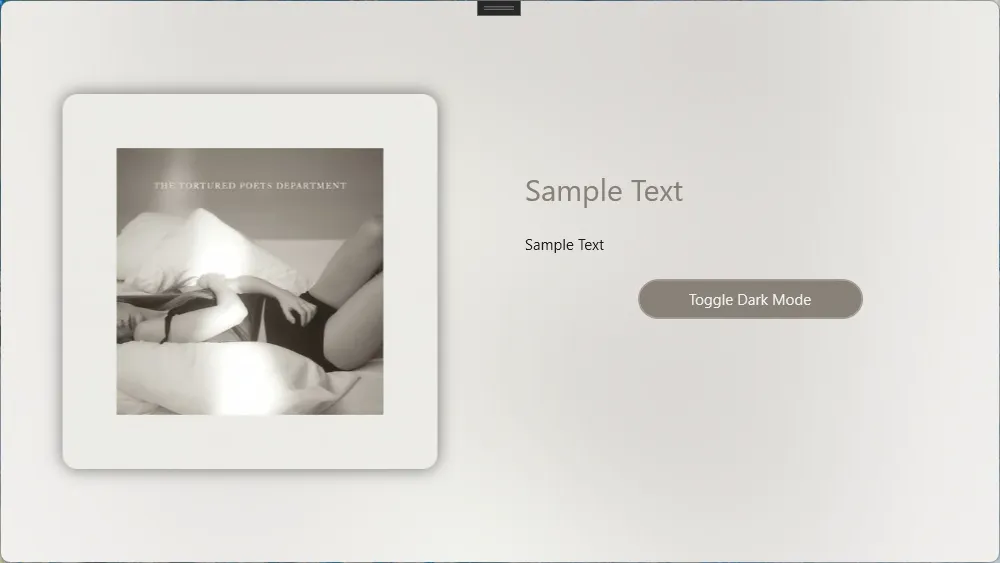
先看效果,在浅色模式下: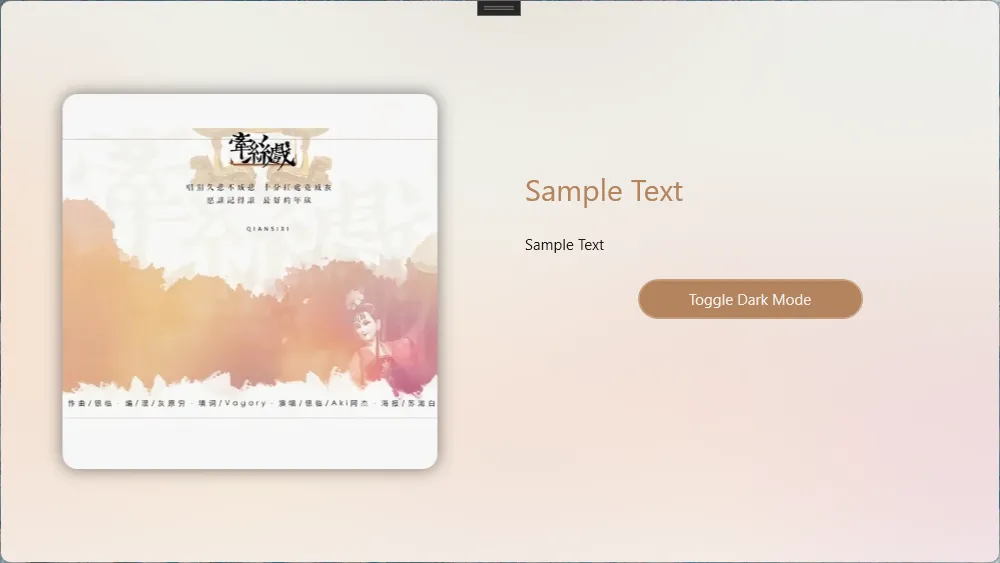
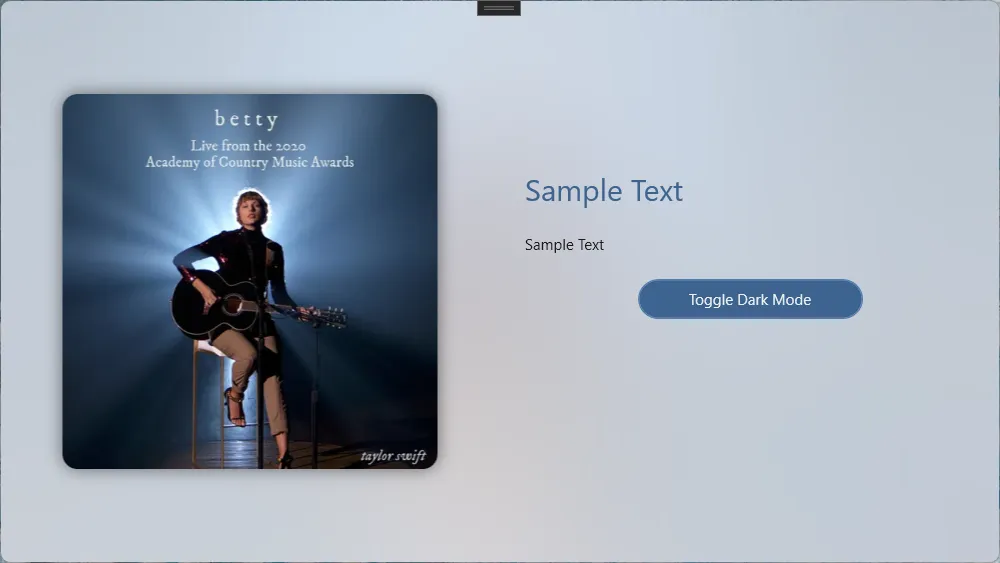


在深色模式下:
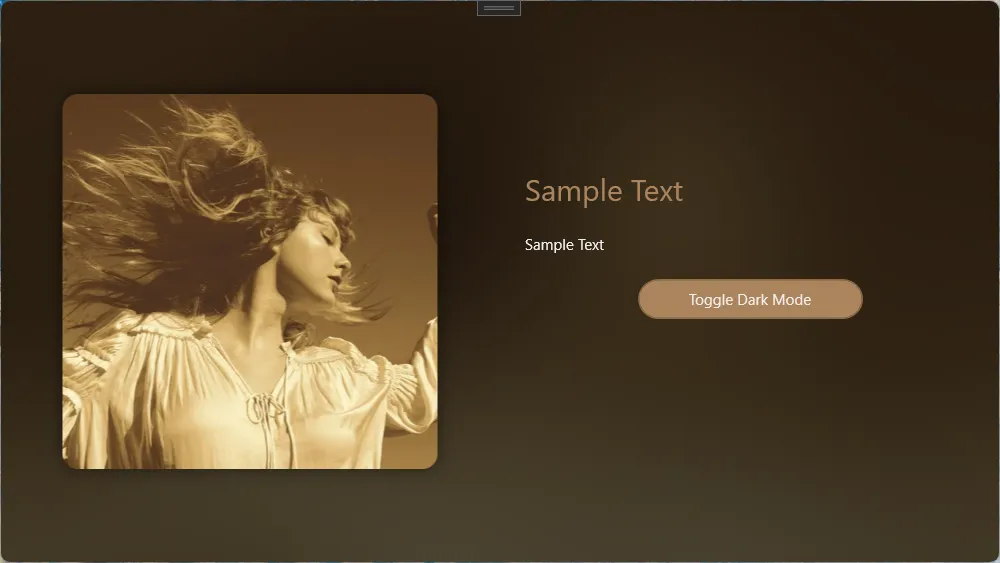
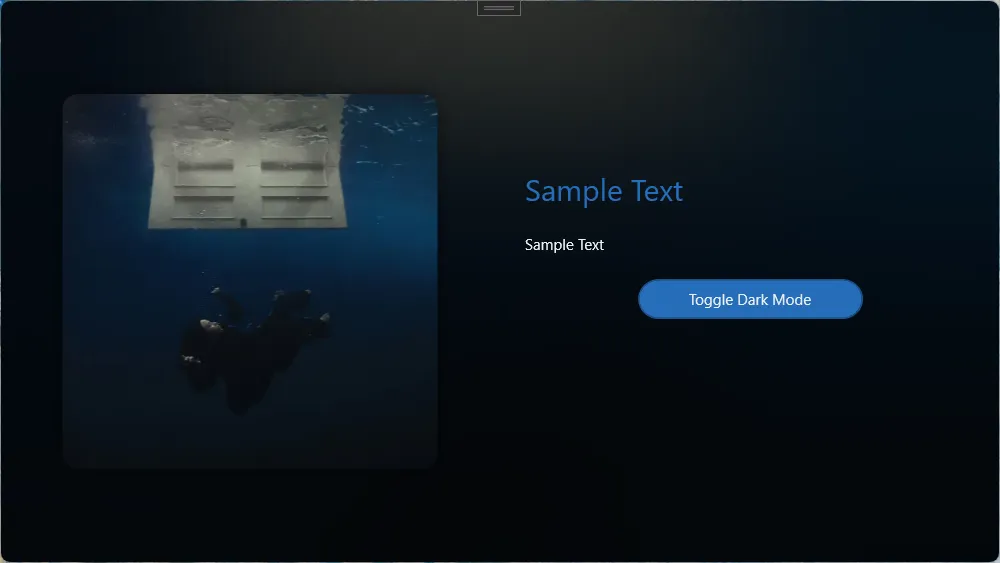

P.S. 此算法只是尽可能地接近Windows Mica效果,并非实际实现;主色调提取算法只能确保在绝大多数情况下适用。
测试项目在Github上开源:
TwilightLemon/MicaImageTest: WPF 使用GDI+提取图片主色调并生成Mica材质特效背景
一、简要原理和设计
1.1 Mica效果
Mica效果是Windows 11的一个新特性,旨在为应用程序提供一种更柔和的背景效果。它通过使用桌面壁纸的颜色和纹理来创建一个静态的模糊背景效果。一个大致的模拟过程如下:
- 根据颜色模式(浅色或深色)来调整图像对比度
- 增加一个白色/黑色的遮罩层
- 大半径 高斯模糊处理
在仓库代码中给出了所有组件的实现,如果你想调整效果,可以修改以下几个值:
1 public static void ApplyMicaEffect(this Bitmap bitmap,bool isDarkmode) 2 { 3 bitmap.AdjustContrast(isDarkmode?-1:-20);//Light Mode通常需要一个更高的对比度 4 bitmap.AddMask(isDarkmode);//添加遮罩层 5 bitmap.ScaleImage(2);//放大图像(原始图像一般为500x500)以提高输出图像质量 6 var rect = new Rectangle(0, 0, bitmap.Width, bitmap.Height); 7 bitmap.GaussianBlur(ref rect, 80f, false);//按需要调整模糊半径 8 }
1.2 主色调提取与微调
从原始图像中提取主色调,主要过程如下:
- 像素采样和颜色量化便于统计
- 过滤过黑或过白的颜色值(我们会在调整步骤单独处理)
- 根据HSL的饱和度和亮度来计算权重,
- 饱和度越高,权重越大
- 亮度稳定(我们定为0.6),权重越大
- 选择权重最大的颜色均值作为主色调
之后为了适配UI,保证亮度、饱和度适合用于呈现内容,还要对颜色进行微调:
- 将颜色转为HSL空间
- 根据颜色模式调节亮度
- 分层调整饱和度,一般来说暗色模式的对比度比亮色模式高
- 对特定色相区间(红/绿/蓝/黄)进行差异化调整
最后计算焦点颜色(FocusAccentColor)只需要根据颜色模式调整亮度即可。
二、使用方法
将代码仓库中的ImageHelper.cs添加到项目,然后在需要的地方调用Bitmap的扩展方法来处理图像。以下是一个简单的示例:
首先开启项目允许使用UnSafe代码:
<PropertyGroup> <!-- 允许使用UnSafe代码 --> <AllowUnsafeBlocks>true</AllowUnsafeBlocks> </PropertyGroup>
导入本地图像文件,计算主色调、焦点色调并应用Mica效果背景:
var image=new BitmapImage(new Uri(ImagePath)); SelectedImg = image; var bitmap = image.ToBitmap(); //major color var majorColor = bitmap.GetMajorColor().AdjustColor(IsDarkMode); var focusColor = majorColor.ApplyColorMode(IsDarkMode); App.Current.Resources["AccentColor"] = new SolidColorBrush(majorColor); App.Current.Resources["FocusedAccentColor"] = new SolidColorBrush(focusColor); //background bitmap.ApplyMicaEffect(IsDarkMode); BackgroundImg = bitmap.ToBitmapImage();
其中,SelectedImg和BackgroundImg是绑定到UI的BitmapImage类型属性,IsDarkMode是指示当前颜色模式的布尔值。
三、注意事项
- 处理大图像时可能会导致性能下降,建议使用较小的图像或在后台线程中处理。
- 如果高斯模糊组件报错,请确保Nuget包
System.Drawing.Common的版本为8.0.1,因为代码中使用了反射获取Bitmap内部的句柄。 - 你可能需要根据实际情况调整模糊半径和对比度等参数,以获得最佳效果。
- 库中实现可能并非最佳写法,如果有更好的方法可以提交PR或者评论区见。
最后附上ImageHelper.cs的完整代码:

1 using System.Drawing; 2 using System.Drawing.Drawing2D; 3 using System.Drawing.Imaging; 4 using System.IO; 5 using System.Reflection; 6 using System.Runtime.InteropServices; 7 using System.Windows.Media.Imaging; 8 9 namespace MicaImageTest; 10 11 public static class ImageHelper 12 { 13 #region 处理模糊图像 14 [DllImport("gdiplus.dll", SetLastError = true, ExactSpelling = true, CharSet = CharSet.Unicode)] 15 private static extern int GdipBitmapApplyEffect(IntPtr bitmap, IntPtr effect, ref Rectangle rectOfInterest, bool useAuxData, IntPtr auxData, int auxDataSize); 16 /// <summary> 17 /// 获取对象的私有字段的值 18 /// </summary> 19 /// <typeparam name="TResult">字段的类型</typeparam> 20 /// <param name="obj">要从其中获取字段值的对象</param> 21 /// <param name="fieldName">字段的名称.</param> 22 /// <returns>字段的值</returns> 23 /// <exception cref="System.InvalidOperationException">无法找到该字段.</exception> 24 /// 25 internal static TResult GetPrivateField<TResult>(this object obj, string fieldName) 26 { 27 if (obj == null) return default(TResult); 28 Type ltType = obj.GetType(); 29 FieldInfo lfiFieldInfo = ltType.GetField(fieldName, BindingFlags.GetField | BindingFlags.Instance | BindingFlags.NonPublic); 30 if (lfiFieldInfo != null) 31 return (TResult)lfiFieldInfo.GetValue(obj); 32 else 33 throw new InvalidOperationException(string.Format("Instance field '{0}' could not be located in object of type '{1}'.", fieldName, obj.GetType().FullName)); 34 } 35 36 [StructLayout(LayoutKind.Sequential)] 37 private struct BlurParameters 38 { 39 internal float Radius; 40 internal bool ExpandEdges; 41 } 42 [DllImport("gdiplus.dll", SetLastError = true, ExactSpelling = true, CharSet = CharSet.Unicode)] 43 private static extern int GdipCreateEffect(Guid guid, out IntPtr effect); 44 private static Guid BlurEffectGuid = new Guid("{633C80A4-1843-482B-9EF2-BE2834C5FDD4}"); 45 [DllImport("gdiplus.dll", SetLastError = true, ExactSpelling = true, CharSet = CharSet.Unicode)] 46 private static extern int GdipSetEffectParameters(IntPtr effect, IntPtr parameters, uint size); 47 public static IntPtr NativeHandle(this Bitmap Bmp) 48 { 49 // 通过反射获取Bitmap的私有字段nativeImage的值,该值为GDI+的内部图像句柄 50 //新版(8.0.1)Drawing的Nuget包中字段由 nativeImage变更为_nativeImage 51 return Bmp.GetPrivateField<IntPtr>("_nativeImage"); 52 } 53 [DllImport("gdiplus.dll", SetLastError = true, ExactSpelling = true, CharSet = CharSet.Unicode)] 54 private static extern int GdipDeleteEffect(IntPtr effect); 55 public static void GaussianBlur(this Bitmap Bmp, ref Rectangle Rect, float Radius = 10, bool ExpandEdge = false) 56 { 57 int Result; 58 IntPtr BlurEffect; 59 BlurParameters BlurPara; 60 if ((Radius < 0) || (Radius > 255)) 61 { 62 throw new ArgumentOutOfRangeException("半径必须在[0,255]范围内"); 63 } 64 BlurPara.Radius = Radius; 65 BlurPara.ExpandEdges = ExpandEdge; 66 Result = GdipCreateEffect(BlurEffectGuid, out BlurEffect); 67 if (Result == 0) 68 { 69 IntPtr Handle = Marshal.AllocHGlobal(Marshal.SizeOf(BlurPara)); 70 Marshal.StructureToPtr(BlurPara, Handle, true); 71 GdipSetEffectParameters(BlurEffect, Handle, (uint)Marshal.SizeOf(BlurPara)); 72 GdipBitmapApplyEffect(Bmp.NativeHandle(), BlurEffect, ref Rect, false, IntPtr.Zero, 0); 73 // 使用GdipBitmapCreateApplyEffect函数可以不改变原始的图像,而把模糊的结果写入到一个新的图像中 74 GdipDeleteEffect(BlurEffect); 75 Marshal.FreeHGlobal(Handle); 76 } 77 else 78 { 79 throw new ExternalException("不支持的GDI+版本,必须为GDI+1.1及以上版本,且操作系统要求为Win Vista及之后版本."); 80 } 81 } 82 #endregion 83 84 public static System.Windows.Media.Color GetMajorColor(this Bitmap bitmap) 85 { 86 int skip = Math.Max(1, Math.Min(bitmap.Width, bitmap.Height) / 100); 87 88 Dictionary<int, ColorInfo> colorMap = []; 89 int pixelCount = 0; 90 91 for (int h = 0; h < bitmap.Height; h += skip) 92 { 93 for (int w = 0; w < bitmap.Width; w += skip) 94 { 95 Color pixel = bitmap.GetPixel(w, h); 96 97 // 量化颜色 (减少相似颜色的数量) 98 int quantizedR = pixel.R / 16 * 16; 99 int quantizedG = pixel.G / 16 * 16; 100 int quantizedB = pixel.B / 16 * 16; 101 102 // 排除极端黑白色 103 int averange = (pixel.R + pixel.G + pixel.B) / 3; 104 if (averange < 24) continue; 105 if (averange > 230) continue; 106 107 int colorKey = (quantizedR << 16) | (quantizedG << 8) | quantizedB; 108 109 if (colorMap.TryGetValue(colorKey, out ColorInfo info)) 110 { 111 info.Count++; 112 info.SumR += pixel.R; 113 info.SumG += pixel.G; 114 info.SumB += pixel.B; 115 } 116 else 117 { 118 colorMap[colorKey] = new ColorInfo 119 { 120 Count = 1, 121 SumR = pixel.R, 122 SumG = pixel.G, 123 SumB = pixel.B 124 }; 125 } 126 pixelCount++; 127 } 128 } 129 130 if (pixelCount == 0 || colorMap.Count == 0) 131 return System.Windows.Media.Colors.Gray; 132 133 var weightedColors = colorMap.Values.Select(info => 134 { 135 float r = info.SumR / (float)info.Count / 255f; 136 float g = info.SumG / (float)info.Count / 255f; 137 float b = info.SumB / (float)info.Count / 255f; 138 139 // 转换为HSL来检查饱和度和亮度 140 RgbToHsl(r, g, b, out float h, out float s, out float l); 141 142 // 颜色越饱和越有可能是主色调,过亮或过暗的颜色权重降低 143 float weight = info.Count * s * (1 - Math.Abs(l - 0.6f) * 1.8f); 144 145 return new 146 { 147 R = info.SumR / info.Count, 148 G = info.SumG / info.Count, 149 B = info.SumB / info.Count, 150 Weight = weight 151 }; 152 }) 153 .OrderByDescending(c => c.Weight); 154 155 if (weightedColors.First() is { } dominantColor) 156 { 157 // 取权重最高的颜色 158 return System.Windows.Media.Color.FromRgb( 159 (byte)dominantColor.R, 160 (byte)dominantColor.G, 161 (byte)dominantColor.B); 162 } 163 164 return System.Windows.Media.Colors.Gray; 165 } 166 167 private class ColorInfo 168 { 169 public int Count { get; set; } 170 public int SumR { get; set; } 171 public int SumG { get; set; } 172 public int SumB { get; set; } 173 } 174 175 public static System.Windows.Media.Color AdjustColor(this System.Windows.Media.Color col, bool isDarkMode) 176 { 177 // 转换为HSL色彩空间,便于调整亮度和饱和度 178 RgbToHsl(col.R / 255f, col.G / 255f, col.B / 255f, out float h, out float s, out float l); 179 180 bool isNearGrayscale = s < 0.15f; // 判断是否接近灰度 181 182 // 1. 基于UI模式进行初步亮度调整 183 if (isDarkMode) 184 { 185 // 在暗色模式下,避免颜色过暗,提高整体亮度 186 if (l < 0.5f) 187 l = 0.3f + l * 0.5f; 188 189 if (isNearGrayscale) 190 l = Math.Max(l, 0.4f); // 确保足够明亮 191 } 192 else 193 { 194 // 在亮色模式下,避免颜色过亮,降低整体亮度 195 if (l > 0.5f) 196 l = 0.3f + l * 0.4f; 197 198 if (isNearGrayscale) 199 l = Math.Min(l, 0.6f); // 确保不过亮 200 } 201 202 // 2. 调整饱和度 203 if (!isNearGrayscale) 204 { 205 if (s > 0.7f) 206 { 207 // 高饱和度降低,但是暗色模式需要更鲜明的颜色 208 s = isDarkMode ? 0.7f - (s - 0.7f) * 0.2f : 0.65f - (s - 0.7f) * 0.4f; 209 } 210 else if (s > 0.4f) 211 { 212 // 中等饱和度微调 213 s = isDarkMode ? s * 0.85f : s * 0.75f; 214 } 215 else if (s > 0.1f) // 低饱和度但不是接近灰度 216 { 217 // 低饱和度增强,尤其在暗色模式下 218 s = isDarkMode ? Math.Min(0.5f, s * 1.5f) : Math.Min(0.4f, s * 1.3f); 219 } 220 } 221 222 // 3. 特殊色相区域的处理 223 if (!isNearGrayscale) // 仅处理有明显色相的颜色 224 { 225 // 红色区域 (0-30° 或 330-360°) 226 if ((h <= 0.08f) || (h >= 0.92f)) 227 { 228 if (isDarkMode) 229 { 230 // 暗色模式下红色需要更高饱和度和亮度 231 s = Math.Min(0.7f, s * 1.1f); 232 l = Math.Min(0.8f, l * 1.15f); 233 } 234 else 235 { 236 // 亮色模式下红色降低饱和度,避免刺眼 237 s *= 0.8f; 238 l = Math.Max(0.4f, l * 0.9f); 239 } 240 } 241 // 绿色区域 (90-150°) 242 else if (h >= 0.25f && h <= 0.42f) 243 { 244 if (isDarkMode) 245 { 246 // 暗色模式下绿色提高亮度,降低饱和度,避免荧光感 247 s *= 0.85f; 248 l = Math.Min(0.7f, l * 1.2f); 249 } 250 else 251 { 252 // 亮色模式下绿色降低饱和度更多 253 s *= 0.75f; 254 } 255 } 256 // 蓝色区域 (210-270°) 257 else if (h >= 0.58f && h <= 0.75f) 258 { 259 if (isDarkMode) 260 { 261 // 暗色模式下蓝色提高亮度和饱和度 262 s = Math.Min(0.85f, s * 1.2f); 263 l = Math.Min(0.7f, l * 1.25f); 264 } 265 else 266 { 267 // 亮色模式下蓝色保持中等饱和度 268 s = Math.Min(0.7f, Math.Max(0.4f, s)); 269 } 270 } 271 // 黄色区域 (30-90°) 272 else if (h > 0.08f && h < 0.25f) 273 { 274 if (isDarkMode) 275 { 276 // 暗色模式下黄色需要降低饱和度,提高亮度 277 s *= 0.8f; 278 l = Math.Min(0.75f, l * 1.2f); 279 } 280 else 281 { 282 // 亮色模式下黄色大幅降低饱和度 283 s *= 0.7f; 284 l = Math.Max(0.5f, l * 0.9f); 285 } 286 } 287 } 288 289 290 291 // 5. 最终亮度修正 - 确保在各种UI模式下都有足够的对比度 292 if (isDarkMode && l < 0.3f) l = 0.3f; // 暗色模式下确保最小亮度 293 if (!isDarkMode && l > 0.7f) l = 0.7f; // 亮色模式下确保最大亮度 294 295 // 转换回RGB 296 HslToRgb(h, s, l, out float r, out float g, out float b); 297 298 // 确保RGB值在有效范围内 299 byte R = (byte)Math.Max(0, Math.Min(255, r * 255)); 300 byte G = (byte)Math.Max(0, Math.Min(255, g * 255)); 301 byte B = (byte)Math.Max(0, Math.Min(255, b * 255)); 302 303 return System.Windows.Media.Color.FromRgb(R, G, B); 304 } 305 public static System.Windows.Media.Color ApplyColorMode(this System.Windows.Media.Color color,bool isDarkMode) 306 { 307 RgbToHsl(color.R/255f,color.G/255f, color.B/255f,out float h, out float s, out float l); 308 if (isDarkMode) 309 l = Math.Max(0.05f, l - 0.1f); 310 else 311 l = Math.Min(0.95f, l + 0.1f); 312 313 HslToRgb(h, s, l, out float r, out float g, out float b); 314 return System.Windows.Media.Color.FromRgb((byte)(r * 255), (byte)(g * 255), (byte)(b * 255)); 315 } 316 317 private static void RgbToHsl(float r, float g, float b, out float h, out float s, out float l) 318 { 319 float max = Math.Max(r, Math.Max(g, b)); 320 float min = Math.Min(r, Math.Min(g, b)); 321 322 // 计算亮度 323 l = (max + min) / 2.0f; 324 325 // 默认值初始化 326 h = 0; 327 s = 0; 328 329 if (max == min) 330 { 331 // 无色调 (灰色) 332 return; 333 } 334 335 float d = max - min; 336 337 // 计算饱和度 338 s = l > 0.5f ? d / (2.0f - max - min) : d / (max + min); 339 340 // 计算色相 341 if (max == r) 342 { 343 h = (g - b) / d + (g < b ? 6.0f : 0.0f); 344 } 345 else if (max == g) 346 { 347 h = (b - r) / d + 2.0f; 348 } 349 else // max == b 350 { 351 h = (r - g) / d + 4.0f; 352 } 353 354 h /= 6.0f; 355 356 // 确保h在[0,1]范围内 357 h = Math.Max(0, Math.Min(1, h)); 358 } 359 360 private static void HslToRgb(float h, float s, float l, out float r, out float g, out float b) 361 { 362 // 确保h在[0,1]范围内 363 h = ((h % 1.0f) + 1.0f) % 1.0f; 364 365 // 确保s和l在[0,1]范围内 366 s = Math.Max(0, Math.Min(1, s)); 367 l = Math.Max(0, Math.Min(1, l)); 368 369 if (s == 0.0f) 370 { 371 // 灰度颜色 372 r = g = b = l; 373 return; 374 } 375 376 float q = l < 0.5f ? l * (1.0f + s) : l + s - l * s; 377 float p = 2.0f * l - q; 378 379 r = HueToRgb(p, q, h + 1.0f / 3.0f); 380 g = HueToRgb(p, q, h); 381 b = HueToRgb(p, q, h - 1.0f / 3.0f); 382 } 383 384 private static float HueToRgb(float p, float q, float t) 385 { 386 // 确保t在[0,1]范围内 387 t = ((t % 1.0f) + 1.0f) % 1.0f; 388 389 if (t < 1.0f / 6.0f) 390 return p + (q - p) * 6.0f * t; 391 if (t < 0.5f) 392 return q; 393 if (t < 2.0f / 3.0f) 394 return p + (q - p) * (2.0f / 3.0f - t) * 6.0f; 395 return p; 396 } 397 public static BitmapImage ToBitmapImage(this Bitmap Bmp) 398 { 399 BitmapImage BmpImage = new(); 400 using (MemoryStream lmemStream = new()) 401 { 402 Bmp.Save(lmemStream, ImageFormat.Png); 403 BmpImage.BeginInit(); 404 BmpImage.StreamSource = new MemoryStream(lmemStream.ToArray()); 405 BmpImage.EndInit(); 406 } 407 return BmpImage; 408 } 409 410 public static Bitmap ToBitmap(this BitmapImage img){ 411 using MemoryStream outStream = new(); 412 BitmapEncoder enc = new PngBitmapEncoder(); 413 enc.Frames.Add(BitmapFrame.Create(img)); 414 enc.Save(outStream); 415 return new Bitmap(outStream); 416 } 417 418 public static void AddMask(this Bitmap bitmap,bool darkmode) 419 { 420 var color1 = darkmode ? Color.FromArgb(150, 0, 0, 0) : Color.FromArgb(160, 255, 255, 255); 421 var color2 = darkmode ? Color.FromArgb(180, 0, 0, 0) : Color.FromArgb(200, 255, 255, 255); 422 using Graphics g = Graphics.FromImage(bitmap); 423 using LinearGradientBrush brush = new( 424 new Rectangle(0, 0, bitmap.Width, bitmap.Height), 425 color1, 426 color2, 427 LinearGradientMode.Vertical); 428 g.FillRectangle(brush, new Rectangle(0, 0, bitmap.Width, bitmap.Height)); 429 } 430 public static void AdjustContrast(this Bitmap bitmap, float contrast) 431 { 432 contrast = (100.0f + contrast) / 100.0f; 433 contrast *= contrast; 434 435 BitmapData data = bitmap.LockBits(new Rectangle(0, 0, bitmap.Width, bitmap.Height), 436 ImageLockMode.ReadWrite, bitmap.PixelFormat); 437 438 int width = bitmap.Width; 439 int height = bitmap.Height; 440 441 unsafe 442 { 443 for (int y = 0; y < height; y++) 444 { 445 byte* row = (byte*)data.Scan0 + (y * data.Stride); 446 for (int x = 0; x < width; x++) 447 { 448 int idx = x * 3; 449 450 float blue = row[idx] / 255.0f; 451 float green = row[idx + 1] / 255.0f; 452 float red = row[idx + 2] / 255.0f; 453 454 // 转换为HSL 455 RgbToHsl(red, green, blue, out float h, out float s, out float l); 456 457 // 调整亮度以增加对比度 458 l = (((l - 0.5f) * contrast) + 0.5f); 459 460 // 转换回RGB 461 HslToRgb(h, s, l, out red, out green, out blue); 462 463 row[idx] = (byte)Math.Max(0, Math.Min(255, blue * 255.0f)); 464 row[idx + 1] = (byte)Math.Max(0, Math.Min(255, green * 255.0f)); 465 row[idx + 2] = (byte)Math.Max(0, Math.Min(255, red * 255.0f)); 466 } 467 } 468 } 469 470 bitmap.UnlockBits(data); 471 } 472 473 public static void ScaleImage(this Bitmap bitmap, double scale) 474 { 475 // 计算新的尺寸 476 int newWidth = (int)(bitmap.Width * scale); 477 int newHeight = (int)(bitmap.Height * scale); 478 479 // 创建目标位图 480 Bitmap newBitmap = new Bitmap(newWidth, newHeight, bitmap.PixelFormat); 481 482 // 设置高质量绘图参数 483 using (Graphics graphics = Graphics.FromImage(newBitmap)) 484 { 485 graphics.CompositingQuality = CompositingQuality.HighQuality; 486 graphics.InterpolationMode = InterpolationMode.HighQualityBicubic; 487 graphics.SmoothingMode = SmoothingMode.HighQuality; 488 graphics.PixelOffsetMode = PixelOffsetMode.HighQuality; 489 490 // 绘制缩放后的图像 491 graphics.DrawImage(bitmap, 492 new Rectangle(0, 0, newWidth, newHeight), 493 new Rectangle(0, 0, bitmap.Width, bitmap.Height), 494 GraphicsUnit.Pixel); 495 } 496 bitmap = newBitmap; 497 } 498 499 public static void ApplyMicaEffect(this Bitmap bitmap,bool isDarkmode) 500 { 501 bitmap.AdjustContrast(isDarkmode?-1:-20); 502 bitmap.AddMask(isDarkmode); 503 bitmap.ScaleImage(2); 504 var rect = new Rectangle(0, 0, bitmap.Width, bitmap.Height); 505 bitmap.GaussianBlur(ref rect, 80f, false); 506 } 507 }
View Code

本作品采用 知识共享署名-非商业性使用-相同方式共享 4.0 国际许可协议 进行许可。欢迎转载、使用、重新发布,但务必保留文章署名TwilightLemon,不得用于商业目的,基于本文修改后的作品务必以相同的许可发布。



![洛谷 P11345 [KTSC 2023 R2] 基地简化 题解](http://www.itfaba.com/wp-content/themes/kemi/timthumb.php?src=http://www.itfaba.com/wp-content/themes/kemi/img/random/1.jpg&w=218&h=124&zc=1)
