

2022-06-25
Jetlinks
Jetlinks 是一个非常优秀物联网基础平台, 还支持开源二次开发, 且他们的开发团队还非常友好的, 即使你使用的是开源的版本还挺愿意帮你解决问题 (当然我司也购买了企业版, 但不能分享学习笔记)
文档&地址
社区版源码仓库
前端源码 gitee
前端源码 github
[[N_JetlinksPro2.0 源码分析]]
[[N_Reactor 响应式框架编程]]
设备接入
设备接入流程图

网络 > 协议 > 网关
网络组件 (org.jetlinks.community.network.Network)
真正与设备连接交互的网络层, 用于管理各种网络服务(MQTT,TCP等),动态配置, 启停. 只负责接收/发送报文,不负责任何处理逻辑。
社区版, 网络组件的实现有四类:
-
org.jetlinks.community.network.tcp.server.TcpServer// 作为服务器接受设备端连接 -
org.jetlinks.community.network.tcp.client.TcpClient// 主动tcp连接设备端 -
org.jetlinks.community.network.mqtt.client.MqttClient//使用客户端连接第三方的MQTT服务器 -
org.jetlinks.community.network.mqtt.server.MqttServer//使用的本机MQTT服务, 接受设备端连接
网络组件, 支持提供关键的两个接口
org.jetlinks.community.network.Network
public interface Network { /** * ID唯一标识 * * @return ID */ String getId(); /** * @return 网络类型 * @see DefaultNetworkType */ NetworkType getType(); /** * 关闭网络组件 */ void shutdown(); /** * @return 是否存活 */ boolean isAlive(); /** * 当{@link Network#isAlive()}为false是,是否自动重新加载. * @return 是否重新加载 * @see NetworkProvider#reload(Network, Object) */ boolean isAutoReload(); } org.jetlinks.community.network.NetworkProvider
public interface NetworkProvider<P> { /** * @return 类型 * @see DefaultNetworkType */ @Nonnull NetworkType getType(); /** * 使用配置创建一个网络组件 * @param properties 配置信息 * @return 网络组件 */ @Nonnull Network createNetwork(@Nonnull P properties); /** * 重新加载网络组件 * @param network 网络组件 * @param properties 配置信息 */ void reload(@Nonnull Network network, @Nonnull P properties); /** * @return 配置定义元数据 */ @Nullable ConfigMetadata getConfigMetadata(); /** * 根据可序列化的配置信息创建网络组件配置 * @param properties 原始配置信息 * @return 网络配置信息 */ @Nonnull Mono<P> createConfig(@Nonnull NetworkProperties properties); ... - 每一个网络组件(
org.jetlinks.community.network.Network) 对应有一个组件提供器对应 (org.jetlinks.community.network.NetworkProvider) - 最终网络组件统一由
org.jetlinks.community.network.NetworkManager管理; - 默认实现是
org.jetlinks.community.network.DefaultNetworkManager(用Spring BeanPostProcessor hook 加载的) - 调用其
org.jetlinks.community.network.DefaultNetworkManager#register方法, 传递 NetworkProvider 可以注册一个网络组件 - 实例组件数据是存在数据库的
network_config表
协议相关 (org.jetlinks.core.ProtocolSupport)
用于自定义消息解析规则,用于认证、将设备发送给平台报文解析为平台统一的报文,以及处理平台下发给设备的指令。
协议(org.jetlinks.core.ProtocolSupport)主要由: 认证器(Authenticator), 消息编解码器(DeviceMessageCodec),消息发送拦截器(DeviceMessageSenderInterceptor) 以及配置元数据(ConfigMetadata)组成.
org.jetlinks.core.defaults.Authenticator // Authenticator
org.jetlinks.core.codec.defaults.DeviceMessageCodec //DeviceMessageCodec
org.jetlinks.core.message.interceptor.DeviceMessageSenderInterceptor //DeviceMessageSenderInterceptor
org.jetlinks.core.ProtocolSupport + org.jetlinks.core.metadata.DeviceMetadataCodec //ConfigMetadata
其默认自带的JetLinks V1.0 协议,在org.jetlinks.supports.official.JetLinksProtocolSupportProvider 提供
- 每一个协议(
org.jetlinks.core.ProtocolSupport) 对应有一个组件提供器对应 (org.jetlinks.core.spi.ProtocolSupportProvider) - 自定义协议, 即实现
org.jetlinks.core.spi.ProtocolSupportProvider这个接口; - 统一由
org.jetlinks.supports.protocol.management.ProtocolSupportManager管理; - 默认实现是
org.jetlinks.supports.protocol.management.ClusterProtocolSupportManager(用Spring BeanPostProcessor hook自动加载 2.0是org.jetlinks.community.protocol.configuration.ProtocolAutoConfiguration配置类加载的) - 调用其
org.jetlinks.supports.protocol.management.ClusterProtocolSupportManager#store方法传递 ProtocolSupportDefinition 进行注册;
注意: 注册后只存起来, 顾名思义, 还跟集群的其他节点有关, 而且跟协议的实现类型(jar,js)有关, 加载也不一样; 参考 org.jetlinks.supports.protocol.management.ProtocolSupportDefinition的属性
public class ProtocolSupportDefinition implements Serializable { private static final long serialVersionUID = -1; private String id;//ID ; 数据库存的就是本地对象的数据 private String name; private String description; private String provider;//jar script 协议实现类型, 目前只有 jar, js 脚本 private byte state;//协议状态 private Map<String,Object> configuration;//配置元数据, jar 的话会存ProtocolSupportProvider类全限定名, jar包路径等 } - 实例组件数据是存在数据库
dev_protocol表
参考下: [自定义协议开发]
网关组件 (org.jetlinks.community.gateway.DeviceGateway)
设备上报数据的处理逻辑入口, 网关代表接入方式需要选择网络组件, 它关联协议, 配置协议
负责平台侧统一的设备接入, 使用网络组件处理对应的请求以及报文, 使用配置的协议解析为平台统一的设备消息(DeviceMessage),然后推送到事件总线。
org.jetlinks.community.gateway.supports.DeviceGateway 网关接口抽象;
设备网关支持提供商,用于提供对各种设备网关的支持.在启动设备网关时,会根据对应的提供商以及配置来创建设备网关. 实现统一管理网关配置,动态创建设备网关.
社区版, 网关的实现有三个
- 在
mqtt-component项目有两个
org.jetlinks.community.network.mqtt.gateway.device.MqttClientDeviceGateway
使用MQTT客户端, 连接第三方MQTT服务器; 例如 emqx
org.jetlinks.community.network.mqtt.gateway.device.MqttServerDeviceGateway
本机作为MQTT服务端, 内置启用MQTT服务器, 接受设备接入;
- 在
tcp-component项目有一个
org.jetlinks.community.network.tcp.device.TcpServerDeviceGateway
本机作为TCP服务器, 监听端口, 接受设备接入;
类似 桥接网络组件和协议组件(作为一个中介者)
- 统一由
org.jetlinks.community.gateway.DeviceGatewayManager管理; - 默认实现是
org.jetlinks.community.gateway.supports.DefaultDeviceGatewayManager(用Spring BeanPostProcessor hook自动加载; 2.0是org.jetlinks.community.gateway.GatewayConfiguration配置类加载的) - 调用其
org.jetlinks.community.gateway.DeviceGatewayManager#start传递一个网关实例ID 启动网关; 其实是改变了一下网关实例的状态, 在有新消息时根据自身状态决定是否分发消息, 在此之前已经调了协议解析, 所有暂停/停止网关不会影响协议跟设备的交互;
参考:org.jetlinks.community.network.mqtt.gateway.device.MqttClientDeviceGateway这个网关实现 - 实例组件是存在数据库
device_gateway表
关键的对象概览
DeviceRegistry 设备注册中心
org.jetlinks.core.device.DeviceRegistry
设备注册中心, 用于统一管理设备以及产品的基本信息,缓存,进行设备指令下发等操作.
例如: 获取设备以及设备的配置缓存信息
registry .getDevice(deviceId) .flatMap(device->device.getSelfConfig("my-config")) .flatMap(conf-> doSomeThing(...)) 相当于总的设备管理器
根据设备ID. 通过 org.jetlinks.core.device.DeviceRegistry#getDevice 可以获取设备操作对象(DeviceOperator)
以 org.jetlinks.supports.cluster.ClusterDeviceRegistry#getDevice 为例:
public Mono<DeviceOperator> getDevice(String deviceId) { if (StringUtils.isEmpty(deviceId)) { return Mono.empty(); } else { //先从缓存获取 Mono<DeviceOperator> deviceOperator = (Mono)this.operatorCache.getIfPresent(deviceId); if (null != deviceOperator) { return deviceOperator; } else { //创建 DeviceOperator DeviceOperator deviceOperator = this.createOperator(deviceId); return deviceOperator.getSelfConfig(DeviceConfigKey.productId).doOnNext((r) -> { //放到缓存 this.operatorCache.put(deviceId, Mono.just(deviceOperator).filterWhen((device) -> { return device.getSelfConfig(DeviceConfigKey.productId).hasElement(); })); }).map((ignore) -> { return deviceOperator; }); } } } private DefaultDeviceOperator createOperator(String deviceId) { DefaultDeviceOperator device = new DefaultDeviceOperator(deviceId, this.supports, this.manager, this.handler, this, this.interceptor, this.stateChecker); if (this.rpcChain != null) { device.setRpcChain(this.rpcChain); } return device; } DeviceOperator 设备操作接口
org.jetlinks.core.device.DeviceOperator
设备操作接口,通过DeviceRegister.getDevice(deviceId)获取,用于对设备进行相关操作,如获取配置,发送消息等.
//通过getConfig 可以获取配置的协议元数据
DeviceOperator#getConfig
它是如何创建的?
org.jetlinks.core.defaults.DefaultDeviceOperator为例
从注册中心拿的时候, 如果不存在, 则创建DeviceOperator
@Override public Mono<DeviceOperator> getDevice(String deviceId) { if (StringUtils.isEmpty(deviceId)) { return Mono.empty(); } { Mono<DeviceOperator> deviceOperator = operatorCache.getIfPresent(deviceId); if (null != deviceOperator) { return deviceOperator; } } //创建 DeviceOperator DeviceOperator deviceOperator = createOperator(deviceId); return deviceOperator //有productId说明是存在的设备 .getSelfConfig(DeviceConfigKey.productId) .doOnNext(r -> operatorCache.put(deviceId, Mono .just(deviceOperator) .filterWhen(device -> device.getSelfConfig(DeviceConfigKey.productId).hasElement()) //设备被注销了?则移除之 .switchIfEmpty(Mono.fromRunnable(() -> operatorCache.invalidate(deviceId))) )) .map(ignore -> deviceOperator); } DeviceProductOperator 产品操作接口
DeviceProductOperator: 产品操作接口,通过DeviceProductOperator.getProduct(productId)获取.
DeviceGateway 设备接入网关接口
DeviceGateway : 设备接入网关接口,利用网络组件来接入设备消息.
DeviceMessageBusinessHandler
DeviceMessageBusinessHandler: 处理设备状态数据库同步,设备自动注册等逻辑等类.
LocalDeviceInstanceService
LocalDeviceInstanceService: 设备实例管理服务类.
DeviceSessionManager
DeviceSessionManager: 设备会话管理器,可获取当前服务的会话信息.
管理会话, 设备的上线下线;
参考: org.jetlinks.community.standalone.configuration.DefaultDeviceSessionManager
在 init
Flux.interval(Duration.ofSeconds(10), Duration.ofSeconds(30), Schedulers.newSingle("device-session-checker")) .flatMap(i -> this .checkSession()//周期性 调用 checkSession() 检查状态 .onErrorContinue((err, val) -> log.error(err.getMessage(), err))) .subscribe(); DeviceDataStoragePolicy 设备数据存储策略(行式/列式/不存储)
DeviceDataStoragePolicy: 设备存储策略接口,实现此接口来进行自定义设备数据存储策略.
DeviceGatewayHelper
DeviceGatewayHelper: 统一处理设备消息,创建Session等操作的逻辑.
DecodedClientMessageHandler
DecodedClientMessageHandler: 解码后的平台消息处理器,如果是自定义实现网关或者在协议包里手动回复消息等处理, 则可以使用此接口直接将设备消息交给平台.(如果调用了DeviceGatewayHelper则不需要此操作).
EventBus 事件总线
EventBus: 事件总线,通过事件总线去订阅设备数据来实现解耦.(也可以用过@Subscribe()注解订阅).
DeviceMessageConnector
DeviceMessageConnector: 负责将设备消息转发到事件总线.
DeviceMessageSender 消息发送器
org.jetlinks.core.device.DeviceMessageSender
消息发送器,用于发送消息给设备.
DeviceMessage 消息对象
所有设备消息(即设备上报转换后, 平台可识别的消息) 派生自这个 org.jetlinks.core.message.DeviceMessage 接口
EncodedMessage 消息对象
设备端原始的消息, (下发/上报给的原始消息)
源码大体流程研究
先了解消息的组成
消息主要由 deviceId, messageId, headers, timestamp 组成.
deviceId为设备的唯一标识, messageId为消息的唯一标识,headers为消息头,通常用于对自定义消息处理的行为,如是否异步消息, 是否分片消息等.
常用的Headers org.jetlinks.core.message.Headers
async 是否异步,boolean类型.
timeout 指定超时时间. 毫秒.
frag_msg_id 分片主消息ID,为下发消息的messageId
frag_num 分片总数
frag_part 当前分片索引
frag_last 是否为最后一个分片,当无法确定分片数量的时候,可以将分片设置到足够大,最后一个分片设置:frag_last=true来完成返回.
keepOnline 与DeviceOnlineMessage配合使用,在TCP短链接,保持设备一直在线状态,连接断开不会设置设备离线.
keepOnlineTimeoutSeconds 指定在线超时时间,在短链接时,如果超过此间隔没有收到消息则认为设备离线.
ignoreStorage 不存储此消息数据,如: 读写属性回复默认也会记录到属性时序数据库中,设置为true后,将不记录.(1.9版本后支持)
ignoreLog 不记录此消息到日志,如: 设置为true,将不记录此消息的日志.
mergeLatest 是否合并最新属性数据,设置此消息头后,将会把最新的消息合并到消息体里( 需要开启最新数据存储)//jetlinks.device.storage.enable-last-data-in-db=true 是否将设备最新到数据存储到数据库
网络组件(Network) 真正与设备连接交互的网络层, 但是它只负责接收/发送报文,不负责任何处理逻辑, 所以最佳的调试地方是网关组件(DeviceGateway)入口处.
消息类型
所有消息类型参考 org.jetlinks.community.device.enums.DeviceLogType
属性相关消息
获取设备属性(ReadPropertyMessage)对应设备回复的消息 ReadPropertyMessageReply.
修改设备属性(WritePropertyMessage)对应设备回复的消息 WritePropertyMessageReply.
设备上报属性(ReportPropertyMessage) 由设备上报.
功能相关消息
调用设备功能到消息(FunctionInvokeMessage)由平台发往设备,对应到返回消息 FunctionInvokeMessageReply.
事件消息
org.jetlinks.core.message.event.EventMessage
EventMessage eventMessage = new EventMessage(); eventMessage.setDeviceId(deviceId); eventMessage.setMessageId(fromDevice.path(MessageConstant.MESSAGE_KEY_MESSAGE_SIGN).asText() ); eventMessage.event(eventId); HashMap data = JacksonUtils.jsonToBean(output.toString(), HashMap.class); eventMessage.setData(data); 其他消息
DeviceOnlineMessage 设备上线消息,通常用于网关代理的子设备的上线操作.
DeviceOfflineMessage 设备离线消息,通常用于网关代理的子设备的下线操作.
ChildDeviceMessage 子设备消息,通常用于网关代理的子设备的消息.
ChildDeviceMessageReply 子设备消息回复,用于平台向网关代理的子设备发送消息后设备回复给平台的结果.
UpdateTagMessage 更新设备标签.
DerivedMetadataMessage 更新设备独立物模型.
设备自注册消息
DeviceRegisterMessage 设备注册消息,通过设置消息头message.addHeader("deviceName","设备名称");和 message.addHeader("productId","产品ID")可实现设备自动注册.
如果配置了状态自管理,在检查子设备状态时,会发送指令ChildDeviceMessage<DeviceStateCheckMessage>, 网关需要返回ChildDeviceMessageReply<DeviceStateCheckMessageReply>.
自定义协议包将消息解析为 DeviceRegisterMessage,
并设置header:productId(必选),deviceName(必选),configuration(可选)。
平台将自动添加设备信息到设备实例中。如果是注册子设备,则解析为 ChildDeviceMessage<DeviceRegisterMessage>即可
消息上报 (MQTT Broker)
设备不是直接接入平台, 而是通过第三方MQTT服务, 如:emqx. 消息编解码与MQTT服务一样,从消息协议中使用 DefaultTransport.MQTT 来获取消息编解码器.
网关处理逻辑
org.jetlinks.community.network.mqtt.gateway.device.MqttClientDeviceGateway
public class MqttClientDeviceGateway extends AbstractDeviceGateway { public MqttClientDeviceGateway(String id, MqttClient mqttClient, DeviceRegistry registry, ProtocolSupports protocolSupport, String protocol, DeviceSessionManager sessionManager, DecodedClientMessageHandler clientMessageHandler, List<String> topics, int qos) { super(id); // mqtt的客户端 this.mqttClient = Objects.requireNonNull(mqttClient, "mqttClient"); //DeviceRegistry : 设备注册中心, 用于统一管理设备以及产品的基本信息,缓存,进行设备指令下发等操作(约等于设备统一管理器) this.registry = Objects.requireNonNull(registry, "registry"); this.protocolSupport = Objects.requireNonNull(protocolSupport, "protocolSupport"); this.protocol = Objects.requireNonNull(protocol, "protocol"); this.topics = Objects.requireNonNull(topics, "topics"); this.helper = new DeviceGatewayHelper(registry, sessionManager, clientMessageHandler); this.qos = qos; } private void doStart() { if (disposable != null) { disposable.dispose(); } disposable = mqttClient .subscribe(topics, qos)//关注MQTT主题, 当有新的消息时 .filter((msg) -> isStarted())//需当前网关 处于启动状态 .flatMap(mqttMessage -> { AtomicReference<Duration> timeoutRef = new AtomicReference<>(); return this //注意这里是根据自定义协议 ProtocolSupportProvider::create 返回的 ProtocolSupport id 去匹配的 .getProtocol() //通过 ProtocolSupport 获取其 DeviceMessageCodec .flatMap(codec -> codec.getMessageCodec(getTransport())) //使用消息编码器 解码消息 .flatMapMany(codec -> codec.decode(FromDeviceMessageContext.of( new UnknownDeviceMqttClientSession(getId() + ":unknown", mqttClient) {//实际给到协议编解码器的Session 总是这个.. @Override public Mono<Boolean> send(EncodedMessage encodedMessage) { return super .send(encodedMessage) .doOnSuccess(r -> monitor.sentMessage()); } @Override public void setKeepAliveTimeout(Duration timeout) { timeoutRef.set(timeout); } } , mqttMessage, registry) )) .doOnError((err) -> log.error("解码MQTT客户端消息失败 {}:{}", //发生了错误 mqttMessage.getTopic(), mqttMessage .getPayload() .toString(StandardCharsets.UTF_8), err)) //消息向上转型 .cast(DeviceMessage.class) .flatMap(message -> { //设备网关监控 (主要是监控消息数量等指标的) monitor.receivedMessage(); return helper//设备网关消息处理,会话管理工具类,用于统一封装对设备消息和会话的处理逻辑 .handleDeviceMessage(message,//最终主要源码见下: org.jetlinks.community.network.utils.DeviceGatewayHelper#handleDeviceMessage device -> createDeviceSession(device, mqttClient),//<!> 注意这个会话在不存在时回调; 见下: [创建会话的回调] ignore->{},//会话自定义回调,处理会话时用来自定义会话,比如重置连接信 () -> log.warn("无法从MQTT[{}]消息中获取设备信息:{}", mqttMessage.print(), message)//当设备在平台不存在时 ); }) .then() //错误处理, 返回 empty .onErrorResume((err) -> { log.error("处理MQTT消息失败:{}", mqttMessage, err); return Mono.empty(); }); }, Integer.MAX_VALUE) .onErrorContinue((err, ms) -> log.error("处理MQTT客户端消息失败", err)) .subscribe();//Flux的API 触发计算 } } 创建会话的回调
private MqttClientSession createDeviceSession(DeviceOperator device, MqttClient client) { return new MqttClientSession(device.getDeviceId(), device, client, monitor); } DeviceGatewayHelper 处理
主要处理消息分支 子设备分支, 上线/离线 处理....
//如果设备状态为'离线' 则会先构造一个设备上线的消息 publish, 然后在 publish 设备原消息
org.jetlinks.community.network.utils.DeviceGatewayHelper#handleDeviceMessage
public Mono<DeviceOperator> handleDeviceMessage(DeviceMessage message, Function<DeviceOperator, Mono<DeviceSession>> sessionBuilder, //会话构造器,在会话不存在时,创建会话 Function<DeviceSession, Mono<Void>> sessionConsumer,//会话自定义回调, 见上 Supplier<Mono<DeviceOperator>> deviceNotFoundCallback//设备不存在的监听器回调 ) { String deviceId = message.getDeviceId(); if (!StringUtils.hasText(deviceId)) { return Mono.empty(); } Mono<DeviceOperator> then = null; boolean doHandle = true; // ........ // 忽略.. 子设备消息,子设备消息回复, 设备离线消息, 设备上线, 平台处理的消息流程分支 // ........ if (then == null) { then = registry.getDevice(deviceId); } if (doHandle) { //<!> 真正主要处理消息部分! 从 设备注册中心 拿到 DeviceOperator 然后在 org.jetlinks.community.device.message.DeviceMessageConnector#handleMessage 处理 //<!> 见下 [发布消息总线] then = then.flatMap(opt -> messageHandler.handleMessage(opt, message).thenReturn(opt)); } return this // 创建或者更新 Session //<!> 见下[会话的创建] .createOrUpdateSession(deviceId, message, sessionBuilder, deviceNotFoundCallback) .flatMap(sessionConsumer) .then(then)//不在意流元素, 在流结束后返回 'then' (即: Mono<DeviceOperator> then 上面定义的) .contextWrite(Context.of(DeviceMessage.class, message));//往 context 中写入 DeviceMessage; key是DeviceMessage.class; (Context 类似Map其内部用于传递数据, 注意contextWrite读取值时, 下游优先;从下往上) } 会话的创建逻辑
org.jetlinks.community.network.utils.DeviceGatewayHelper#createOrUpdateSession
private Mono<DeviceSession> createOrUpdateSession(String deviceId, DeviceMessage message, Function<DeviceOperator, Mono<DeviceSession>> sessionBuilder, Supplier<Mono<DeviceOperator>> deviceNotFoundCallback) { return sessionManager .getSession(deviceId, false) .filterWhen(DeviceSession::isAliveAsync) .map(old -> { //需要更新会话时才进行更新 if (needUpdateSession(old, message)) { return sessionManager .compute(deviceId, null, session -> updateSession(session, message, sessionBuilder)); } applySessionKeepaliveTimeout(message, old); old.keepAlive(); return Mono.just(old); }) //会话不存在 则尝试创建或者更新 .defaultIfEmpty(Mono.defer(() -> sessionManager //<!> 注意 注意 注意 这个会话管理 `sessionManager.compute` 见下 [设备会话注册 (上线事件)] .compute(deviceId, createNewSession(//<!> 见下 <<<<<<<创建会话>>>>>>> deviceId, message, sessionBuilder, () -> {// deviceNotFoundCallback 回调 //设备注册 if (isDoRegister(message)) { return messageHandler .handleMessage(null, message) //延迟2秒后尝试重新获取设备并上线 .then(Mono.delay(Duration.ofSeconds(2))) .then(registry.getDevice(deviceId)); } if (deviceNotFoundCallback != null) { return deviceNotFoundCallback.get(); } return Mono.empty(); }), //compute 的第二个参数 session -> updateSession(session, message, sessionBuilder)))) .flatMap(Function.identity()); } //org.jetlinks.community.network.utils.DeviceGatewayHelper#createNewSession //<<<<<<<创建会话>>>>>>> private Mono<DeviceSession> createNewSession(String deviceId, DeviceMessage message, Function<DeviceOperator, Mono<DeviceSession>> sessionBuilder, Supplier<Mono<DeviceOperator>> deviceNotFoundCallback) { return registry .getDevice(deviceId)//从注册中心 拿 DeviceOperator .switchIfEmpty(Mono.defer(deviceNotFoundCallback)) .flatMap(device -> sessionBuilder //给设备 回调 SessionBuilder 创建会话 见上: [创建会话的回调] .apply(device) .map(newSession -> { //保持在线,在低功率设备上,可能无法保持长连接,通过keepOnline的header来标识让设备保持在线 if (message.getHeader(Headers.keepOnline).orElse(false)) { int timeout = message.getHeaderOrDefault(Headers.keepOnlineTimeoutSeconds); newSession = new KeepOnlineSession(newSession, Duration.ofSeconds(timeout)); } return newSession; })); } 设备会话注册 (上线事件)
当设备离线时, 设备上报消息, 会触发上线事件; 这个不在消息处理分支里面; 而在创建 Session 过程中.
org.jetlinks.supports.device.session.AbstractDeviceSessionManager#compute(java.lang.String, reactor.core.publisher.Mono<org.jetlinks.core.server.session.DeviceSession>, java.util.function.Function<org.jetlinks.core.server.session.DeviceSession,reactor.core.publisher.Mono<org.jetlinks.core.server.session.DeviceSession>>)
public Mono<DeviceSession> compute(@Nonnull String deviceId, Mono<DeviceSession> creator, Function<DeviceSession, Mono<DeviceSession>> updater) { Mono<DeviceSession> ref = localSessions .compute(deviceId, (_id, old) -> { Mono<DeviceSession> operator; if (old == null) { if (creator == null) { return null; } //创建新会话 operator = creator .flatMap(this::doRegister)//创建完成, 注册会话 见下 .doOnNext(this::replaceSession); } else { ... 省略 ... org.jetlinks.supports.device.session.AbstractDeviceSessionManager#doRegister
private Mono<DeviceSession> doRegister(DeviceSession session) { if (session.getOperator() == null) { return Mono.empty(); } return this .remoteSessionIsAlive(session.getDeviceId()) .flatMap(alive -> session .getOperator()//调 DeviceOperator 的 online .online(getCurrentServerId(), session.getId(), session .getClientAddress() .map(InetSocketAddress::toString) .orElse(null)) .then(fireEvent(DeviceSessionEvent.of(DeviceSessionEvent.Type.register, session, alive))))//触发事件 见下 .thenReturn(session); } protected Mono<Void> fireEvent(DeviceSessionEvent event) { if (sessionEventHandlers.isEmpty()) { return Mono.empty(); } return Flux .fromIterable(sessionEventHandlers) .flatMap(handler -> Mono .defer(() -> handler.apply(event)) .onErrorResume(err -> { log.error("fire session event error {}", event, err); return Mono.empty(); })) .then(); } 典型的观察者模式, 那么是谁订阅了, 在哪里处理这个事件?
上线/离线 事件总线发布
org.jetlinks.community.device.message.DeviceMessageConnector#DeviceMessageConnector
public DeviceMessageConnector(EventBus eventBus, DeviceRegistry registry, MessageHandler messageHandler, DeviceSessionManager sessionManager) { this.registry = registry; this.eventBus = eventBus; this.messageHandler = messageHandler; sessionManager.listenEvent(event->{// sessionManager 即是 AbstractDeviceSessionManager 的派生类; 订阅上线/离线事件 if(event.isClusterExists()){ return Mono.empty(); } //从会话管理器里监听会话注册,转发为设备离线消息 if(event.getType()== DeviceSessionEvent.Type.unregister){ return this.handleSessionUnregister(event.getSession()); } //从会话管理器里监听会话注销,转发为设备上线消息 if(event.getType()== DeviceSessionEvent.Type.register){ return this.handleSessionRegister(event.getSession());//见下 } return Mono.empty(); }); } protected Mono<Void> handleSessionRegister(DeviceSession session) { DeviceOnlineMessage message = new DeviceOnlineMessage(); message.addHeader("from", "session-register"); //添加客户端地址信息 message.addHeader("address", session.getClientAddress().map(InetSocketAddress::toString).orElse("")); message.setDeviceId(session.getDeviceId()); message.setTimestamp(System.currentTimeMillis()); // 最终殊途同归 调到 org.jetlinks.community.device.message.DeviceMessageConnector#onMessage 发布事件总线 return this .onMessage(message) .onErrorResume(doOnError); } 同步设备状态到数据库
在 org.jetlinks.community.device.service.DeviceMessageBusinessHandler#init 方法
使用代码订阅消息事件总线, 设备上下线消息...
@PostConstruct public void init() { Subscription subscription = Subscription .builder() .subscriberId("device-state-synchronizer") .topics("/device/*/*/online", "/device/*/*/offline") .justLocal()//只订阅本地 .build(); //订阅设备上下线消息,同步数据库中的设备状态, //最小间隔800毫秒,最大缓冲数量500,最长间隔2秒. //如果2条消息间隔大于0.8秒则不缓冲直接更新 //否则缓冲,数量超过500后批量更新 //无论缓冲区是否超过500条,都每2秒更新一次. FluxUtils.bufferRate(eventBus .subscribe(subscription, DeviceMessage.class) .map(DeviceMessage::getDeviceId), 800, Integer.getInteger("device.state.sync.batch", 500), Duration.ofSeconds(2)) .onBackpressureBuffer(64, list -> log.warn("无法处理更多设备状态同步!"), BufferOverflowStrategy.DROP_OLDEST) .publishOn(Schedulers.boundedElastic(), 64) .concatMap(list -> deviceService.syncStateBatch(Flux.just(list), false).map(List::size)) .onErrorContinue((err, obj) -> log.error(err.getMessage(), err)) .subscribe((i) -> log.info("同步设备状态成功:{}", i)); } 发布消息总线
org.jetlinks.community.device.message.DeviceMessageConnector#handleMessage
org.jetlinks.community.device.message.DeviceMessageConnector#onMessage
public Mono<Void> onMessage(Message message) { if (null == message) { return Mono.empty(); } message.addHeader(PropertyConstants.uid, IDGenerator.SNOW_FLAKE_STRING.generate()); return this //处理子设备消息 和 <>盲猜提取事件总线的匹配路径 @Subscribe("/device/*/*/online") .getTopic(message) //事件总线发布, //基于订阅发布的事件总线,可用于事件传递,消息转发等. //见下[消息总线发布过程] .flatMap(topic -> eventBus.publish(topic, message).then()) .onErrorResume(doOnError)//发生错误 返回一个 Mono.empty(); .then(); } 消息总线发布过程
org.jetlinks.core.event.EventBus#publish(java.lang.String, org.jetlinks.core.Payload)
org.jetlinks.supports.event.BrokerEventBus#publish(java.lang.String, org.jetlinks.core.codec.Encoder<T>, T)
org.jetlinks.supports.event.BrokerEventBus#publish(java.lang.String, org.jetlinks.core.codec.Encoder<T>, T, reactor.core.scheduler.Scheduler)
@Override public <T> Mono<Long> publish(String topic, Encoder<T> encoder, T payload, Scheduler scheduler) { return TraceHolder //写入跟踪信息到header中 .writeContextTo(TopicPayload.of(topic, Payload.of(payload, encoder)), TopicPayload::addHeader) .map(pld -> { long subs = this //见下[过滤/处理共享订阅] .doPublish(pld.getTopic(), sub -> !sub.isLocal() || sub.hasFeature(Subscription.Feature.local), //见下: 生成推送 sub -> doPublish(pld.getTopic(), sub, pld) ); if (log.isTraceEnabled()) { log.trace("topic [{}] has {} subscriber", pld.getTopic(), subs); } ReferenceCountUtil.safeRelease(pld); return subs; }); } 过滤/处理共享订阅
org.jetlinks.supports.event.BrokerEventBus#doPublish(java.lang.String, java.util.function.Predicate<org.jetlinks.supports.event.BrokerEventBus.SubscriptionInfo>, java.util.function.Consumer<org.jetlinks.supports.event.BrokerEventBus.SubscriptionInfo>)
private long doPublish(String topic, Predicate<SubscriptionInfo> predicate, Consumer<SubscriptionInfo> subscriberConsumer) { //共享订阅, (有多个订阅者)只有一个订阅者能收到 Map<String, List<SubscriptionInfo>> sharedMap = new HashMap<>(); //去重 Set<Object> distinct = new HashSet<>(64); //从订阅表中查找topic root.findTopic(topic, subs -> { for (SubscriptionInfo sub : subs.getSubscribers()) { //broker已经失效则不推送 if (sub.isBroker() && !sub.getEventConnection().isAlive()) { sub.dispose(); continue; } if (!predicate.test(sub) || !distinct.add(sub.sink)) { continue; } //共享订阅时,添加到缓存,最后再处理 if (sub.hasFeature(Subscription.Feature.shared)) { sharedMap .computeIfAbsent(sub.subscriber, ignore -> new ArrayList<>(8)) .add(sub); continue; } subscriberConsumer.accept(sub); } }, () -> { //处理共享订阅 for (List<SubscriptionInfo> value : sharedMap.values()) { subscriberConsumer.accept(value.get(ThreadLocalRandom.current().nextInt(0, value.size()))); } }); return distinct.size(); } 生成推送
private boolean doPublish(String topic, SubscriptionInfo info, TopicPayload payload) { try { //已经取消订阅则不推送 if (info.sink.isCancelled()) { return false; } payload.retain(); info.sink.next(payload); if (log.isDebugEnabled()) { log.debug("publish [{}] to [{}] complete", topic, info); } return true; } catch (Throwable error) { log.error("publish [{}] to [{}] event error", topic, info, error); ReferenceCountUtil.safeRelease(payload); } return false; } 关于消息总线
@Subscribe("/device/**")
采用树结构来定义topic如:/device/id/message/type . topic支持路径通配符,如:/device/** 或者/device//message/.
设备消息主题
也可参考 org.jetlinks.pro.utils.TopicUtils
消息的topic 的前缀均为: /device/{productId}/{deviceId}.
如:产品product-1下的设备device-1上线消息: /device/product-1/device-1/online.
可通过通配符订阅所有设备的指定消息,如:/device///online,或者订阅所有消息:/device/**.
| topic | 类型 | 说明 |
|---|---|---|
| /online | DeviceOnlineMessage | 设备上线 |
| /offline | DeviceOfflineMessage | 设备离线 |
| /message/event/ | DeviceEventMessage | 设备事件 |
| /message/property/report | ReportPropertyMessage | 设备上报属性 |
| /message/send/property/read | ReadPropertyMessage | 平台下发读取消息指令 |
| /message/send/property/write | WritePropertyMessage | 平台下发修改消息指令 |
| /message/property/read/reply | ReadPropertyMessageReply | 读取属性回复 |
| /message/property/write/reply | WritePropertyMessageReply | 修改属性回复 |
| /message/send/function | FunctionInvokeMessage | 平台下发功能调用 |
| /message/function/reply | FunctionInvokeMessageReply | 调用功能回复 |
| /register | DeviceRegisterMessage | 设备注册,通常与子设备消息配合使用 |
| /unregister | DeviceUnRegisterMessage | 设备注销,同上 |
| /message/children/{childrenDeviceId}/ | ChildDeviceMessage | 子设备消息,{topic}为子设备消息对应的topic |
| /message/children/reply/{childrenDeviceId}/ | ChildDeviceMessage | 子设备回复消息,同上 |
| /message/direct | DirectDeviceMessage | 透传消息 |
| /message/tags/update | UpdateTagMessage | 更新标签消息 since 1.5 |
| /firmware/pull | RequestFirmwareMessage | 拉取固件请求 (设备->平台) |
| /firmware/pull/reply | RequestFirmwareMessageReply | 拉取固件请求回复 (平台->设备) |
| /firmware/report | ReportFirmwareMessage | 上报固件信息 |
| /firmware/progress | UpgradeFirmwareProgressMessage | 上报更新固件进度 |
| /firmware/push | UpgradeFirmwareMessage | 推送固件更新 |
| /firmware/push/reply | UpgradeFirmwareMessageReply | 固件更新回复 |
| /message/log | DeviceLogMessage | 设备日志 |
| /message/tags/update | UpdateTagMessage | 更新标签 |
| /metadata/derived | DerivedMetadataMessage | 更新物模型 |
消息入库 订阅
org.jetlinks.community.device.message.writer.TimeSeriesMessageWriterConnector
/** * 订阅设备消息 入库 * @param message 设备消息 * @return void */ @Subscribe(topics = "/device/**", id = "device-message-ts-writer") public Mono<Void> writeDeviceMessageToTs(DeviceMessage message) { return dataService.saveDeviceMessage(message); } org.jetlinks.community.device.service.data.DefaultDeviceDataService#saveDeviceMessage(org.jetlinks.core.message.DeviceMessage)
策略模式; 目前有两类, 行式存储&列式存储
/** * 保存单个设备消息,为了提升性能,存储策略会对保存请求进行缓冲,达到一定条件后 * 再进行批量写出,具体由不同对存储策略实现。 * <p> * 如果保存失败,在这里不会得到错误信息. * @param message 设备消息 * @return void */ @Nonnull @Override public Mono<Void> saveDeviceMessage(@Nonnull DeviceMessage message) { return this .getDeviceStrategy(message.getDeviceId()) .flatMap(strategy -> strategy.saveDeviceMessage(message)); } org.jetlinks.community.device.service.data.AbstractDeviceDataStoragePolicy#saveDeviceMessage(org.jetlinks.core.message.DeviceMessage)
org.jetlinks.community.elastic.search.timeseries.ElasticSearchTimeSeriesService#commit(org.jetlinks.community.timeseries.TimeSeriesData)
//最终最终在 ElasticSearchTimeSeriesService 这里提交 @Override public Mono<Void> commit(TimeSeriesData data) { Map<String, Object> mapData = data.getData(); mapData.put("timestamp", data.getTimestamp()); return elasticSearchService.commit(index[0], mapData); } 
平台消息下发
HTTP 接口
主要有三种类型消息
//发送设置属性指令到设备
org.jetlinks.community.device.web.DeviceInstanceController::writeProperties
//发送调用设备功能指令到设备
org.jetlinks.community.device.web.DeviceInstanceController::invokedFunction
//发送指令到设备
org.jetlinks.community.device.web.DeviceInstanceController::sendMessage
参数验证和物模型
org.jetlinks.community.device.service.LocalDeviceInstanceService#invokeFunction
@SneakyThrows public Flux<?> invokeFunction(String deviceId, String functionId, Map<String, Object> properties) { return registry .getDevice(deviceId)//通过 设备注册中心 找 DeviceOperator .switchIfEmpty(ErrorUtils.notFound("设备不存在")) .flatMap(operator -> operator .messageSender()//拿到 消息发送器, 用于发送消息给设备. .invokeFunction(functionId)//new 了一个消息对象; new DefaultFunctionInvokeMessageSender(operator, function); .messageId(IDGenerator.SNOW_FLAKE_STRING.generate())//生成唯一消息id .setParameter(properties)//设置入参 org.jetlinks.core.defaults.DefaultFunctionInvokeMessageSender#setParameter .validate()//验证入参 org.jetlinks.core.defaults.DefaultFunctionInvokeMessageSender#validate ) .flatMapMany(FunctionInvokeMessageSender::send)//调用发送 org.jetlinks.core.defaults.DefaultFunctionInvokeMessageSender#send 见下: .flatMap(mapReply(FunctionInvokeMessageReply::getOutput));//处理回复 } org.jetlinks.core.defaults.DefaultFunctionInvokeMessageSender#send
org.jetlinks.core.defaults.DefaultFunctionInvokeMessageSender#doSend
private Flux<FunctionInvokeMessageReply> doSend() { //拿到(消息发送器)发送 org.jetlinks.core.defaults.DefaultDeviceMessageSender 见下 return this.operator.messageSender().send(Mono.just(this.message)); } 核心逻辑
org.jetlinks.core.defaults.DefaultDeviceMessageSender#send(org.reactivestreams.Publisher<org.jetlinks.core.message.RepayableDeviceMessage<R>>)
org.jetlinks.core.defaults.DefaultDeviceMessageSender#send(org.reactivestreams.Publisher<? extends org.jetlinks.core.message.DeviceMessage>, java.util.function.Function<java.lang.Object,R>)
/** * 发送消息并自定义返回结果转换器 * * @param message 消息 * @param replyMapping 消息回复转换器 * @param <R> 回复类型 * @return 异步发送结果 * @see DeviceMessageSender#send(Publisher) */ public <R extends DeviceMessage> Flux<R> send(Publisher<? extends DeviceMessage> message, Function<Object, R> replyMapping) { return Mono .zip( //当前设备连接的服务器ID operator.getConnectionServerId() .switchIfEmpty(refreshAndGetConnectionServerId()) .defaultIfEmpty(""), //拦截器 operator.getProtocol() .flatMap(ProtocolSupport::getSenderInterceptor) .defaultIfEmpty(DeviceMessageSenderInterceptor.DO_NOTING),//如果没有, 返回一个啥也不干的 消息拦截处理器 org.jetlinks.core.message.interceptor.DeviceMessageSenderInterceptor //网关id operator.getSelfConfig(DeviceConfigKey.parentGatewayId).defaultIfEmpty("") )//合并: 这里 T1是 服务器ID, T2是 消息拦截器, T3是 父设备的网关ID .flatMapMany(serverAndInterceptor -> { DeviceMessageSenderInterceptor interceptor = serverAndInterceptor .getT2() .andThen(globalInterceptor); String server = serverAndInterceptor.getT1(); String parentGatewayId = serverAndInterceptor.getT3(); //有上级网关设备则通过父级设备发送消息 if (StringUtils.isEmpty(server) && StringUtils.hasText(parentGatewayId)) { return Flux .from(message) .flatMap(msg -> interceptor.preSend(operator, msg)) .flatMap(msg -> this .sendToParentDevice(parentGatewayId, msg) .as(flux -> interceptor.afterSent(operator, msg, interceptor.doSend(operator, msg, flux))) ) .map(r -> (R) r); } return Flux .from(message) .flatMap(msg -> interceptor.preSend(operator,msg))//hook 预回调; 在消息发送前触发. 执行此方法后将使用返回值DeviceMessage进行发送到设备. .concatMap(msg -> Flux .defer(() -> { //缓存中没有serverId,说明当前设备并未连接到平台. if (StringUtils.isEmpty(server)) { return interceptor.afterSent(operator, msg, Flux.error(new DeviceOperationException(ErrorCode.CLIENT_OFFLINE))); } boolean forget = msg.getHeader(Headers.sendAndForget).orElse(false); //(预定义,回复的处理) 定义处理来自设备的回复. Flux<R> replyStream = forget ? Flux.empty() : handler //监听来自其他服务的回复 (集群代理) org.jetlinks.core.device.DeviceOperationBroker .handleReply(msg.getDeviceId(), msg.getMessageId(), Duration.ofMillis(msg.getHeader(Headers.timeout) .orElse(defaultTimeout)))//这里处理等待回复的 超时时间<!> .map(replyMapping)//处理回复; 参见: org.jetlinks.core.defaults.DefaultDeviceMessageSender#convertReply(java.lang.Object) ; 其实是处理 DeviceMessageReply 实例的消息 .onErrorResume(DeviceOperationException.class, error -> { if (error.getCode() == ErrorCode.CLIENT_OFFLINE) { //返回离线错误,重新检查状态,以矫正设备缓存的状态 return operator .checkState() .then(Mono.error(error)); } return Mono.error(error); }) .onErrorMap(TimeoutException.class, timeout -> new DeviceOperationException(ErrorCode.TIME_OUT, timeout)) .as(flux -> this.logReply(msg, flux)); //发送消息到设备连接的服务器 return handler// (集群代理) org.jetlinks.core.device.DeviceOperationBroker .send(server, Mono.just(msg))// =========== <!> 见下: 集群的处理 .defaultIfEmpty(-1) .flatMapMany(len -> { //设备未连接到服务器 if (len == 0) { //尝试发起状态检查,同步设备的真实状态 return operator .checkState() .flatMapMany(state -> { if (DeviceState.online != state) { return interceptor.afterSent(operator, msg, Flux.error(new DeviceOperationException(ErrorCode.CLIENT_OFFLINE))); } /* 设备在线,但是serverId对应的服务没有监听处理消息 1. 服务挂了 2. 设备缓存的serverId不对 */ //尝试发送给父设备 if (StringUtils.hasText(parentGatewayId)) { log.debug("Device [{}] Cached Server [{}] Not Available,Dispatch To Parent [{}]", operator.getDeviceId(), server, parentGatewayId); return interceptor .afterSent(operator, msg, sendToParentDevice(parentGatewayId, msg)) .map(r -> (R) r); } log.warn("Device [{}] Cached Server [{}] Not Available", operator.getDeviceId(), server); return interceptor.afterSent(operator, msg, Flux.error(new DeviceOperationException(ErrorCode.SERVER_NOT_AVAILABLE))); }); } else if (len == -1) { return interceptor.afterSent(operator, msg, Flux.error(new DeviceOperationException(ErrorCode.CLIENT_OFFLINE))); } log.debug("send device[{}] message complete", operator.getDeviceId()); return interceptor.afterSent(operator, msg, replyStream); }) ; }) .as(flux -> interceptor .doSend(operator, msg, flux.cast(DeviceMessage.class)) .map(_resp -> (R) _resp))); }); } 集群的处理
org.jetlinks.supports.cluster.ClusterDeviceOperationBroker#send(java.lang.String, org.reactivestreams.Publisher<? extends org.jetlinks.core.message.Message>)
public Mono<Integer> send(String deviceGatewayServerId, Publisher<? extends Message> message) { //是本机服务器 if (currentServerId().equals(deviceGatewayServerId)) { return Flux .from(message) .flatMap(this::handleSendToDevice)//<!>见下 消息队列 & 计数 .then(Reactors.ALWAYS_ONE); } //不是本机服务器 其他成员 Member member = getMember(deviceGatewayServerId); ..省略后面在研究.. } 消息队列 & 计数
org.jetlinks.supports.cluster.ClusterDeviceOperationBroker#handleSendToDevice
private Mono<Void> handleSendToDevice(Message message) { if(message instanceof RepayableDeviceMessage){//如果是 有回复的消息 放到队列 RepayableDeviceMessage<?> msg = ((RepayableDeviceMessage<?>) message); awaits.put(getAwaitReplyKey(msg),msg); } if (sendToDevice.currentSubscriberCount() == 0//判断 sendToDevice 有无订阅者 // `sendToDevice` 这个对象, 是 Reactor 体系的, 类似消息队列之类的; // tryEmitNext 提交会被其订阅者消费; 异步提交, 返回提交成功/失败的状态; // 1. 在哪被订阅的? 见下 handleSendToDeviceMessage 方法内 `sendToDevice.asFlux()`, 它的返回是可以被订阅的 '序列流' // 2. 在什么时候被订阅的? 见下: [下发消息处理的订阅] // || sendToDevice.tryEmitNext(message).isFailure()) { log.warn("no handler for message {}", message); // 处理消息回复 ======================= <!> 见下: [回复处理] return doReply(createReply(message).error(ErrorCode.SYSTEM_ERROR)); } return Mono.empty(); } @Override public Flux<Message> handleSendToDeviceMessage(String serverId) { return sendToDevice.asFlux(); } 下发消息处理的订阅
Spring 的入口配置类, 创建 ClusterSendToDeviceMessageHandler
org.jetlinks.community.configure.device.DeviceClusterConfiguration
@ConditionalOnBean(DecodedClientMessageHandler.class) @Bean public ClusterSendToDeviceMessageHandler defaultSendToDeviceMessageHandler( DeviceSessionManager sessionManager, DeviceRegistry registry, MessageHandler messageHandler,//注意这个 messageHandler 就是 ClusterDeviceOperationBroker DecodedClientMessageHandler clientMessageHandler) { return new ClusterSendToDeviceMessageHandler(sessionManager, messageHandler, registry, clientMessageHandler); } org.jetlinks.supports.server.ClusterSendToDeviceMessageHandler#init
public ClusterSendToDeviceMessageHandler( DeviceSessionManager sessionManager, MessageHandler handler, DeviceRegistry registry, DecodedClientMessageHandler decodedClientMessageHandler) { this.sessionManager = sessionManager; this.handler = handler; this.registry = registry; this.decodedClientMessageHandler = decodedClientMessageHandler; init(); } private void init() { handler .handleSendToDeviceMessage(sessionManager.getCurrentServerId())//这里调用 ClusterDeviceOperationBroker#handleSendToDeviceMessage 订阅 .flatMap(msg -> handleMessage(msg)//======================= 见下 .onErrorResume(err -> { log.error("handle send to device message error {}", msg, err); return Mono.empty(); })) .subscribe(); } 下发消息处理
org.jetlinks.supports.server.ClusterSendToDeviceMessageHandler#handleMessage
private Mono<Void> handleMessage(Message msg) { if (!(msg instanceof DeviceMessage)) { return Mono.empty(); } DeviceMessage message = ((DeviceMessage) msg); if (message.getDeviceId() == null) { log.warn("deviceId is null :{}", message); return Mono.empty(); } return sessionManager .getSession(message.getDeviceId()) //会话存在则直接发送给会话 .map(session -> sendTo(session, message)) //处理会话不存在的消息 .defaultIfEmpty(Mono.defer(() -> sendToUnknownSession(message))) .flatMap(Function.identity()) .contextWrite(TraceHolder.readToContext(Context.empty(), message.getHeaders())); } org.jetlinks.supports.server.ClusterSendToDeviceMessageHandler#sendTo
private Mono<Void> sendTo(DeviceSession session, DeviceMessage message) { DeviceOperator device; //子设备会话都发给网关 if (session.isWrapFrom(ChildrenDeviceSession.class)) { device = session.unwrap(ChildrenDeviceSession.class).getParentDevice(); if (!(message instanceof ChildDeviceMessage)) { ChildDeviceMessage msg = new ChildDeviceMessage(); msg.setChildDeviceMessage(message); msg.setChildDeviceId(message.getDeviceId()); msg.setDeviceId(device.getDeviceId()); message = msg; } } else { device = session.getOperator(); } //never happen if (null == device) { return this .doReply((DeviceOperator) null, createReply(message).error(ErrorCode.CONNECTION_LOST)) .then(); } CodecContext context = new CodecContext(device, message, DeviceSession.trace(session)); return device .getProtocol()//拿到协议 .flatMap(protocol -> protocol.getMessageCodec(context.session.getTransport()))//拿到消息编码器 .flatMapMany(codec -> codec.encode(context))//消息编码器 编码消息 .as(create(DeviceTracer.SpanName.encode(device.getDeviceId()), (span, msg) -> span.setAttribute(DeviceTracer.SpanKey.message, msg.toString()))) //发送给会话 .map(msg -> context.session.send(msg).then()) //协议包返回了empty,可能是不支持这类消息 .defaultIfEmpty(Mono.defer(() -> handleUnsupportedMessage(context))) .flatMap(Function.identity()) .onErrorResume(err -> { if (!(err instanceof DeviceOperationException)) { log.error("handle send to device message error {}", context.message, err); } if (!context.alreadyReply) { return doReply(context, createReply(context.message).error(err)); } return Mono.empty(); }) .then(Mono.defer(() -> handleMessageSent(context))); } 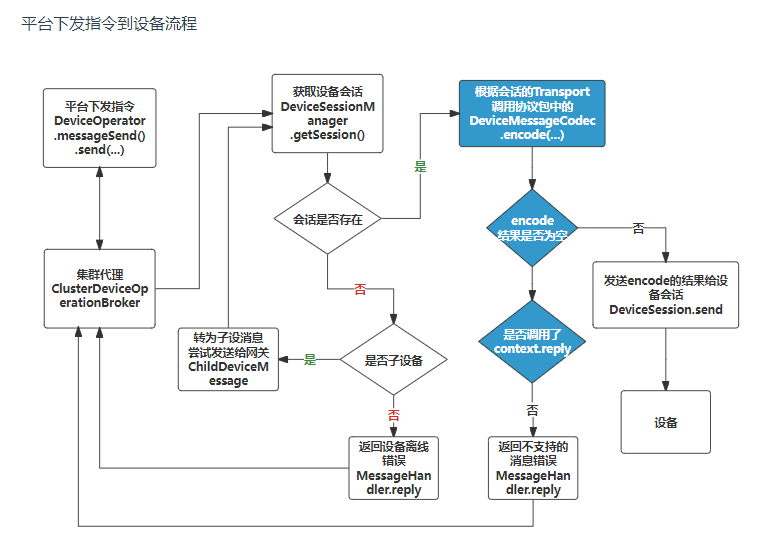
回复处理
org.jetlinks.supports.cluster.ClusterDeviceOperationBroker#doReply
@Override protected Mono<Void> doReply(DeviceMessageReply reply) { //从队列拿 RepayableDeviceMessage<?> msg = awaits.remove(getAwaitReplyKey(reply)); Member member = null; if (null != msg) {//拿到发送的服务器 member = msg.getHeader(Headers.sendFrom) .map(this::getMember) .orElse(null); } Function<Member, Mono<Void>> handler = _member -> cluster .send(_member, io.scalecube.cluster.transport.api.Message .builder() .qualifier(QUALIFIER_REPLY) .data(reply) .build()); //fast reply if (null != member) {//给发送的服务器 回复 return handler.apply(member); } return Flux .fromIterable(cluster.otherMembers()) .flatMap(handler)//每个集群成员调一遍??? .then(); } 设备状态检查
获取设备详情会触发状态检查 /device/instance/HSZ-22A-061-00001/detail
org.jetlinks.core.defaults.DefaultDeviceOperator#checkState
public Mono<Byte> checkState() { return Mono .zip( stateChecker // 回调 .checkState(this) // 见下 org.jetlinks.supports.cluster.CompositeDeviceStateChecker#checkState .switchIfEmpty(Mono.defer(() -> DEFAULT_STATE_CHECKER.checkState(this)))// 注意: lambda 变量传的是this, 后面会调到自己的 checkState0 方法 .defaultIfEmpty(DeviceState.online), this.getState() ) .flatMap(tp2 -> { byte newer = tp2.getT1(); byte old = tp2.getT2(); if (newer != old) {// log.info("device[{}] state changed from {} to {}", this.getDeviceId(), old, newer); Map<String, Object> configs = new HashMap<>(); configs.put("state", newer); if (newer == DeviceState.online) { configs.put("onlineTime", System.currentTimeMillis()); } else if (newer == DeviceState.offline) { configs.put("offlineTime", System.currentTimeMillis()); } return this .setConfigs(configs)//更新, 检查后的状态 .thenReturn(newer); } return Mono.just(newer); }); } org.jetlinks.supports.cluster.CompositeDeviceStateChecker#checkState
org.jetlinks.core.defaults.DefaultDeviceOperator#checkState0
协议自定义了状态检查逻辑
private static Mono<Byte> checkState0(DefaultDeviceOperator operator) { return operator .getProtocol() .flatMap(ProtocolSupport::getStateChecker) //如果协议自定义了, 状态检查逻辑, 用协议的 .flatMap(deviceStateChecker -> deviceStateChecker.checkState(operator)) .switchIfEmpty(operator.doCheckState()); //默认检查 } org.jetlinks.core.defaults.DefaultDeviceOperator#doCheckState
默认检查逻辑
private Mono<Byte> doCheckState() { return Mono .defer(() -> this .getSelfConfigs(stateCacheKeys) .flatMap(values -> { //当前设备连接到的服务器 String server = values//default .getValue(connectionServerId) .orElse(null); //设备缓存的状态 Byte state = values.getValue("state") .map(val -> val.as(Byte.class)) .orElse(DeviceState.unknown); //如果缓存中存储有当前设备所在服务信息则尝试发起状态检查 if (StringUtils.hasText(server)) { return handler .getDeviceState(server, Collections.singletonList(id)) //见下 .map(DeviceStateInfo::getState) .singleOrEmpty() .timeout(Duration.ofSeconds(1), Mono.just(state)) .defaultIfEmpty(state); } ...... } 往下就是 DeviceSession 的检查逻辑
@Override public Flux<DeviceStateInfo> getDeviceState(String deviceGatewayServerId, Collection<String> deviceIdList) { return Flux .fromIterable(deviceIdList) .flatMap(id -> sessionManager .isAlive(id, false)//见下: //最终 这个 alive 是false .map(alive -> new DeviceStateInfo(id, alive ? DeviceState.online : DeviceState.offline)) ); } org.jetlinks.supports.device.session.AbstractDeviceSessionManager#isAlive
@Override public final Mono<Boolean> isAlive(String deviceId, boolean onlyLocal) { Mono<Boolean> localAlive = this .getSession(deviceId)// 根据设备ID 找session, 找不到就为false, 最终是离线 .hasElement(); if (onlyLocal) { return localAlive; } return localAlive .flatMap(alive -> { if (alive) { return Reactors.ALWAYS_TRUE; } return remoteSessionIsAlive(deviceId); }); } org.jetlinks.supports.device.session.AbstractDeviceSessionManager#executeInterval
org.jetlinks.supports.device.session.AbstractDeviceSessionManager#checkSession
org.jetlinks.supports.device.session.AbstractDeviceSessionManager#checkSessionAlive
设备最新属性查询
Controller 接口入口
org.jetlinks.community.device.web.DeviceInstanceController#getDeviceLatestProperties(java.lang.String)
@GetMapping("/{deviceId:.+}/properties/latest") @QueryAction @Operation(summary = "获取指定ID设备最新的全部属性") public Flux<DeviceProperty> getDeviceLatestProperties(@PathVariable @Parameter(description = "设备ID") String deviceId) { return deviceDataService.queryEachOneProperties(deviceId, QueryParamEntity.of()); } org.jetlinks.community.device.service.data.DefaultDeviceDataService#queryEachOneProperties
@Nonnull @Override public Flux<DeviceProperty> queryEachOneProperties(@Nonnull String deviceId, @Nonnull QueryParamEntity query, @Nonnull String... properties) { return this //获取到设备的存储策略 .getDeviceStrategy(deviceId) .flatMapMany(strategy -> strategy.queryEachOneProperties(deviceId, query, properties)); } 以行式存储为例:
org.jetlinks.community.device.service.data.TimeSeriesRowDeviceDataStoreStoragePolicy#queryEachProperties
@Nonnull @Override public Flux<DeviceProperty> queryEachProperties(@Nonnull String deviceId, @Nonnull QueryParamEntity query, @Nonnull String... property) { return getProductAndMetadataByDevice(deviceId) .flatMapMany(tp2 -> { Map<String, PropertyMetadata> propertiesMap = getPropertyMetadata(tp2.getT2(), property) .stream() .collect(Collectors.toMap(PropertyMetadata::getId, Function.identity(), (a, b) -> a)); if (propertiesMap.isEmpty()) { return Flux.empty(); } return timeSeriesManager .getService(devicePropertyMetric(tp2.getT1().getId())) //一条属性行, 必然是聚合查询; 有两个实现, 反正最终都会调到ElasticRestClient的API .aggregation(AggregationQueryParam .of() .agg(new LimitAggregationColumn("property", "property", Aggregation.TOP, query.getPageSize())) .groupBy(new LimitGroup("property", "property", propertiesMap.size() * 2)) //按property分组 (一条属性一行的) .filter(query) .filter(q -> q.where("deviceId", deviceId).in("property", propertiesMap.keySet())) ).map(data -> DeviceProperty .of(data, data.getString("property").map(propertiesMap::get).orElse(null)) .deviceId(deviceId)); }); } 消息头
消息头 定义了一些平台行为, 可参考: org.jetlinks.core.message.Headers
设置设备多久未通讯/未上报, 置为离线的时间
message.addHeader("keepOnline",true); message.addHeader("keepOnlineTimeoutSeconds" ,610); message.addHeader(Headers.keepOnline, true); message.addHeader(Headers.keepOnlineTimeoutSeconds, 60); 同步指令调用的超时时间
/** * 指定发送消息的超时时间 */ toDeviceMessage.addHeader("keepOnline",true); toDeviceMessage.addHeader( HeaderKey.of("timeout", TimeUnit.SECONDS.toMillis(10), Long.class) ,30 ) /** * 是否合并历史属性数据,设置此消息头后,将会把历史最新的消息合并到消息体里 * @since 1.1.4 */ HeaderKey<Boolean> mergeLatest = HeaderKey.of("mergeLatest", false, Boolean.class); 规则引擎 RuleEngine
实体到RuleModel
从数据库到RuleModel
org.jetlinks.community.rule.engine.service.RuleInstanceService#start
org.jetlinks.community.rule.engine.service.RuleInstanceService#doStart
public Mono<Void> start(String id) { return findById(Mono.just(id)) //从数据库找到 规则实体数据 .flatMap(this::doStart); } private Mono<Void> doStart(RuleInstanceEntity entity) { return Mono.defer(() -> { RuleModel model = entity.toRule(modelParser);//解析为 RuleModel return ruleEngine .startRule(entity.getId(), model) //使用规则引擎 执行规则, 见下 .then(createUpdate() .set(RuleInstanceEntity::getState, RuleInstanceState.started) .where(entity::getId) .execute()).then(); }); } org.jetlinks.rule.engine.defaults.DefaultRuleEngine#startRule
public Flux<Task> startRule(String instanceId, RuleModel model) { //ScheduleJobCompiler 调度任务编译器,将规则模型编译成调度任务 return Flux.fromIterable(new ScheduleJobCompiler(instanceId, model).compile()) .flatMap(scheduler::schedule) .collectList() .flatMapIterable(Function.identity()) .flatMap(task -> task.start().thenReturn(task));//最后在执行 定时任务 } 核心执行逻辑
org.jetlinks.community.rule.engine.device.DeviceAlarmTaskExecutorProvider.DeviceAlarmTaskExecutor#doSubscribe
public Flux<Map<String, Object>> doSubscribe(EventBus eventBus) { //满足触发条件的输出数据流 List<Flux<? extends Map<String, Object>>> triggerOutputs = new ArrayList<>(); int index = 0; //上游节点的输入 //定时触发时: 定时节点输出到设备指令节点,设备指令节点输出到当前节点 Flux<RuleData> input = context .getInput() .accept() //使用cache,多个定时收到相同的数据 //通过header来进行判断具体是哪个触发器触发的,应该还有更好的方式. .replay(0) .refCount(1,Duration.ofMillis(10)); for (DeviceAlarmRule.Trigger trigger : rule.getTriggers()) { //QL不存在,理论上不会发生 ReactorQL ql = triggerQL.get(trigger); if (ql == null) { log.warn("DeviceAlarmRule trigger {} init error", index); continue; } Flux<? extends Map<String, Object>> datasource; int currentIndex = index; //since 1.11 定时触发的不从eventBus订阅 if (trigger.getTrigger() == DeviceAlarmRule.TriggerType.timer) { //从上游获取输入进行处理(通常是定时触发发送指令后得到的回复) datasource = input .filter(data -> { //通过上游输出的header来判断是否为同一个触发规则,还有更好的方式? return data .getHeader("triggerIndex") .map(idx -> CastUtils.castNumber(idx).intValue() == currentIndex) .orElse(true); }) .flatMap(RuleData::dataToMap); } //从事件总线中订阅数据 else { String topic = trigger .getType() .getTopic(rule.getProductId(), rule.getDeviceId(), trigger.getModelId()); //从事件总线订阅数据进行处理 Subscription subscription = Subscription.of( "device_alarm:" + rule.getId() + ":" + index++, topic, Subscription.Feature.local ); datasource = eventBus .subscribe(subscription, DeviceMessage.class) .map(Jsonable::toJson); } ReactorQLContext qlContext = ReactorQLContext .ofDatasource((t) -> datasource .doOnNext(map -> { if (StringUtils.hasText(rule.getDeviceName())) { map.putIfAbsent("deviceName", rule.getDeviceName()); } if (StringUtils.hasText(rule.getProductName())) { map.putIfAbsent("productName", rule.getProductName()); } map.put("productId", rule.getProductId()); map.put("alarmId", rule.getId()); map.put("alarmName", rule.getName()); })); //绑定SQL中的预编译变量 trigger.toFilterBinds().forEach(qlContext::bind); //启动ReactorQL进行实时数据处理 triggerOutputs.add(ql.start(qlContext).map(ReactorQLRecord::asMap)); } Flux<Map<String, Object>> resultFlux = Flux.merge(triggerOutputs); //防抖 ShakeLimit shakeLimit; if ((shakeLimit = rule.getShakeLimit()) != null) { resultFlux = shakeLimit.transfer( resultFlux, (duration, flux) -> StringUtils.hasText(rule.getDeviceId()) //规则已经指定了固定的设备,直接开启时间窗口就行 ? flux.window(duration, scheduler) //规则配置在设备产品上,则按设备ID分组后再开窗口 //设备越多,消耗的内存越大 : flux .groupBy(map -> String.valueOf(map.get("deviceId")), Integer.MAX_VALUE) .flatMap(group -> group.window(duration, scheduler), Integer.MAX_VALUE), (alarm, total) -> alarm.put("totalAlarms", total) ); } return resultFlux .as(result -> { //有多个触发条件时对重复的数据进行去重, //防止同时满足条件时会产生多个告警记录 if (rule.getTriggers().size() > 1) { return result .as(FluxUtils.distinct( map -> map.getOrDefault(PropertyConstants.uid.getKey(), ""), Duration.ofSeconds(1))); } return result; }) .flatMap(map -> { @SuppressWarnings("all") Map<String, Object> headers = (Map<String, Object>) map.remove("headers"); map.put("productId", rule.getProductId()); map.put("alarmId", rule.getId()); map.put("alarmName", rule.getName()); if (null != rule.getLevel()) { map.put("alarmLevel", rule.getLevel()); } if (null != rule.getType()) { map.put("alarmType", rule.getType()); } if (StringUtils.hasText(rule.getDeviceName())) { map.putIfAbsent("deviceName", rule.getDeviceName()); } if (StringUtils.hasText(rule.getProductName())) { map.putIfAbsent("productName", rule.getProductName()); } if (StringUtils.hasText(rule.getDeviceId())) { map.putIfAbsent("deviceId", rule.getDeviceId()); } if (!map.containsKey("deviceName") && map.get("deviceId") != null) { map.putIfAbsent("deviceName", map.get("deviceId")); } if (!map.containsKey("productName")) { map.putIfAbsent("productName", rule.getProductId()); } if (log.isDebugEnabled()) { log.debug("发生设备告警:{}", map); } //生成告警记录时生成ID,方便下游做处理。 map.putIfAbsent("id", IDGenerator.MD5.generate()); return eventBus .publish(String.format( "/rule-engine/device/alarm/%s/%s/%s", rule.getProductId(), map.get("deviceId"), rule.getId()), map) .thenReturn(map); }); } 触发规则事件
org.jetlinks.rule.engine.defaults.AbstractExecutionContext#fireEvent
@Override public <T> Mono<T> fireEvent(@Nonnull String event, @Nonnull RuleData data) { //规则自定义配置 data.setHeader(RuleConstants.Headers.ruleConfiguration, getJob().getRuleConfiguration()); //任务执行器标识 data.setHeader(RuleConstants.Headers.jobExecutor, getJob().getExecutor()); //模型类型 data.setHeader(RuleConstants.Headers.modelType, getJob().getModelType()); //使用事件总线 publish Mono<T> then = eventBus .publish(RuleConstants.Topics.event(job.getInstanceId(), job.getNodeId(), event), data) .doOnSubscribe(ignore -> log.trace("fire job task [{}] event [{}] ", job, event)) .then(Mono.empty()); Output output = eventOutputs.get(event); if (output != null) { return output .write(data) .then(then); } return then; } 自定义协议开发
协议相关接口对象
协议(ProtocolSupport)主要由 认证器(Authenticator), 消息编解码器(DeviceMessageCodec),消息发送拦截器(DeviceMessageSenderInterceptor) 以及配置元数据(ConfigMetadata)组成.
见上: [协议相关 (org.jetlinks.core.spi.ProtocolSupportProvider)]
上传时指定的全限定类名, 是org.jetlinks.core.spi.ProtocolSupportProvider 的派生类!
官方的一个演示例子
协议提供商 (ProtocolSupportProvider): 用于创建协议包实例,在发布协议时,将使用此接口的实现类来创建协议包实例.
协议支持 (ProtocolSupport) : 用于解析设备和平台通信报文的插件,同时还对接入协议进行一些描述,如: 接入说明,需要的配置信息,默认物模型等.
编解码 (DeviceMessageCodec): 对设备上报的数据进行解码,翻译为平台定义的统一的设备消息(DeviceMessage).以及将平台下发的消息(指令)DeviceMessage,编码为设备支持的报文.
设备操作器(DeviceOperator): 对一个设备实例的操作接口,可通过此接口获取、设置配置信息,获取物模型等操作.
设备会话 (DeviceSession): 一个设备的连接会话信息,如: TCP,MQTT连接.
设备消息 (DeviceMessage): 平台统一定义的设备消息,如:属性上报(ReportPropertyMessage),功能调用(FunctionInvokeMessage)等.
设备原始消息 (EncodedMessage): 设备端原始的消息,如: MQTT(MqttMessage),HTTP(HttpExchangeMessage)等.
http://doc.jetlinks.cn/dev-guide/protocol-support.html#名词解释
ProtocolSupportDefinition: 协议包的定义描述 (例如 jar,script 类型), ProtocolSupportLoaderProvider 用它来加载
认证器
谁持有认证器Authenticator?
在 org.jetlinks.core.ProtocolSupport 有两个 authenticate重载方法处理认证; 最终是持有并委托给org.jetlinks.core.defaults.Authenticator这个进行认证
创建在SupportProvider 中
public Mono<? extends ProtocolSupport> create(ServiceContext context) { CompositeProtocolSupport support = new CompositeProtocolSupport(); support.setId(this.getProtocolId()); support.setName(this.getProtocolName()); support.setDescription(this.getProtocolDescription()); //持有 Authenticator Authenticator authenticator = this.getAuthenticator(); support.addAuthenticator(DefaultTransport.MQTT, authenticator); support.addAuthenticator(DefaultTransport.MQTT_TLS, authenticator); DefaultConfigMetadata mqttMetaConfig = this.getMqttMetaConfig(); support.addConfigMetadata(DefaultTransport.MQTT, mqttMetaConfig); support.addConfigMetadata(DefaultTransport.MQTT_TLS, mqttMetaConfig); DeviceMessageCodec codec = this.getDeviceMessageCodec(); support.addMessageCodecSupport(DefaultTransport.MQTT, () -> { return Mono.just(codec); }); support.addMessageCodecSupport(DefaultTransport.MQTT_TLS, () -> { return Mono.just(codec); }); return Mono.just(support); } 参考 org.jetlinks.core.defaults.CompositeProtocolSupport
public interface Authenticator { /** * 对指定对设备进行认证 * @param request 认证请求 * @param device 设备 * @return 认证结果 */ Mono<AuthenticationResponse> authenticate(@Nonnull AuthenticationRequest request, @Nonnull DeviceOperator device); /** * 在网络连接建立的时候,可能无法获取设备的标识(如:http,websocket等),则会调用此方法来进行认证. * 注意: 认证通过后,需要设置设备ID.{@link AuthenticationResponse#success(String)} * @param request 认证请求 * @param registry 设备注册中心 * @return 认证结果 */ default Mono<AuthenticationResponse> authenticate(@Nonnull AuthenticationRequest request, @Nonnull DeviceRegistry registry) { } } 什么时候调用认证器Authenticator认证?
org.jetlinks.community.network.mqtt.gateway.device.MqttClientDeviceGateway (MQTT Broker)网关没看到调用认证(其实是需要自己调用, 见:[在解编码器上下文]), 但是 (MQTT Servver) 是调用了认证的可以参考下: org.jetlinks.community.network.mqtt.gateway.device.MqttServerDeviceGateway#doStart 的源码
private void doStart() { if (disposable != null) { disposable.dispose(); } disposable = mqttServer //监听连接 .handleConnection() .filter(conn -> { //暂停或者已停止时. if (!isStarted()) { //直接响应SERVER_UNAVAILABLE conn.reject(MqttConnectReturnCode.CONNECTION_REFUSED_SERVER_UNAVAILABLE); monitor.rejected(); } return isStarted(); }) .publishOn(Schedulers.parallel()) // <!> 处理mqtt连接请求 并处理认证 见下 .flatMap(this::handleConnection) //处理认证结果 .flatMap(tuple3 -> handleAuthResponse(tuple3.getT1(), tuple3.getT2(), tuple3.getT3())) .flatMap(tp -> handleAcceptedMqttConnection(tp.getT1(), tp.getT2(), tp.getT3()), Integer.MAX_VALUE) .contextWrite(ReactiveLogger.start("network", mqttServer.getId())) .subscribe(); } private Mono<Tuple3<DeviceOperator, AuthenticationResponse, MqttConnection>> handleConnection(MqttConnection connection) { //内存不够了 if (SystemUtils.memoryIsOutOfWatermark()) { //直接拒绝,响应SERVER_UNAVAILABLE,不再处理此连接 connection.reject(MqttConnectReturnCode.CONNECTION_REFUSED_SERVER_UNAVAILABLE); return Mono.empty(); } return Mono .justOrEmpty(connection.getAuth()) .flatMap(auth -> { // new MQTT 认证请求对象 MqttAuthenticationRequest request = new MqttAuthenticationRequest(connection.getClientId(), auth.getUsername(), auth.getPassword(), getTransport()); return supportMono //使用自定义协议来认证; <!>调用 ProtocolSupport 委托给 Authenticator 认证 .map(support -> support.authenticate(request, registry)) //没有指定自定义协议,则使用clientId对应的设备进行认证. .defaultIfEmpty(Mono.defer(() -> registry .getDevice(connection.getClientId()) .flatMap(device -> device.authenticate(request)))) .flatMap(Function.identity()) //如果认证结果返回空,说明协议没有设置认证,或者认证返回不对,默认返回BAD_USER_NAME_OR_PASSWORD,防止由于协议编写不当导致mqtt任意访问的安全问题. .switchIfEmpty(Mono.fromRunnable(() -> connection.reject(MqttConnectReturnCode.CONNECTION_REFUSED_BAD_USER_NAME_OR_PASSWORD))); }) .flatMap(resp -> { //认证响应可以自定义设备ID,如果没有则使用mqtt的clientId String deviceId = StringUtils.isEmpty(resp.getDeviceId()) ? connection.getClientId() : resp.getDeviceId(); //认证返回了新的设备ID,则使用新的设备 return registry .getDevice(deviceId) .map(operator -> Tuples.of(operator, resp, connection)) //设备不存在,应答IDENTIFIER_REJECTED .switchIfEmpty(Mono.fromRunnable(() -> connection.reject(MqttConnectReturnCode.CONNECTION_REFUSED_IDENTIFIER_REJECTED))) ; }) //设备认证错误,拒绝连接 .onErrorResume((err) -> Mono.fromRunnable(() -> { log.error("MQTT连接认证[{}]失败", connection.getClientId(), err); //监控信息 monitor.rejected(); //应答SERVER_UNAVAILABLE connection.reject(MqttConnectReturnCode.CONNECTION_REFUSED_SERVER_UNAVAILABLE); })) .subscribeOn(Schedulers.parallel()); } 协议产品 元数据
public class JkDeviceMetadataCodec implements DeviceMetadataCodec { /** source 其实就是设备物理模型 { "events": [], "properties": [ ], "functions": [], "tags": [] } */ @Override public Mono<DeviceMetadata> decode(String source) { SimpleDeviceMetadata metadata = JacksonUtils.jsonToBean(source, SimpleDeviceMetadata.class); return Mono.just(metadata); } @Override public Mono<String> encode(DeviceMetadata metadata) { String s = JacksonUtils.beanToJson(metadata); return Mono.just(s); } } 所有数据类型结构
{ " int(原生)、float(原生)、double(原生)":{ "min":"参数最小值(int、float、double类型特有)", "max":"参数最大值(int、float、double类型特有)", "step":"步长,字符串类型", "unit":"属性单位", "type":"属性类型: int(原生)、float(原生)、double(原生)、text(原生)" }, "date":{ "dateFormat":"时间格式", "type":"date" }, "bool":{ "trueValue":"true值,可自定义", "trueText":"trueText值,可自定义", "falseValue":"false值,可自定义", "falseText":"falseText值,可自定义", "type":"boolean" }, "enum":{ "elements":[ { "value":"1", "key":"在线" },{ "value":"0", "key":"离线" } ], "type":"enum" }, "text":{ "expands":{ "maxLength":"最大长度" }, "type":"string" }, "object":{ "properties":[//其它类型结构跟类型结构与外部属性的结构一致 { "id":"标识", "name":"名称", "valueType":{ "min":"最小值", "max":"最大值", "step":"步长", "unit":"单位", "type":"数据类型" }, "description":"备注" } ], "type":"object" }, "array":{ "elementType":{ "type":"object", "properties":[//其它类型结构跟类型结构与外部属性的结构一致 { "id":"标识", "name":"名称", "valueType":{ "min":"最小值", "max":"最大值", "step":"步长", "unit":"单位", "type":"类型" }, "description":"备注" } ] }, "expands":{ "elementNumber":"元素个数" }, "type":"array" }, "file":{ "bodyType":"文件元素类型", "type":"file" }, "password":{ "type":"password" } } 在哪加载协议包?
协议加载
发布接口
org.jetlinks.community.device.web.ProtocolSupportController#deploy
LocalProtocolSupportService 顾名思义
org.jetlinks.community.device.service.LocalProtocolSupportService#deploy
public Mono<Boolean> deploy(String id) { return findById(Mono.just(id)) .switchIfEmpty(Mono.error(NotFoundException::new)) .map(ProtocolSupportEntity::toDeployDefinition) //见下 .flatMap(def->loader.load(def).thenReturn(def)) .onErrorMap(err->new BusinessException("无法加载协议:"+err.getMessage(),err)) .flatMap(supportManager::save) .flatMap(r -> createUpdate() .set(ProtocolSupportEntity::getState, 1) .where(ProtocolSupportEntity::getId, id) .execute()) .map(i -> i > 0); } org.jetlinks.community.standalone.configuration.SpringProtocolSupportLoader#load
@Override public Mono<? extends ProtocolSupport> load(ProtocolSupportDefinition definition) { return Mono .justOrEmpty(this.providers.get(definition.getProvider()))// definition.getProvider() = jar /类型 .switchIfEmpty(Mono.error(() -> new UnsupportedOperationException("unsupported provider:" + definition.getProvider()))) //org.jetlinks.community.standalone.configuration.protocol.AutoDownloadJarProtocolSupportLoader 见下 .flatMap((provider) -> provider.load(definition)) .map(loaded -> new RenameProtocolSupport(definition.getId(), definition.getName(), definition.getDescription(), loaded)); } org.jetlinks.community.standalone.configuration.protocol.AutoDownloadJarProtocolSupportLoader#load
可参考下笔记: [踩坑指南/调试协议/最终加载逻辑]
public Mono<? extends ProtocolSupport> load(ProtocolSupportDefinition definition) { //复制新的配置信息 ProtocolSupportDefinition newDef = FastBeanCopier.copy(definition, new ProtocolSupportDefinition()); Map<String, Object> config = newDef.getConfiguration(); String location = Optional .ofNullable(config.get("location")) .map(String::valueOf) .orElse(null); //远程文件则先下载再加载 if (StringUtils.hasText(location) && location.startsWith("http")) { String urlMd5 = DigestUtils.md5Hex(location); //地址没变则直接加载本地文件 File file = new File(tempPath, (newDef.getId() + "_" + urlMd5) + ".jar"); if (file.exists()) { //设置文件地址文本地文件 config.put("location", file.getAbsolutePath()); return super .load(newDef) .subscribeOn(Schedulers.boundedElastic()) //加载失败则删除文件,防止文件内容错误时,一直无法加载 .doOnError(err -> file.delete()); } return webClient .get() .uri(location) .retrieve() .bodyToFlux(DataBuffer.class) .as(dataStream -> { log.debug("download protocol file {} to {}", location, file.getAbsolutePath()); //写出文件 return DataBufferUtils .write(dataStream, file.toPath(), CREATE, WRITE) .thenReturn(file.getAbsolutePath()); }) //使用弹性线程池来写出文件 .subscribeOn(Schedulers.boundedElastic())//新调度器 //设置本地文件路径 .doOnNext(path -> config.put("location", path)) .then(super.load(newDef)) .timeout(loadTimeout, Mono.error(() -> new TimeoutException("获取协议文件失败:" + location))) //失败时删除文件 .doOnError(err -> file.delete()) ; } //使用文件管理器获取文件 String fileId = (String) config.getOrDefault("fileId", null); if (!StringUtils.hasText(fileId)) { return Mono.error(new IllegalArgumentException("location or fileId can not be empty")); } return loadFromFileManager(newDef.getId(), fileId) .flatMap(file -> { config.put("location", file.getAbsolutePath()); return super .load(newDef)//<!> 关键点 见下 .subscribeOn(Schedulers.boundedElastic()) //加载失败则删除文件,防止文件内容错误时,一直无法加载 .doOnError(err -> file.delete()); }); } org.jetlinks.supports.protocol.management.jar.JarProtocolSupportLoader#load
public Mono<? extends ProtocolSupport> load(ProtocolSupportDefinition definition) { String id = definition.getId();//协议 id 对应 dev_protocol 表 return Mono .defer(() -> { try { Map<String, Object> config = definition.getConfiguration(); //本地jar 文件路径 String location = Optional .ofNullable(config.get("location")) .map(String::valueOf) .orElseThrow(() -> new IllegalArgumentException("location")); URL url; // 这个是 URLClassLoader 派生类 ProtocolClassLoader loader; URL fLocation = url;// 符合 URLClassLoader 使用的 url 资源路径: file:/D:/jetlinks-files/temp/sny-protocol-test_7e71d24c04ec8065dd81d314914e48ff.jar { ProtocolSupportProvider oldProvider = loaded.remove(id); //停掉旧的 ProtocolSupportProvider if (null != oldProvider) { oldProvider.dispose(); } } // 创建类加载器 loader = protocolLoaders.compute(id, (key, old) -> { if (null != old) { try { closeLoader(old); } catch (Exception ignore) { } } return createClassLoader(fLocation); }); ProtocolSupportProvider supportProvider;//协议实例 log.debug("load protocol support from : {}", location); // provider 是 cn.simae.jksq.provider.HSZSupportProvider 全限定类名 String provider = Optional .ofNullable(config.get("provider")) .map(String::valueOf) .map(String::trim) .orElse(null); if (provider != null) { //直接从classLoad获取,防止冲突 @SuppressWarnings("all") Class<ProtocolSupportProvider> providerType = (Class) loader.loadSelfClass(provider);//最终是用 URLClassLoader 类加载器加载, 见下 supportProvider = providerType.getDeclaredConstructor().newInstance(); } else { //这里应该是扫描jar包的所有 ProtocolSupportProvider supportProvider = lookupProvider(loader); ..... return supportProvider//最终调用 create 传入 serviceContext 了 .create(serviceContext) .onErrorMap(Exceptions::bubble); }) .subscribeOn(Schedulers.boundedElastic()) .as(MonoTracer.create(ProtocolTracer.SpanName.install(id))); } org.jetlinks.supports.protocol.management.jar.ProtocolClassLoader#loadSelfClass
public Class<?> loadSelfClass(String name){ Class<?> clazz = super.findClass(name); resolveClass(clazz); return clazz; } 应用启动时的加载
有一个 BeanPostProcessor 的接口实现Bean
org.jetlinks.community.standalone.configuration.SpringProtocolSupports
@Override public Object postProcessAfterInitialization(Object o, String s) throws BeansException { if (o == this) { return o; } if (o instanceof ProtocolSupports) { register(((ProtocolSupports) o));//见下 } return o; } org.jetlinks.core.defaults.CompositeProtocolSupports#register
public void register(ProtocolSupports supports) { //注册的其实是 org.jetlinks.community.standalone.configuration.LazyInitManagementProtocolSupports 的包装 this.supports.add(supports); } org.jetlinks.community.standalone.configuration.LazyInitManagementProtocolSupports
public class LazyInitManagementProtocolSupports extends StaticProtocolSupports implements CommandLineRunner { private ProtocolSupportManager manager; private ProtocolSupportLoader loader; private ClusterManager clusterManager; @Setter(AccessLevel.PRIVATE) private Map<String, String> configProtocolIdMapping = new ConcurrentHashMap<>(); private Duration loadTimeOut = Duration.ofSeconds(30); public void init() { clusterManager.<ProtocolSupportDefinition>getTopic("_protocol_changed") .subscribe() .subscribe(protocol -> this.init(protocol).subscribe()); try { manager.loadAll() .filter(de -> de.getState() == 1)//判断状态, 禁用的不加载嘛 .flatMap(this::init)//init .blockLast(loadTimeOut); } catch (Throwable e) { log.error("load protocol error", e); } } public Mono<Void> init(ProtocolSupportDefinition definition) { if (definition.getState() != 1) { String protocol = configProtocolIdMapping.get(definition.getId());//获得 协议定义 if (protocol != null) { log.debug("uninstall protocol:{}", definition); unRegister(protocol); return Mono.empty(); } } String operation = definition.getState() != 1 ? "uninstall" : "install"; Consumer<ProtocolSupport> consumer = definition.getState() != 1 ? this::unRegister : this::register; log.debug("{} protocol:{}", operation, definition); return loader////// 常规加载逻辑了 .load(definition) .doOnNext(e -> { log.debug("{} protocol[{}] success: {}", operation, definition.getId(), e); configProtocolIdMapping.put(definition.getId(), e.getId()); consumer.accept(e); }) .onErrorResume((e) -> { log.error("{} protocol[{}] error: {}", operation, definition.getId(), e); return Mono.empty(); }) .then(); } @Override public void run(String... args) { init(); } } 协议使用
网关持有 org.jetlinks.core.ProtocolSupports, 这个对象是网关构造时注入的
例: org.jetlinks.community.network.mqtt.gateway.device.MqttClientDeviceGateway#doStart
public class MqttClientDeviceGateway extends AbstractDeviceGateway { //管理多个 ProtocolSupport 的对象 private final ProtocolSupports protocolSupport; ..... private void doStart() { if (disposable != null) { disposable.dispose(); } disposable = mqttClient .subscribe(topics, qos) .filter((msg) -> isStarted()) .flatMap(mqttMessage -> { AtomicReference<Duration> timeoutRef = new AtomicReference<>(); return this .getProtocol()//拿到 ProtocolSupport .flatMap(codec -> codec.getMessageCodec(getTransport()))//调用其编解码器 } ..... } 协议发布接口
/protocol/sny-protocol-mqtt/_deploy
在解编码器上下文
给设备发送消息
@Override public Mono<? extends Message> decode(MessageDecodeContext context) { FromDeviceMessageContext ctx = (FromDeviceMessageContext) context; ObjectNode root = JacksonUtils.createObjectNode(); root.put("device_id", deviceId); .... String r_payload = root.toString(); log.error("MqttDeviceMessageCode:: 应答 {}",payload); SimpleMqttMessage encodeMessage = getMQTTMessage(deviceId, r_payload); ctx.getSession().send( encodeMessage ).subscribe(result -> {// 注意 不 subscribe 不执行.. (Reactor 体系的东西) log.error("应答结果: {} ", result); }); } MessageDecodeContext context, 可向下转型为 org.jetlinks.core.message.codec.FromDeviceMessageContext
然后通过 getSession() 获取Session, `Session#send( encodeMessage );~ 直接发送编码后的消息
获取设备元数据
//device为null说明时首次连接,平台未识别到当前连接属于哪个设备 //返回了DeviceMessage之后,将会与DeviceMessage对应的设备进行绑定,之后getDevice()则为此设备对应的信息. device = context.getDevice()//null if(device==null){ //处理认证等逻辑,具体根据实际协议来处理 return handleFirstMessage(payload); } else { return handleMessage(payload); } //或者通过设备ID拿 (新版 block 阻塞会报错) context.getDevice("HSZ-22A-061-00001").block().getProduct().block().getId() //推荐 context.getDeviceAsync() .map(deviceOperator -> deviceOperator.getConfig("firmwarePath")) .flatMap(val -> val.map(Value::asString)) .flatMap(firmwarePath -> { 获取协议配置
context.getDevice(deviceId) .flatMap(deviceOperator-> deviceOperator.getConfig("resourcePath")) 缓存和获取数据
// 设置 (全局 和 Self 都是同一个设置?) deviceOperator.setConfig("__except_report", value); deviceOperator.setConfig(ConfigKey.of("__except_report", "预期上报次数", Integer.class), 3); // 获取 (全局) Mono<Value> activeMono = deviceOperator.getSelfConfig("__except_report"); // 获取 (每个设备独立) Mono<Value> activeMono = deviceOperator.getSelfConfig("__except_report"); 网关子设备接入
一个典型的流程:
-
自定义消息协议编解码: ChildDeviceMessage则为平台发往子设备的消息.
-
父设备通过MQTT接入平台.
-
父设备上报子设备数据,消息协议需要解码为
ChildDeviceMessage或者ChildDeviceMessageReply. ChildDeviceMessage.deviceId为父设备ID, ChildDeviceMessage.message.deviceId为子设备ID. -
如果平台需要发送消息到子设备,那么必须先对子设备进行上线: 消息协议解码为ChildDeviceMessage.message=DeviceOnlineMessage.
-
通过API直接向子设备发送消息.平台将自动根据设备关联信息转换对应的消息.
-
消息协议将收到
ChildDeviceMessage,根据消息类型转换为对应对设备消息.
消息发送拦截器
使用拦截器可以拦截消息发送和返回的动作,通过修改参数等操作实现自定义逻辑,如: 当设备离线时,将消息缓存到设备配置中,等设备上线时再重发.
DeviceMessageSenderInterceptor{ //发送前 Mono<DeviceMessage> preSend(DeviceOperator device, DeviceMessage message); //发送后 <R extends DeviceMessage> Flux<R> afterSent(DeviceOperator device, DeviceMessage message, Flux<R> reply); } 设备自注册
原理: 自定义协议包将消息解析为 DeviceRegisterMessage,并设置 header:productId(必选),deviceName(必选),configuration(可选)。
平台将自动添加设备信息到设备实例中。如果是注册子设备,则解析为 ChildDeviceMessage<DeviceRegisterMessage>即可
TIP:
header中的configuration为设备的自定义配置信息,会保持到DeviceInstanceEntity.configuration中,类型为Map<String,Object>,
在后续的操作中,可通过 DeviceOperator.getSelfConfig 来获取这些配置信息。
踩坑指南
调试协议
自带的协议调试, 加载jar包, 总是报错..
关键入口
AutoDownloadJarProtocolSupportLoader::load
public Mono<? extends ProtocolSupport> load(ProtocolSupportDefinition definition) { ... /** * * 这个 fileId 是 org.jetlinks.community.io.file.FileManager 的文件ID 最终是 数据库 s_file 表的ID, //注意上 jetlinks.protocol.temp.path * */ String fileId = (String) config.getOrDefault("fileId", null); if (!StringUtils.hasText(fileId)) { return Mono.error(new IllegalArgumentException("location or fileId can not be empty")); } //如果文件不存在; 在临时目录生成文件, 从 FileManager 找到文件 写入; 最后应该是用类加载器加载 return loadFromFileManager(newDef.getId(), fileId) .flatMap(file -> { config.put("location", file.getAbsolutePath()); return super .load(newDef) .subscribeOn(Schedulers.boundedElastic()) //加载失败则删除文件,防止文件内容错误时,一直无法加载 .doOnError(err -> file.delete()); }); } 最终加载逻辑
org.jetlinks.supports.protocol.management.jar.JarProtocolSupportLoader#load
public Mono<? extends ProtocolSupport> load(ProtocolSupportDefinition definition) { try { String id = definition.getId(); return (Mono)Mono.defer(() -> { try { Map<String, Object> config = definition.getConfiguration(); String location = (String)Optional.ofNullable(config.get("location")).map(String::valueOf).orElseThrow(() -> { return new IllegalArgumentException("location"); }); // 创建 jar包 url 地址 URL url; if (!location.contains("://")) { url = (new File(location)).toURI().toURL(); } else { url = new URL("jar:" + location + "!/"); } ProtocolSupportProvider supportProvider = (ProtocolSupportProvider)this.loaded.remove(id); if (null != supportProvider) { supportProvider.dispose(); } // 这个是URLClassLoader ProtocolClassLoader loader = (ProtocolClassLoader)this.protocolLoaders.compute(id, (key, old) -> { if (null != old) { try { this.closeLoader(old); } catch (Exception var5) { } } return this.createClassLoader(url); }); log.debug("load protocol support from : {}", location); // provider 全限定类名(即上传的时候指定的) //cn.simae.jksq.provider.JkSQSupportProvider String provider = (String)Optional.ofNullable(config.get("provider")).map(String::valueOf).map(String::trim).orElse((Object)null); if (provider != null) { // <!>最终 类加载器 加载! Class<ProtocolSupportProvider> providerType = loader.loadSelfClass(provider); // new 实例 supportProvider = (ProtocolSupportProvider)providerType.getDeclaredConstructor().newInstance(); } else { supportProvider = this.lookupProvider(loader); if (null == supportProvider) { return Mono.error(new IllegalArgumentException("error.protocol_provider_not_found")); } } ProtocolSupportProvider oldProvider = (ProtocolSupportProvider)this.loaded.put(id, supportProvider); try { if (null != oldProvider) { oldProvider.dispose(); } } catch (Throwable var12) { log.error(var12.getMessage(), var12); } //生命周期 return supportProvider.create(this.serviceContext).onErrorMap(Exceptions::bubble); } catch (Throwable var13) { return Mono.error(var13); } }).subscribeOn(Schedulers.boundedElastic()).as(MonoTracer.create(SpanName.install(id))); } catch (Throwable var3) { throw var3; } } 注意两个地方
一个是环境变量:
tempPath = new File(System.getProperty("jetlinks.protocol.temp.path", "F:/jetlinks-files/temp"));
一个是上传存储文件夹:
file:
manager:
storage-base-path: F:/jetlinks-files
解码器拿到的 payload 是空?
web接口: /jetlinks/protocol/decode
controller: org.jetlinks.community.device.web.ProtocolSupportController#convertToDetail
- 关键代码
org.jetlinks.community.device.web.request.ProtocolDecodePayload#doDecode
//这个 support 是 org.jetlinks.core.spi.ProtocolSupportProvider#create 返回的对象 public Publisher<? extends Message> doDecode(ProtocolSupport support, DeviceOperator deviceOperator) { return support .getMessageCodec(getTransport()) .flatMapMany(codec -> codec.decode(new FromDeviceMessageContext() { @Override public EncodedMessage getMessage() { //封装调试消息 return toEncodedMessage(); } @Override public DeviceSession getSession() { return null; } @Nullable @Override public DeviceOperator getDevice() { return deviceOperator; } })); } public EncodedMessage toEncodedMessage() { if (transport == DefaultTransport.MQTT || transport == DefaultTransport.MQTT_TLS) { if (payload.startsWith("{")) { SimpleMqttMessage message = FastBeanCopier.copy(JSON.parseObject(payload), new SimpleMqttMessage()); message.setPayloadType(MessagePayloadType.of(payloadType.getId())); } //给 DeviceMessageCodec 就是这个, 可以拿它直接调试 //return SimpleMqttMessage.of(payload);//真正文本解析是在 org.jetlinks.core.message.codec.TextMessageParser#parse return SimpleMqttMessage.builder()// 原来的有问题, 改下 .payload(Unpooled.wrappedBuffer(payload.getBytes() )) .topic("/debug") .payloadType(MessagePayloadType.JSON) .qosLevel(0) .build(); } else if (transport == DefaultTransport.CoAP || transport == DefaultTransport.CoAP_DTLS) { return DefaultCoapMessage.of(payload); } return EncodedMessage.simple(payloadType.write(payload)); } /** json 要有个空白行, 否则全解析到 header 里面去了 ? { (空白行) "device_type": "JK-SQ", "device_id": "SQ03B-2110033", "timestamp": 1656504852, "message_type": "GetSta", ... } */ //org.jetlinks.core.message.codec.TextMessageParser#parse public void parse(String text) { String[] lines = text.trim().split("[n]"); int lineIndex = 0; for (String line : lines) { line = line.trim(); if(line.startsWith("//")){ continue; } if (StringUtils.isEmpty(line)) { if (lineIndex > 0) { break; } } String[] header = line.split("[:]"); .... } //body if (lineIndex < lines.length) { // 末尾有会多一个 '}' 这啥逻辑?? String body = String.join("n", Arrays.copyOfRange(lines, lineIndex, lines.length)).trim(); MessagePayloadType type; byte[] data; .... } } **总结: **
两个问题, 一个是路径不对(原来貌似是linux的?) , 还一个是封装SimpleMqttMessage 解析格式不对
不支持的协议?
public class JkSQSupportProvider implements ProtocolSupportProvider { private static final Logger log = LoggerFactory.getLogger(JkSQSupportProvider.class); @Override public Mono<? extends ProtocolSupport> create(ServiceContext context) { CompositeProtocolSupport support = new CompositeProtocolSupport(); support.setId("jk001");//这里面的id 要跟协议上传时配置的 id 一致 !!! support.setName("jk 采集设备支持测试"); support.setDescription("Protocol Version 1.0"); support.addAuthenticator(DefaultTransport.MQTT, getAuthenticator()); } } 踩坑指南
设备状态总数不正确??
主要是 LocalCacheClusterConfigStorage 这个caches NonBlockingHashMap属性,
缓存 org.jetlinks.core.defaults.DefaultDeviceOperator 数据getSelfConfig 方法
无论 get put 都会调用 getOrCreateCache 这个方法
org.jetlinks.supports.config.LocalCacheClusterConfigStorage#getOrCreateCache
private Cache getOrCreateCache(String key) { return caches .computeIfAbsent(key, this::createCache); } so 在这个打个条件断点 key.equals("state")
莫名其妙 state 又被设置为-1(离线)
最最最终原因是两个服务在运行, 用同一个网关; 冲突了 😮💨
protected final Mono<Void> closeSession(DeviceSession session) { try { session.close(); } catch (Throwable ignore) { } if (session.getOperator() == null) { return Mono.empty(); } return this //初始化会话连接信息,判断设备是否在其他服务节点还存在连接 .initSessionConnection(session) .flatMap(alive -> { //其他节点存活 //或者本地会话存在,可能在离线的同时又上线了? //都认为设备会话依然存活 boolean sessionExists = alive || localSessions.containsKey(session.getDeviceId()); if (sessionExists) { log.info("device [{}] session [{}] closed,but session still exists!", session.getDeviceId(), session); return fireEvent(DeviceSessionEvent.of(DeviceSessionEvent.Type.unregister, session, true)); } else { log.info("device [{}] session [{}] closed", session.getDeviceId(), session); return session .getOperator() .offline() .then( fireEvent(DeviceSessionEvent.of(DeviceSessionEvent.Type.unregister, session, false)) ); } }); } connection_lost?
其错误在这个枚举类定义的 org.jetlinks.core.enums.ErrorCode
org.jetlinks.core.server.session.KeepOnlineSession#send
@Override public Mono<Boolean> send(EncodedMessage encodedMessage) { return Mono .defer(() -> { //这个 parent 是 DeviceSession if (parent.isAlive()) { return parent.send(encodedMessage); } return Mono.error(new DeviceOperationException(ErrorCode.CONNECTION_LOST)); }); } so 是 org.jetlinks.community.network.mqtt.gateway.device.session.MqttClientSession#isAlive
判定为已断开
error.product_not_activated ?
产品状态不正确
org.jetlinks.core.exception.ProductNotActivatedException: error.product_not_activated at org.jetlinks.core.defaults.DefaultDeviceOperator.lambda$onProductNonexistent$7(DefaultDeviceOperator.java:159) Suppressed: reactor.core.publisher.FluxOnAssembly$OnAssemblyException: Assembly trace from producer [reactor.core.publisher.MonoFlatMap] : reactor.core.publisher.Mono.flatMap(Mono.java:3105) org.jetlinks.core.defaults.DefaultDeviceOperator#DefaultDeviceOperator(java.lang.String, org.jetlinks.core.ProtocolSupports, org.jetlinks.core.config.ConfigStorageManager, org.jetlinks.core.device.DeviceOperationBroker, org.jetlinks.core.device.DeviceRegistry, org.jetlinks.core.message.interceptor.DeviceMessageSenderInterceptor, org.jetlinks.core.device.DeviceStateChecker)
public DefaultDeviceOperator(String id, ProtocolSupports supports, ConfigStorageManager storageManager, DeviceOperationBroker handler, DeviceRegistry registry, DeviceMessageSenderInterceptor interceptor, DeviceStateChecker deviceStateChecker) { this.id = id; this.registry = registry; this.handler = handler; this.messageSender = new DefaultDeviceMessageSender(handler, this, registry, interceptor); this.storageMono = storageManager.getStorage("device:" + id); // <!> this.parent = getReactiveStorage() .flatMap(store -> store.getConfigs(productIdAndVersionKey)) .flatMap(productIdAndVersion -> { //支持指定产品版本 String _productId = productIdAndVersion.getString(productId.getKey(), (String) null); String _version = productIdAndVersion.getString(productVersion.getKey(), (String) null); return registry.getProduct(_productId, _version);//从注册中心, 拿产品描述, 见下: 通过DeviceRegistry拿 }); //支持设备自定义协议 this.protocolSupportMono = this .getSelfConfig(protocol) .flatMap(supports::getProtocol) .switchIfEmpty(this.parent.flatMap(DeviceProductOperator::getProtocol)); this.stateChecker = deviceStateChecker; this.metadataMono = this //获取最后更新物模型的时间 .getSelfConfig(lastMetadataTimeKey) .flatMap(i -> { //如果有时间,则表示设备有独立的物模型. //如果时间一致,则直接返回物模型缓存. if (i.equals(lastMetadataTime) && metadataCache != null) { return Mono.just(metadataCache); } METADATA_TIME_UPDATER.set(this, i); //加载真实的物模型 return Mono .zip(getSelfConfig(metadata), protocolSupportMono) .flatMap(tp2 -> tp2 .getT2() .getMetadataCodec() .decode(tp2.getT1()) .doOnNext(metadata -> METADATA_UPDATER.set(this, metadata))); }) //如果上游为空,则使用产品的物模型 .switchIfEmpty(this.getParent()// 关键是 this.getParent() 为空<!>; 然后转onProductNonexistent 抛出异常了 //这个 parent 在上面初始化的(其实是产品) .switchIfEmpty(Mono.defer(this::onProductNonexistent)) .flatMap(DeviceProductOperator::getMetadata) ); } 注册中心创建产品op 代码
org.jetlinks.supports.cluster.ClusterDeviceRegistry#getProduct(java.lang.String, java.lang.String)
public Mono<DeviceProductOperator> getProduct(String productId) { if (StringUtils.isEmpty(productId)) { return Mono.empty(); } { //先读缓存 DeviceProductOperator operator = productOperatorMap.get(productId); if (null != operator) { return Mono.just(operator); } } //没有创建. 见下 [创建DefaultDeviceProductOperator] DefaultDeviceProductOperator deviceOperator = createProductOperator(productId); return deviceOperator .getConfig(DeviceConfigKey.protocol)//返回的是null, 包括获取元数据等; ProductOperator 创建有问题? .doOnNext(r -> productOperatorMap.put(productId, deviceOperator)) .map((r) -> deviceOperator); } 创建 DefaultDeviceProductOperator
org.jetlinks.supports.cluster.ClusterDeviceRegistry#createProductOperator(java.lang.String)
private DefaultDeviceProductOperator createProductOperator(String id) { return new DefaultDeviceProductOperator(id, supports, manager,//是 org.jetlinks.supports.config.EventBusStorageManager::getStorage 表达式; 即返回的实例 LocalCacheClusterConfigStorage () -> getProductBind(id, null).values().flatMap(this::getDevice)); } org.jetlinks.core.defaults.DefaultDeviceProductOperator#DefaultDeviceProductOperator(java.lang.String, org.jetlinks.core.ProtocolSupports, reactor.core.publisher.Mono<org.jetlinks.core.config.ConfigStorage>, java.util.function.Supplier<reactor.core.publisher.Flux<org.jetlinks.core.device.DeviceOperator>>)
public DefaultDeviceProductOperator(String id, ProtocolSupports supports, Mono<ConfigStorage> storageMono, Supplier<Flux<DeviceOperator>> supplier) { this.id = id; this.storageMono = storageMono; this.devicesSupplier = supplier; this.inLocalMetadata = Mono.fromSupplier(() -> metadata); //创建 DeviceConfigKey.protocol 问题应该是这里<!> this.protocolSupportMono = this .getConfig(DeviceConfigKey.protocol) .flatMap(supports::getProtocol); Mono<DeviceMetadata> loadMetadata = Mono .zip( this.getProtocol().map(ProtocolSupport::getMetadataCodec), this.getConfig(DeviceConfigKey.metadata), this.getConfig(lastMetadataTimeKey) .switchIfEmpty(Mono.defer(() -> { long now = System.currentTimeMillis(); return this .setConfig(lastMetadataTimeKey, now) .thenReturn(now); })) ) .flatMap(tp3 -> tp3 .getT1() .decode(tp3.getT2()) .doOnNext(decode -> { this.metadata = decode; this.lstMetadataChangeTime = tp3.getT3(); })); //创建 元数据描述 this.metadataMono = this .getConfig(lastMetadataTimeKey) .flatMap(time -> { if (time.equals(lstMetadataChangeTime)) { return inLocalMetadata; } return Mono.empty(); }) .switchIfEmpty(loadMetadata); } org.jetlinks.core.config.StorageConfigurable#getConfig(java.lang.String, boolean)
default Mono<? extends Configurable> getParent() { return Mono.empty(); } default Mono<Value> getConfig(String key, boolean fallbackParent) { if (fallbackParent) { //最终是这里空 return getReactiveStorage()//是 org.jetlinks.supports.config.EventBusStorageManager::getStorage 表达式; 即返回的实例 LocalCacheClusterConfigStorage .flatMap(store -> store.getConfig(key)) .switchIfEmpty(getParent().flatMap(parent -> parent.getConfig(key)));//getParent() 必定空, 见上 } return getReactiveStorage().flatMap(store -> store.getConfig(key)); } org.jetlinks.supports.config.LocalCacheClusterConfigStorage#getConfig
org.jetlinks.supports.config.LocalCacheClusterConfigStorage#getOrCreateCache
org.jetlinks.supports.config.LocalCacheClusterConfigStorage#createCache
private Cache createCache(String key) { return new Cache(key); } 源码 与jar 版本不对; 好恶心! Cache 的获取
org.jetlinks.supports.config.LocalCacheClusterConfigStorage.Cache#getRef
void reload() { cached = null; ref = clusterCache//两个实现 .get(key)// 这里是从redis获取 见下: .map(Value::simple) .doOnNext(this::setValue) .switchIfEmpty(Mono.fromRunnable(() -> this.setValue(null)))//拿不到, 就设为空; 就没查过数据库.. .cache(v -> Duration.ofMillis(expires <= 0 ? Long.MAX_VALUE : expires), error -> Duration.ZERO, () -> Duration.ZERO); } org.jetlinks.supports.cluster.redis.RedisClusterCache#get(K)
@Override public Mono<V> get(K key) { //最最终key是... device-product:JK-ZG,protocol return hash.get(redisKey, key); } 产品保存并生效, 会写到redis; 但拿不到就设为空了; so 直接改数据库是没用的, 需要重启 😮💨
前端
大量的 ENOENT: no such file or directory, open 和 Error: EPERM: operation not permitted, unlink
换node版本导致两次安装不一致,删除 node_modules, package-lock.json (yarn.lock) 重新安装之
存储策略
行式存储
这是系统默认情况下使用的存储方案,使用elasticsearch存储设备数据. 每一个属性值都保存为一条索引记录.典型应用场景: 设备每次只会上报一部分属性, 以及支持读取部分属性数据的时候.
优点: 灵活,几乎满足任意场景下的属性数据存储.
缺点: 设备属性个数较多时,数据量指数增长,可能性能较低.
一条消息有多少个属性就有多少行, 一个属性一条记录在ES中存储
... "hits": [ { "_index": "properties_hsz_2022-07", "_type": "_doc", "_id": "fdc1fa20a1853c019b4764be5056c2f8", "_score": 1, "_source": { "type": "string", "deviceId": "HSZ-22A-061-00001", "property": "live_id_480p_ori", "id": "fdc1fa20a1853c019b4764be5056c2f8", "value": "2", "timestamp": 1656913295884, "createTime": 1656913295887 } }, { "_index": "properties_hsz_2022-07", "_type": "_doc", "_id": "2d0f03ba363b89386ea1a263ceb7ef27", "_score": 1, "_source": { "type": "string", "deviceId": "HSZ-22A-061-00001", "property": "used_memory", "id": "2d0f03ba363b89386ea1a263ceb7ef27", "value": "2", "timestamp": 1656913295884, "createTime": 1656913295887 } } ... ] 列式存储
使用 elasticsearch 存储设备数据. 一个属性作为一列,一条属性消息作为一条索引记录进行存储, 适合设备每次都上报所有的属性值的场景.
优点: 在属性个数较多,并且设备每次都会上报全部属性时,性能更高
缺点: 设备必须上报全部属性.
一条消息一条记录在ES中存储
... "hits":[ { "_index": "properties_hsz_2022-07", "_type": "_doc", "_id": "0ad4f18f926671e8cb95cb368911893a", "_score": 2.4849067, "_source": { "live_id_480p_ori": "2", "productId": "HSZ", "used_memory": 17301504, "bind_state": 0, "playback_id": "4", "version": "V1.0 beta", "deviceId": "HSZ-22A-061-00002", "bat_vol": 50, "live_id_480p": "0", "id": "0ad4f18f926671e8cb95cb368911893a", "p2p_id": "ssx2333", "timestamp": 1658969811369 } } .... ] hsweb-framework 框架
hsweb 是一个用于快速搭建企业后台管理系统的基础项目,集成一揽子便捷功能如:通用增删改查,在线代码生成,权限管理(可控制到列和行),动态多数据源分布式事务,动态脚本,动态定时任务,在线数据库维护等等. 基于 spring-boot, mybaits





