

之前出过websocket推送,sse推送,grpc的推送应该更具性价比,虽然前端要求复杂了一点点。下面快速的一步一步完成一个netcore服务端+web客户端的推送。
后端项目结构
GrpcRealtimePush/
├── Services/
│ └── ChatService.cs # gRPC服务实现
├── Protos/
│ └── chat.proto # Protocol Buffers定义
├── Program.cs # 服务启动配置
├── GrpcRealtimePush.csproj # 项目文件
└── appsettings.json # 配置文件
1.安装必要的grpc包
<Project Sdk="Microsoft.NET.Sdk.Web"> <PropertyGroup> <TargetFramework>net9.0</TargetFramework> <Nullable>enable</Nullable> <ImplicitUsings>enable</ImplicitUsings> </PropertyGroup> <ItemGroup> <Protobuf Include="Protoschat.proto" GrpcServices="Server" /> </ItemGroup> <ItemGroup> <PackageReference Include="Grpc.AspNetCore" Version="2.64.0" /> <PackageReference Include="Grpc.AspNetCore.Web" Version="2.64.0" /> </ItemGroup> </Project>
2.创建好proto文件
syntax = "proto3"; package chat; option csharp_namespace = "GrpcRealtimePush"; // 服务定义 service ChatService { // 服务端流式推送方法 rpc StartRealtimePush(RealtimePushRequest) returns (stream RealtimePushResponse); } // 请求消息 message RealtimePushRequest { string client_id = 1; // 客户端ID int64 timestamp = 2; // 时间戳 } // 响应消息 message RealtimePushResponse { string data = 1; // 推送数据 int64 timestamp = 2; // 时间戳 string data_type = 3; // 数据类型 }
proto文件定义就这样:
- **`service ChatService`**: 定义gRPC服务
- **`rpc StartRealtimePush`**: 服务端流式方法,返回 `stream`表示持续推送
- **`message`**: 定义请求和响应的数据结构
- **字段编号**: 1, 2, 3等是字段的唯一标识,用于序列化
3.实现上面的方法
using Grpc.Core; namespace GrpcRealtimePush.Services; public class ChatService : GrpcRealtimePush.ChatService.ChatServiceBase { private readonly ILogger<ChatService> _logger; public ChatService(ILogger<ChatService> logger) { _logger = logger; } public override async Task StartRealtimePush(RealtimePushRequest request, IServerStreamWriter<RealtimePushResponse> responseStream, ServerCallContext context) { _logger.LogInformation("🚀 实时推送已启动! 客户端: {ClientId}", request.ClientId); try { // 开始连续数据推送 var counter = 1; var random = new Random(); var dataTypes = new[] { "系统状态", "用户活动", "数据更新", "通知消息", "性能指标" }; _logger.LogInformation("🔄 开始连续数据推送循环..."); while (!context.CancellationToken.IsCancellationRequested && counter <= 100) { // 模拟不同类型的实时数据 var dataType = dataTypes[random.Next(dataTypes.Length)]; var value = random.Next(1, 1000); var timestamp = DateTime.UtcNow; var response = new RealtimePushResponse { Data = $"#{counter:D4} - 数值: {value} | 时间: {timestamp:HH:mm:ss.fff}", Timestamp = DateTimeOffset.UtcNow.ToUnixTimeSeconds(), DataType = dataType }; await responseStream.WriteAsync(response); _logger.LogInformation("📡 推送数据 #{Counter}: [{DataType}] = {Value} at {Time}", counter, dataType, value, timestamp.ToString("HH:mm:ss.fff")); counter++; // 等待2秒后发送下一条数据 await Task.Delay(2000, context.CancellationToken); } // 发送完成消息 await responseStream.WriteAsync(new RealtimePushResponse { Data = "实时推送测试完成!", Timestamp = DateTimeOffset.UtcNow.ToUnixTimeSeconds(), DataType = "系统消息" }); } catch (OperationCanceledException) { _logger.LogInformation("实时推送会话已取消,客户端: {ClientId}", request.ClientId); } catch (Exception ex) { _logger.LogError(ex, "实时推送会话出错: {Error}", ex.Message); // 尝试向客户端发送错误消息 try { await responseStream.WriteAsync(new RealtimePushResponse { Data = $"服务器错误: {ex.Message}", Timestamp = DateTimeOffset.UtcNow.ToUnixTimeSeconds(), DataType = "错误消息" }); } catch (Exception sendError) { _logger.LogError(sendError, "发送错误消息失败"); } } _logger.LogInformation("实时推送会话结束,客户端: {ClientId}", request.ClientId); } }
4.Program文件
using GrpcRealtimePush.Services; var builder = WebApplication.CreateBuilder(args); // 添加gRPC服务 builder.Services.AddGrpc(); // 配置CORS策略,支持gRPC-Web builder.Services.AddCors(options => { options.AddPolicy("AllowAll", policy => { policy.AllowAnyOrigin() .AllowAnyMethod() .AllowAnyHeader() .WithExposedHeaders("Grpc-Status", "Grpc-Message", "Grpc-Encoding", "Grpc-Accept-Encoding", "Content-Type"); }); }); var app = builder.Build(); // 配置HTTP请求管道 // 启用CORS app.UseCors("AllowAll"); // 启用gRPC-Web中间件 app.UseGrpcWeb(); // 配置HTTPS重定向(gRPC-Web需要) app.UseHttpsRedirection(); // 映射gRPC服务并启用gRPC-Web支持 app.MapGrpcService<ChatService>().EnableGrpcWeb(); app.MapGet("/", () => "Communication with gRPC endpoints must be made through a gRPC client. To learn how to create a client, visit: https://go.microsoft.com/fwlink/?linkid=2086909"); app.Run();
以上代码对于后端来说应该轻车熟路,后端服务就这样起来了。
先测试一下后端服务是否正常,我这里有go环境,直接安装grpcurl工具。
# 安装grpcurl工具 go install github.com/fullstorydev/grpcurl/cmd/grpcurl@latest # 测试服务 grpcurl -insecure localhost:5201 list
grpcurl -insecure -d "{"client_id":"test-client","timestamp":1234567890}" localhost:5201 chat.ChatService/StartRealtimePush
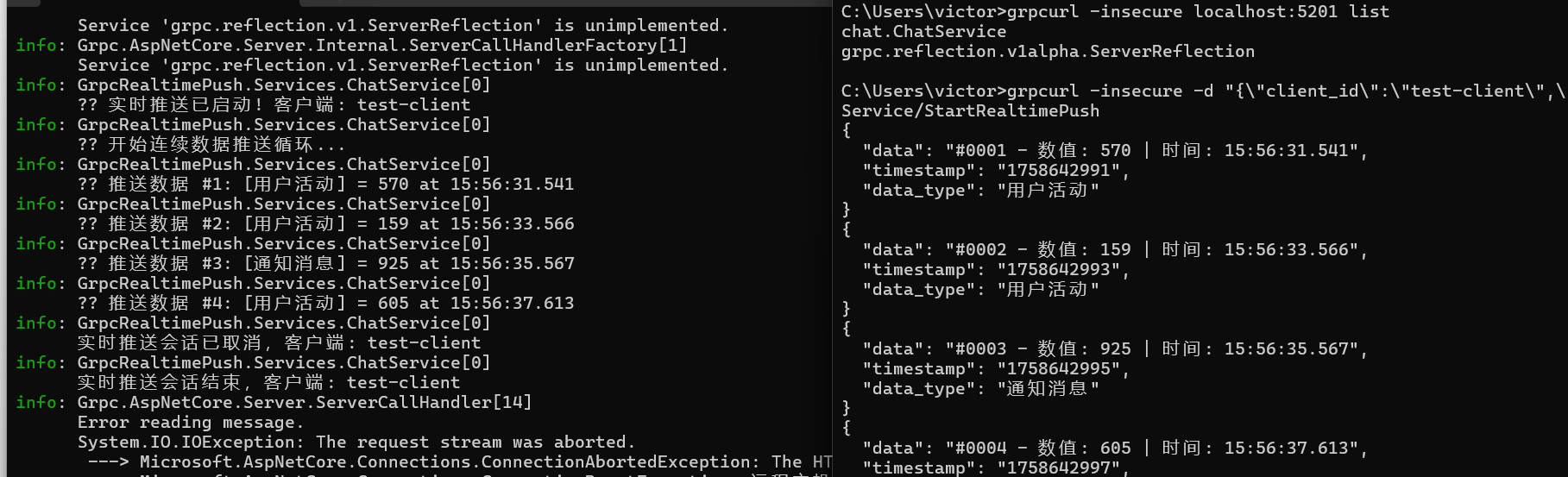
下面就是完成前端代码了,这里使用js+html。
前端的结构如下:
client/
├── generated/ # 生成的代码
│ ├── chat_pb_browser.js # Protocol Buffers消息类
│ └── chat_grpc_web_pb_browser.js # gRPC服务客户端
├── grpc-web-shim.js # gRPC-Web兼容层
├── client.js # 主要业务逻辑
├── index.html # 用户界面
前端准备工作安装protoc和插件。protoc把后端的proto文件转成两个js文件,插件就是grpc链接需要的。
# 安装Protocol Buffers编译器 # Windows: 下载 https://github.com/protocolbuffers/protobuf/releases # macOS: brew install protobuf # Linux: apt-get install protobuf-compiler # 验证安装 protoc --version # 安装gRPC-Web插件 npm install -g grpc-web
核心转换代码脚本如下:
protoc -I=GrpcRealtimePushProtos ` --js_out=import_style=commonjs:clientgenerated ` --grpc-web_out=import_style=commonjs,mode=grpcwebtext:clientgenerated ` GrpcRealtimePushProtoschat.proto
执行了protoc后会生成下面2个js文件
1. `chat_pb_browser.js`
// Browser-compatible version of chat_pb.js (function () { 'use strict'; // 确保命名空间存在 if (!window.proto) window.proto = {}; if (!window.proto.chat) window.proto.chat = {}; // RealtimePushRequest类 window.proto.chat.RealtimePushRequest = function (opt_data) { jspb.Message.initialize(this, opt_data, 0, -1, null, null); }; // 继承jspb.Message if (jspb.Message) { window.proto.chat.RealtimePushRequest.prototype = Object.create(jspb.Message.prototype); window.proto.chat.RealtimePushRequest.prototype.constructor = window.proto.chat.RealtimePushRequest; } // RealtimePushRequest方法 window.proto.chat.RealtimePushRequest.prototype.getClientId = function () { return jspb.Message.getFieldWithDefault(this, 1, ""); }; window.proto.chat.RealtimePushRequest.prototype.setClientId = function (value) { return jspb.Message.setProto3StringField(this, 1, value); }; window.proto.chat.RealtimePushRequest.prototype.getTimestamp = function () { return jspb.Message.getFieldWithDefault(this, 2, 0); }; window.proto.chat.RealtimePushRequest.prototype.setTimestamp = function (value) { return jspb.Message.setProto3IntField(this, 2, value); }; // 序列化方法 window.proto.chat.RealtimePushRequest.prototype.serializeBinary = function () { const writer = new jspb.BinaryWriter(); window.proto.chat.RealtimePushRequest.serializeBinaryToWriter(this, writer); return writer.getResultBuffer(); }; window.proto.chat.RealtimePushRequest.serializeBinaryToWriter = function (message, writer) { const f = message.getClientId(); if (f.length > 0) { writer.writeString(1, f); } const f2 = message.getTimestamp(); if (f2 !== 0) { writer.writeInt64(2, f2); } }; window.proto.chat.RealtimePushRequest.deserializeBinary = function (bytes) { const reader = new jspb.BinaryReader(bytes); const msg = new window.proto.chat.RealtimePushRequest(); return window.proto.chat.RealtimePushRequest.deserializeBinaryFromReader(msg, reader); }; window.proto.chat.RealtimePushRequest.deserializeBinaryFromReader = function (msg, reader) { while (reader.nextField()) { if (reader.isEndGroup()) { break; } const field = reader.getFieldNumber(); switch (field) { case 1: const value = reader.readString(); msg.setClientId(value); break; case 2: const value2 = reader.readInt64(); msg.setTimestamp(value2); break; default: reader.skipField(); break; } } return msg; }; // RealtimePushResponse类 window.proto.chat.RealtimePushResponse = function (opt_data) { jspb.Message.initialize(this, opt_data, 0, -1, null, null); }; // 继承jspb.Message if (jspb.Message) { window.proto.chat.RealtimePushResponse.prototype = Object.create(jspb.Message.prototype); window.proto.chat.RealtimePushResponse.prototype.constructor = window.proto.chat.RealtimePushResponse; } // RealtimePushResponse方法 window.proto.chat.RealtimePushResponse.prototype.getData = function () { return jspb.Message.getFieldWithDefault(this, 1, ""); }; window.proto.chat.RealtimePushResponse.prototype.setData = function (value) { return jspb.Message.setProto3StringField(this, 1, value); }; window.proto.chat.RealtimePushResponse.prototype.getTimestamp = function () { return jspb.Message.getFieldWithDefault(this, 2, 0); }; window.proto.chat.RealtimePushResponse.prototype.setTimestamp = function (value) { return jspb.Message.setProto3IntField(this, 2, value); }; window.proto.chat.RealtimePushResponse.prototype.getDataType = function () { return jspb.Message.getFieldWithDefault(this, 3, ""); }; window.proto.chat.RealtimePushResponse.prototype.setDataType = function (value) { return jspb.Message.setProto3StringField(this, 3, value); }; // 序列化方法 window.proto.chat.RealtimePushResponse.prototype.serializeBinary = function () { const writer = new jspb.BinaryWriter(); window.proto.chat.RealtimePushResponse.serializeBinaryToWriter(this, writer); return writer.getResultBuffer(); }; window.proto.chat.RealtimePushResponse.serializeBinaryToWriter = function (message, writer) { const f = message.getData(); if (f.length > 0) { writer.writeString(1, f); } const f2 = message.getTimestamp(); if (f2 !== 0) { writer.writeInt64(2, f2); } const f3 = message.getDataType(); if (f3.length > 0) { writer.writeString(3, f3); } }; window.proto.chat.RealtimePushResponse.deserializeBinary = function (bytes) { const reader = new jspb.BinaryReader(bytes); const msg = new window.proto.chat.RealtimePushResponse(); return window.proto.chat.RealtimePushResponse.deserializeBinaryFromReader(msg, reader); }; window.proto.chat.RealtimePushResponse.deserializeBinaryFromReader = function (msg, reader) { while (reader.nextField()) { if (reader.isEndGroup()) { break; } const field = reader.getFieldNumber(); switch (field) { case 1: const value = reader.readString(); msg.setData(value); break; case 2: const value2 = reader.readInt64(); msg.setTimestamp(value2); break; case 3: const value3 = reader.readString(); msg.setDataType(value3); break; default: reader.skipField(); break; } } return msg; }; console.log('chat_pb_browser.js loaded successfully'); })();
2. `chat_grpc_web_pb_browser.js`
// Browser-compatible version of chat_grpc_web_pb.js (function () { 'use strict'; // 确保命名空间存在 if (!window.proto) window.proto = {}; if (!window.proto.chat) window.proto.chat = {}; // ChatServiceClient类 window.proto.chat.ChatServiceClient = function (hostname, credentials, options) { if (!options) options = {}; options['format'] = options['format'] || 'text'; // 使用gRPC-Web基类 window.grpc.web.GrpcWebClientBase.call(this, options); this.hostname_ = hostname; this.credentials_ = credentials; this.options_ = options; }; // 继承基类 if (window.grpc && window.grpc.web && window.grpc.web.GrpcWebClientBase) { window.proto.chat.ChatServiceClient.prototype = Object.create(window.grpc.web.GrpcWebClientBase.prototype); window.proto.chat.ChatServiceClient.prototype.constructor = window.proto.chat.ChatServiceClient; } // 方法描述符 const methodDescriptor_StartRealtimePush = new window.grpc.web.MethodDescriptor( '/chat.ChatService/StartRealtimePush', window.grpc.web.MethodType.SERVER_STREAMING, window.proto.chat.RealtimePushRequest, window.proto.chat.RealtimePushResponse, function (request) { return request.serializeBinary(); }, function (bytes) { return window.proto.chat.RealtimePushResponse.deserializeBinary(bytes); } ); // StartRealtimePush方法 window.proto.chat.ChatServiceClient.prototype.startRealtimePush = function (request, metadata) { const url = this.hostname_ + '/chat.ChatService/StartRealtimePush'; return this.serverStreaming(url, request, metadata || {}, methodDescriptor_StartRealtimePush); }; console.log('chat_grpc_web_pb_browser.js loaded successfully'); })();
下面就需要创建连接层代码,该代码手动创建,有需要可以拷贝更改复用。
`grpc-web-shim.js`
// gRPC-Web compatibility shim (function() { 'use strict'; // 创建grpc命名空间 if (typeof window.grpc === 'undefined') { window.grpc = {}; } if (typeof window.grpc.web === 'undefined') { window.grpc.web = {}; } // 方法类型枚举 window.grpc.web.MethodType = { UNARY: 'unary', SERVER_STREAMING: 'server_streaming', CLIENT_STREAMING: 'client_streaming', BIDIRECTIONAL_STREAMING: 'bidirectional_streaming' }; // 方法描述符 window.grpc.web.MethodDescriptor = function(path, methodType, requestType, responseType, requestSerializeFn, responseDeserializeFn) { this.path = path; this.methodType = methodType; this.requestType = requestType; this.responseType = responseType; this.requestSerializeFn = requestSerializeFn; this.responseDeserializeFn = responseDeserializeFn; }; // 基础客户端类 window.grpc.web.GrpcWebClientBase = function(options) { this.options = options || {}; this.format = this.options.format || 'text'; }; // 服务端流式方法 window.grpc.web.GrpcWebClientBase.prototype.serverStreaming = function(url, request, metadata, methodDescriptor) { const self = this; // 创建简单的事件发射器 const stream = { listeners: {}, on: function(event, callback) { if (!this.listeners[event]) { this.listeners[event] = []; } this.listeners[event].push(callback); }, emit: function(event, data) { if (this.listeners[event]) { this.listeners[event].forEach(callback => callback(data)); } } }; try { // 序列化请求 const serializedRequest = methodDescriptor.requestSerializeFn(request); // 创建gRPC-Web帧 const frameHeader = new Uint8Array(5); frameHeader[0] = 0; // 压缩标志 const messageLength = serializedRequest.length; frameHeader[1] = (messageLength >>> 24) & 0xFF; frameHeader[2] = (messageLength >>> 16) & 0xFF; frameHeader[3] = (messageLength >>> 8) & 0xFF; frameHeader[4] = messageLength & 0xFF; const framedMessage = new Uint8Array(5 + messageLength); framedMessage.set(frameHeader, 0); framedMessage.set(serializedRequest, 5); const base64Request = btoa(String.fromCharCode.apply(null, framedMessage)); const headers = { 'Content-Type': 'application/grpc-web-text', 'X-Grpc-Web': '1', 'Accept': 'application/grpc-web-text' }; // 添加元数据 if (metadata) { Object.keys(metadata).forEach(key => { if (key.toLowerCase() !== 'content-type') { headers[key] = metadata[key]; } }); } const fetchOptions = { method: 'POST', headers: headers, body: base64Request }; fetch(url, fetchOptions) .then(response => { if (!response.ok) { throw new Error(`HTTP ${response.status}: ${response.statusText}`); } console.log('开始读取流式响应...'); // 使用ReadableStream读取gRPC-Web流式响应 const reader = response.body.getReader(); const decoder = new TextDecoder(); let buffer = ''; let messageCount = 0; function readStreamChunk() { return reader.read().then(({ done, value }) => { if (done) { console.log('📡 流读取完成,总共处理消息:', messageCount); if (buffer.length > 0) { console.log('📦 处理流结束时的剩余缓冲区'); processStreamBuffer(); } stream.emit('end'); return; } // 将新数据添加到缓冲区 const chunk = decoder.decode(value, { stream: true }); buffer += chunk; console.log('📦 收到流数据块:', chunk.length, '字符,缓冲区总计:', buffer.length); // 处理缓冲区中的完整消息 processStreamBuffer(); // 继续读取 return readStreamChunk(); }).catch(error => { console.error('❌ 流读取错误:', error); stream.emit('error', error); }); } function processStreamBuffer() { console.log('🔍 处理缓冲区,长度:', buffer.length); while (buffer.length > 0) { try { // 查找完整的base64块 let messageBase64 = buffer; // 检查是否包含trailer标记 const trailerMarkers = ['gAAAA', 'gAAA', 'gAA', 'gA']; let trailerIndex = -1; for (const marker of trailerMarkers) { const index = messageBase64.indexOf(marker); if (index > 0) { trailerIndex = index; break; } } if (trailerIndex > 0) { messageBase64 = messageBase64.substring(0, trailerIndex); console.log('📦 在索引处找到trailer:', trailerIndex); } // 清理base64字符串 const cleanBase64 = messageBase64.replace(/[^A-Za-z0-9+/=]/g, ''); // 确保base64字符串长度是4的倍数 let paddedBase64 = cleanBase64; const padding = paddedBase64.length % 4; if (padding > 0) { paddedBase64 += '='.repeat(4 - padding); } if (paddedBase64.length === 0) { console.log('❌ 清理后base64为空'); buffer = ''; break; } // 解码base64 const binaryString = atob(paddedBase64); const responseBytes = new Uint8Array(binaryString.length); for (let i = 0; i < binaryString.length; i++) { responseBytes[i] = binaryString.charCodeAt(i); } console.log('📦 解码字节长度:', responseBytes.length); // 检查是否有足够的数据来读取gRPC帧头 if (responseBytes.length >= 5) { const compressionFlag = responseBytes[0]; const frameMsgLength = (responseBytes[1] << 24) | (responseBytes[2] << 16) | (responseBytes[3] << 8) | responseBytes[4]; console.log(`📡 流帧: 压缩=${compressionFlag}, 长度=${frameMsgLength}, 总计=${responseBytes.length}`); // 检查是否有完整的消息数据 if (responseBytes.length >= 5 + frameMsgLength && frameMsgLength > 0) { const messageBytes = responseBytes.slice(5, 5 + frameMsgLength); try { const response = methodDescriptor.responseDeserializeFn(messageBytes); messageCount++; console.log(`✅ 成功解析消息 #${messageCount},发射数据`); stream.emit('data', response); // 处理完成后,移除已处理的数据 if (trailerIndex > 0) { buffer = buffer.substring(trailerIndex); console.log('📦 移动缓冲区越过trailer,剩余长度:', buffer.length); } else { buffer = ''; console.log('📦 完全清空缓冲区'); } } catch (deserializeError) { console.error('❌ 反序列化错误:', deserializeError); buffer = ''; break; } } else { console.log('❌ 帧数据不完整或长度无效'); if (buffer.length < 200) { break; } else { buffer = ''; break; } } } else { console.log('❌ 帧太短,等待更多数据'); break; } } catch (parseError) { console.error('❌ 处理流消息错误:', parseError); buffer = ''; break; } } console.log('🔍 剩余缓冲区长度:', buffer.length); } // 开始读取流 return readStreamChunk(); }) .catch(error => { console.error('流获取错误:', error); stream.emit('error', error); }); } catch (error) { setTimeout(() => stream.emit('error', error), 0); } return stream; }; console.log('gRPC-Web shim loaded successfully'); })();
下面就是简单的获取实时数据的业务逻辑了
`client.js`
// gRPC-Web Chat Client Implementation class RealtimePushClient { constructor() { this.client = null; this.isConnected = false; this.serverUrl = 'https://localhost:5201'; // 流式传输相关属性 this.currentStream = null; this.streamMessageCount = 0; this.streamStartTime = null; this.initializeUI(); } initializeUI() { const streamButton = document.getElementById('streamButton'); const stopStreamButton = document.getElementById('stopStreamButton'); const clearButton = document.getElementById('clearButton'); streamButton.addEventListener('click', () => this.startStreamingChat()); stopStreamButton.addEventListener('click', () => this.stopStreaming()); clearButton.addEventListener('click', () => this.clearMessages()); // 初始化连接状态 this.updateConnectionStatus(false, '正在初始化...'); // 页面加载时尝试连接 this.connect(); } connect() { try { // 初始化gRPC-Web客户端 console.log('正在初始化实时推送客户端...'); // 检查必要的依赖是否可用 if (typeof jspb === 'undefined') { throw new Error('google-protobuf 库未加载'); } if (typeof grpc === 'undefined' || !grpc.web) { console.warn('grpc-web 库未完全加载,等待重试...'); setTimeout(() => this.connect(), 1000); return; } if (typeof proto === 'undefined' || !proto.chat || !proto.chat.ChatServiceClient) { throw new Error('gRPC 生成的客户端代码未加载'); } // 创建gRPC-Web客户端 this.client = new proto.chat.ChatServiceClient(this.serverUrl, null, { format: 'text', withCredentials: false }); console.log('实时推送客户端创建成功'); this.updateConnectionStatus(true, '已连接'); this.addMessage('系统', '🚀 实时推送客户端已就绪', 'system'); } catch (error) { console.error('连接初始化失败:', error); this.updateConnectionStatus(false, '初始化失败'); this.addMessage('系统', '初始化失败: ' + this.getErrorMessage(error), 'error'); } } startStreamingChat() { if (!this.isConnected) { this.addMessage('系统', '未连接到服务器,无法启动实时推送', 'error'); return; } if (!this.client) { this.addMessage('系统', 'gRPC客户端未初始化', 'error'); return; } // 检查是否已在流式传输 if (this.currentStream) { this.addMessage('系统', '实时推送已在运行中', 'system'); return; } try { // 创建实时推送请求 const pushRequest = new proto.chat.RealtimePushRequest(); pushRequest.setClientId('web-client-' + Date.now()); pushRequest.setTimestamp(Math.floor(Date.now() / 1000)); console.log('启动实时推送:', { clientId: pushRequest.getClientId(), timestamp: pushRequest.getTimestamp() }); // 添加流式传输的元数据 const metadata = { 'x-user-agent': 'grpc-web-realtime-client' }; // 开始流式传输 const stream = this.client.startRealtimePush(pushRequest, metadata); if (!stream) { throw new Error('无法创建实时推送连接'); } // 存储流引用 this.currentStream = stream; this.streamMessageCount = 0; this.streamStartTime = Date.now(); // 更新UI显示流式传输已激活 this.updateStreamingUI(true); stream.on('data', (response) => { if (response && typeof response.getData === 'function') { this.streamMessageCount++; // 添加带有实时数据特殊样式的消息 this.addRealtimeMessage( `[${response.getDataType()}] ${response.getData()}`, this.streamMessageCount ); // 更新统计信息 this.updateStreamStats(); } }); stream.on('error', (error) => { console.error('实时推送错误:', error); this.addMessage('系统', '实时推送错误: ' + this.getErrorMessage(error), 'error'); this.stopStreaming(); }); stream.on('end', () => { console.log('实时推送结束'); this.addMessage('系统', '实时推送已结束', 'system'); this.stopStreaming(); }); this.addMessage('系统', '🚀 实时数据推送已启动', 'system'); } catch (error) { console.error('启动实时推送失败:', error); this.addMessage('系统', '启动实时推送失败: ' + this.getErrorMessage(error), 'error'); } } // 其他方法实现... updateConnectionStatus(connected, message = '') { const statusDiv = document.getElementById('status'); const streamButton = document.getElementById('streamButton'); this.isConnected = connected; if (connected) { statusDiv.textContent = '状态: 已连接' + (message ? ' - ' + message : ''); statusDiv.className = 'status connected'; streamButton.disabled = false; } else { statusDiv.textContent = '状态: 未连接' + (message ? ' - ' + message : ''); statusDiv.className = 'status disconnected'; streamButton.disabled = true; } } addMessage(sender, content, type) { const chatContainer = document.getElementById('chatContainer'); const messageDiv = document.createElement('div'); messageDiv.className = `message ${type}`; const timestamp = new Date().toLocaleTimeString(); messageDiv.innerHTML = ` <div><strong>${sender}</strong> <small>${timestamp}</small></div> <div>${content}</div> `; chatContainer.appendChild(messageDiv); chatContainer.scrollTop = chatContainer.scrollHeight; } addRealtimeMessage(content, count) { const chatContainer = document.getElementById('chatContainer'); const messageDiv = document.createElement('div'); messageDiv.className = 'message realtime'; const timestamp = new Date().toLocaleTimeString(); messageDiv.innerHTML = ` <div class="realtime-header"> <strong>📡 实时数据 #${count}</strong> <small>${timestamp}</small> </div> <div class="realtime-content">${content}</div> `; chatContainer.appendChild(messageDiv); chatContainer.scrollTop = chatContainer.scrollHeight; // 保持最后100条消息以防止内存问题 const messages = chatContainer.querySelectorAll('.message'); if (messages.length > 100) { for (let i = 0; i < messages.length - 100; i++) { messages[i].remove(); } } } getErrorMessage(error) { if (!error) return '未知错误'; // 处理gRPC-Web特定错误 if (error.code !== undefined) { const grpcErrorCodes = { 0: 'OK', 1: 'CANCELLED - 操作被取消', 2: 'UNKNOWN - 未知错误', 3: 'INVALID_ARGUMENT - 无效参数', 4: 'DEADLINE_EXCEEDED - 请求超时', 5: 'NOT_FOUND - 未找到', 6: 'ALREADY_EXISTS - 已存在', 7: 'PERMISSION_DENIED - 权限被拒绝', 8: 'RESOURCE_EXHAUSTED - 资源耗尽', 9: 'FAILED_PRECONDITION - 前置条件失败', 10: 'ABORTED - 操作被中止', 11: 'OUT_OF_RANGE - 超出范围', 12: 'UNIMPLEMENTED - 未实现', 13: 'INTERNAL - 内部错误', 14: 'UNAVAILABLE - 服务不可用', 15: 'DATA_LOSS - 数据丢失', 16: 'UNAUTHENTICATED - 未认证' }; const codeDescription = grpcErrorCodes[error.code] || `未知错误代码: ${error.code}`; return `gRPC错误: ${codeDescription}`; } return error.message || error.toString(); } } // 页面加载时初始化实时推送客户端 document.addEventListener('DOMContentLoaded', () => { window.realtimePushClient = new RealtimePushClient(); });
最后创建一个html界面
`index.html`
<!DOCTYPE html> <html lang="zh-CN"> <head> <meta charset="UTF-8"> <meta name="viewport" content="width=device-width, initial-scale=1.0"> <title>gRPC-Web 实时数据推送</title> <style> body { font-family: Arial, sans-serif; max-width: 800px; margin: 0 auto; padding: 20px; background-color: #f5f5f5; } h1 { color: #333; text-align: center; margin-bottom: 30px; } .chat-container { border: 1px solid #ccc; height: 400px; overflow-y: auto; padding: 10px; margin-bottom: 20px; background-color: #fff; border-radius: 8px; box-shadow: 0 2px 4px rgba(0,0,0,0.1); } .message { margin-bottom: 10px; padding: 8px; border-radius: 5px; border-left: 4px solid #ddd; } .system { background-color: #fff3e0; border-left-color: #ff9800; text-align: center; font-style: italic; } .error { background-color: #ffebee; border-left-color: #f44336; color: #c62828; text-align: center; } .realtime { background-color: #e8f5e8; border-left-color: #4caf50; animation: fadeIn 0.3s ease-in; } .realtime-header { font-weight: bold; color: #2e7d32; margin-bottom: 5px; } .realtime-content { font-family: 'Courier New', monospace; font-size: 0.9em; color: #1b5e20; } .input-container { display: flex; gap: 10px; margin-top: 20px; } button { padding: 12px 24px; border: none; border-radius: 6px; cursor: pointer; font-size: 14px; font-weight: bold; transition: background-color 0.3s; } #streamButton { background-color: #4caf50; color: white; } #streamButton:hover:not(:disabled) { background-color: #388e3c; } #streamButton:disabled { background-color: #cccccc; cursor: not-allowed; opacity: 0.6; } #stopStreamButton { background-color: #f44336; color: white; } #stopStreamButton:hover { background-color: #d32f2f; } #clearButton { background-color: #757575; color: white; } #clearButton:hover { background-color: #616161; } .status { margin-bottom: 15px; padding: 10px; border-radius: 6px; font-weight: bold; text-align: center; } .connected { background-color: #c8e6c9; color: #2e7d32; border: 1px solid #4caf50; } .disconnected { background-color: #ffcdd2; color: #c62828; border: 1px solid #f44336; } .stream-stats { background-color: #f3e5f5; padding: 10px; margin: 10px 0; border-radius: 6px; font-size: 0.9em; color: #4a148c; border: 1px solid #9c27b0; } @keyframes fadeIn { from { opacity: 0; transform: translateY(-10px); } to { opacity: 1; transform: translateY(0); } } </style> </head> <body> <h1>🚀 gRPC-Web 实时数据推送系统</h1> <div id="status" class="status disconnected"> 状态: 未连接 </div> <div id="chatContainer" class="chat-container"> <div class="loading">正在初始化客户端...</div> </div> <div class="input-container"> <button id="streamButton">🚀 启动实时推送</button> <button id="stopStreamButton" style="display: none;">⏹️ 停止推送</button> <button id="clearButton">🗑️ 清空消息</button> </div> <!-- 引入依赖库 --> <script src="https://unpkg.com/google-protobuf@3.21.2/google-protobuf.js"></script> <!-- 本地gRPC-Web兼容层 --> <script src="./grpc-web-shim.js"></script> <!-- 浏览器兼容的gRPC-Web文件 --> <script src="./generated/chat_pb_browser.js"></script> <script src="./generated/chat_grpc_web_pb_browser.js"></script> <!-- 主要客户端脚本 --> <script src="./client.js"></script> </body> </html>
直接双击index.html,或者通过http.server启动服务就能愉快的接收推送的实时数据了
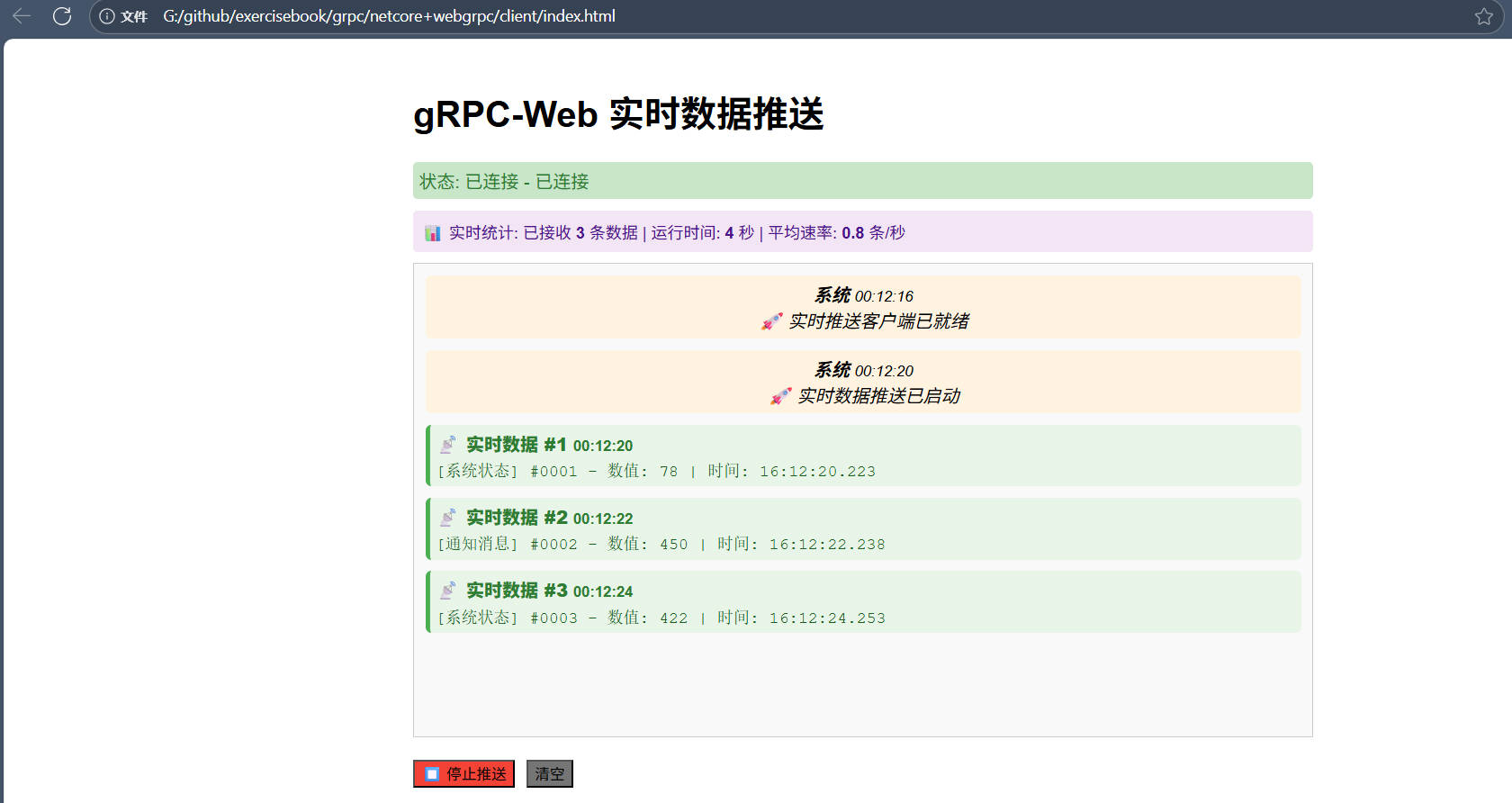
跟其他推送送相比,类型安全,性能高,压缩传输等等,但是前端支持相对没那么友好。



![洛谷 P11345 [KTSC 2023 R2] 基地简化 题解](https://www.itfaba.com/wp-content/themes/kemi/timthumb.php?src=https://www.itfaba.com/wp-content/themes/kemi/img/random/3.jpg&w=218&h=124&zc=1)
