

OpenAI接口支持的function calling使得大模型能够方便的集成外部能力和数据,是实现agent(智能体)的重要基础,能让LLM和各种功能集成,从而解决复杂的问题。 对于兼容openai接口的大模型如阿里的通义千问,也是可以使用类似的方法进行调用。
模型实际上从不自行执行函数,仅生成需要调用的函数名称和调用的参数,应用自行判断执行,对于langchain等框架则把这一层封装到框架中。并且传入的函数描述,和输出的函数调用描述都是计算在token上。
如果确实想使用openai相关模型,可以通过点击我的推荐链接 https://referer.shadowai.xyz/r/1017200 ,进入CloseAI平台,该平台提供商用级OpenAI代理服务。
或者也可以使用兼容openai接口的模型,如阿里百炼 https://bailian.console.aliyun.com/。
开发流程通常如下:
步骤1:定义一个你希望模型调用的函数 步骤2:向模型描述你的函数,以便它知道如何调用它 步骤3:将您的函数定义作为可用的“工具”传递给模型,同时附上消息内容 步骤4:接收并处理模型响应 步骤5:将函数调用结果返回给模型 步骤6:流程如果尚未结束可以继续循环上述步骤. 以下我们用一个使用大模型openai的function calling并且是多轮对话的例子进行讲解。
场景如下,在用户需要查询本机内存使用情况的时候如果可用内存超过80%时,保存至文件mem_high.txt;不超过80%时,保存到mem_ok.txt。
因此我们提供了能够一个查询本机可用内存和一个保存文本到本地文件工具函数,那么我们应该怎么让大模型进行调用呢?
- 安装所需库:psuti、openai。psutil = process and system utilities,支持linux,mac和windows操作系统,实现系统信息获取和监控
pip install psutil openai -
准备大模型的apikey,兼容openai接口协议即可。
-
以下是详细的代码及解释
from openai import OpenAI from openai.types.chat.chat_completion_message_function_tool_call import ChatCompletionMessageFunctionToolCall import psutil import json client = OpenAI( api_key="xxxxx", base_url="xxxx" ) def get_memory_info(): mem = psutil.virtual_memory() mem_info = {"total": mem.total, "available": mem.available, "used": mem.used, "free": mem.free} return json.dumps(mem_info) def write_file(file_name, text): with open(file_name, "w", encoding="utf-8") as f: f.write(text) def do_function_tool_call(function_tool_call: ChatCompletionMessageFunctionToolCall): """ 基于大模型返回的函数调用说明,进行函数调用,并且构造tool的message返回 """ function_call = function_tool_call.function name = function_call.name args = function_call.arguments if name == "get_memory_info": func_result = get_memory_info() elif name == "write_file": args_dict = json.loads(args) func_result = write_file(args_dict["file_name"], args_dict["text"]) else: raise Exception("unkown function:" + name) if func_result is None: func_result = "" ## 需要把response的关联的function_tool_call设置tool_call_id tool_message = {"role": "tool", "tool_call_id": function_tool_call.id, "content": func_result} return tool_message ## 以下对传递给llm的工具集描述,注意在早期版本是使用functions参数进行调用格式上会有所差异,openai认为tools可以支持更加广泛的工具支持因此推荐使用tools传参 tools = [ { "type": "function", "function": { "name": "get_memory_info", "description": "获取系统内存,会将系统的内存情况用json格式返回", "parameters": { "type": "object", "properties": {}, "required": [] } } }, { "type": "function", "function": { "name": "write_file", "description": "将文本数据写入文件", "parameters": { "type": "object", "properties": { "file_name": { "type": "string", "description": "文件名" }, "text": { "type": "string", "description": "写入的文本数据" } }, "required": ["file_name", "text"] } } }] user_input = "需要帮我计算电脑的内存使用率和具体的使用情况,如果内存使用率超过80%,则将内存相关信息写到mem_high.txt文件,不超过80%将内存相关信息写到mem_ok.txt文件中" messages = [{"role": "user", "content": user_input}] response = client.chat.completions.create( model="gpt-5-mini", messages=messages, tools=tools ) resp_msg = response.choices[0].message # 实现多轮对话,首先会执行查询内存函数调用 messages.append(resp_msg) # 对于实际开发来说需要严格tool_calls是否为空再决定是否调用 function_tool_call = resp_msg.tool_calls[0] # 大模型只返回需要调用的函数名称和参数,需要应用自行调用。 tool_message = do_function_tool_call(function_tool_call) # 将函数(工具)执行结果封装成tool类型返回. messages.append(tool_message) response = client.chat.completions.create( model="gpt-5-mini", messages=messages, tools=tools ) # 实现多轮对话,执行写入函数的调用 resp_msg = response.choices[0].message messages.append(resp_msg) function_tool_call = resp_msg.tool_calls[0] tool_message = do_function_tool_call(function_tool_call) messages.append(tool_message) response = client.chat.completions.create( model="gpt-5-mini", messages=messages, tools=tools ) print(response.choices[0].message.content) 最终的输出:
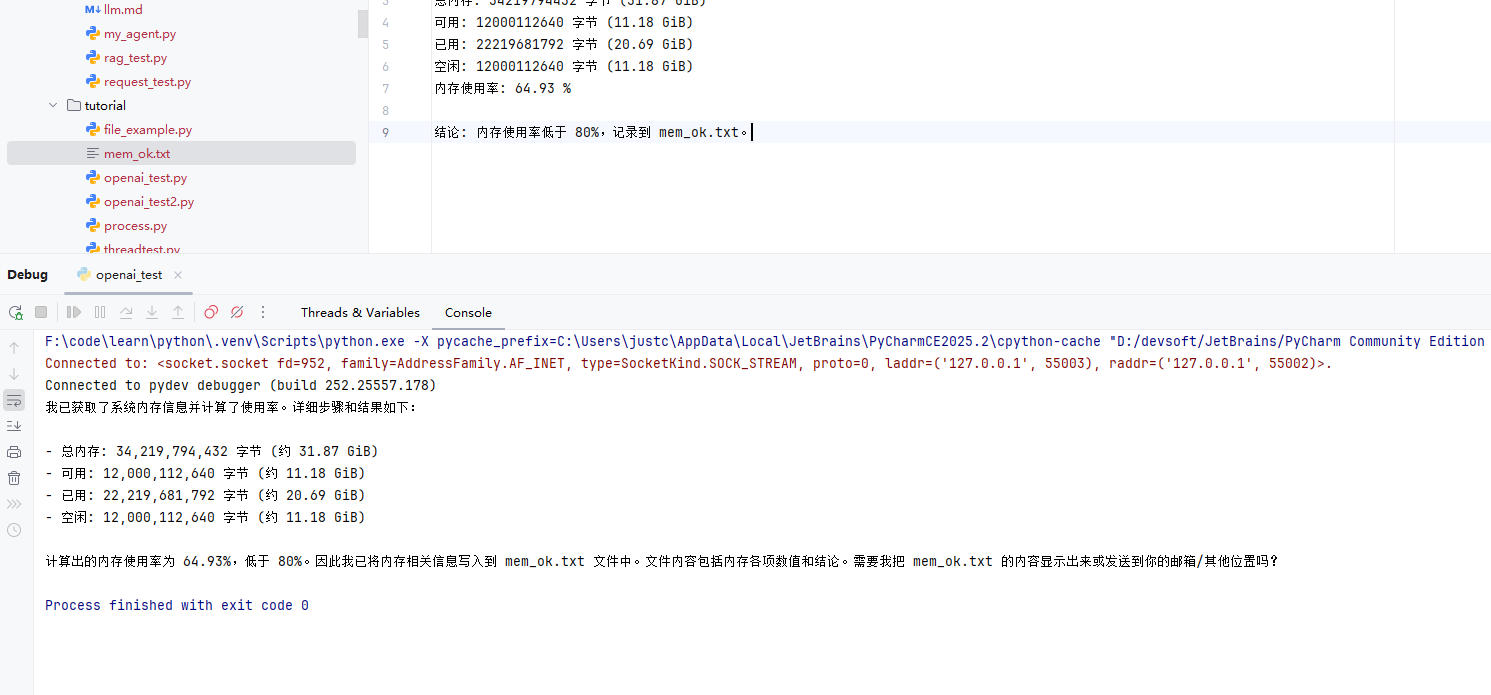
为了了解下实际出入参格式,贴一下实际的json辅助理解
这是首轮输入输出:
req:
{ "messages": [ { "role": "user", "content": "需要帮我计算我电脑的内存使用率和具体的使用情况,如果内存使用率超过80%,写到mem_high.txt文件,否则写到mem_ok.txt" } ], "model": "gpt-5-mini", "tools": [ { "type": "function", "function": { "name": "get_memory_info", "description": "获取系统内存,会将系统的内存情况用json格式返回", "parameters": { "type": "object", "properties": {}, "required": [] } } }, { "type": "function", "function": { "name": "write_file", "description": "将文本数据写入文件", "parameters": { "type": "object", "properties": { "file_name": { "type": "string", "description": "文件名" }, "text": { "type": "string", "description": "写入的文本数据" } }, "required": [ "file_name", "text" ] } } } ] } resp:
{ "choices": [ { "finish_reason": "tool_calls", "index": 0, "logprobs": null, "message": { "annotations": [], "content": null, "refusal": null, "role": "assistant", "tool_calls": [ { "function": { "arguments": "{}", "name": "get_memory_info" }, "id": "call_1k3y8eKABbbNKpUT7SBm7L3l", "type": "function" } ] } } ], "created": 1758770660, "id": "chatcmpl-CJWseIPtV6FGKTi7XsAdwkbeskgXO", "model": "gpt-5-mini-2025-08-07", "object": "chat.completion", "system_fingerprint": null, "usage": { "completion_tokens": 213, "completion_tokens_details": { "accepted_prediction_tokens": 0, "audio_tokens": 0, "reasoning_tokens": 192, "rejected_prediction_tokens": 0 }, "prompt_tokens": 201, "prompt_tokens_details": { "audio_tokens": 0, "cached_tokens": 0 }, "total_tokens": 414 } } 这个是最后一轮输入输出:
req:
{ "messages": [ { "role": "user", "content": "需要帮我计算电脑的内存使用率和具体的使用情况,如果内存使用率超过80%,则将内存相关信息写到mem_high.txt文件,不超过80%将内存相关信息写到mem_ok.txt文件中" }, { "role": "assistant", "annotations": [], "tool_calls": [ { "id": "call_vxeBJnnY6W4iFKdbuGlzCgix", "function": { "arguments": "{}", "name": "get_memory_info" }, "type": "function" } ] }, { "role": "tool", "tool_call_id": "call_vxeBJnnY6W4iFKdbuGlzCgix", "content": "{"total": 34219794432, "available": 12072124416, "used": 22147670016, "free": 12072124416}" }, { "role": "assistant", "annotations": [], "tool_calls": [ { "id": "call_c6Bw3DaspJCBVefCYk74aXkr", "function": { "arguments": "{"file_name":"mem_ok.txt","text":"内存使用情况:\n\n总内存: 34219794432 字节 (约 31.87 GiB)\n已用: 22147670016 字节 (约 20.63 GiB)\n可用: 12072124416 字节 (约 11.24 GiB)\n空闲: 12072124416 字节 (约 11.24 GiB)\n内存使用率: 64.75%\n\n结论: 内存使用率低于 80%,已将上述内存信息保存到文件 mem_ok.txt。"}", "name": "write_file" }, "type": "function" } ] }, { "role": "tool", "tool_call_id": "call_c6Bw3DaspJCBVefCYk74aXkr", "content": "" } ], "model": "gpt-5-mini", "tools": [ { "type": "function", "function": { "name": "get_memory_info", "description": "获取系统内存,会将系统的内存情况用json格式返回", "parameters": { "type": "object", "properties": {}, "required": [] } } }, { "type": "function", "function": { "name": "write_file", "description": "将文本数据写入文件", "parameters": { "type": "object", "properties": { "file_name": { "type": "string", "description": "文件名" }, "text": { "type": "string", "description": "写入的文本数据" } }, "required": [ "file_name", "text" ] } } } ] } resp:
{ "choices": [ { "finish_reason": "stop", "index": 0, "logprobs": null, "message": { "annotations": [], "content": "已计算并保存内存信息,结果如下:nn- 总内存:34,219,794,432 字节(约 31.87 GiB)n- 已用内存:22,147,670,016 字节(约 20.63 GiB)n- 可用/空闲:12,072,124,416 字节(约 11.24 GiB)n- 内存使用率:64.75%(计算方法:已用 / 总内存 × 100)nn判断与操作:n- 由于使用率 64.75% 小于阈值 80%,已把内存信息写入文件 mem_ok.txt(文件名:mem_ok.txt,位于当前工作目录)。nn如果你希望,我可以:n- 展示 mem_ok.txt 的完整内容;n- 或者把内存使用率限制、告警阈值改为其他值并重新检查; n- 或给出减少内存占用的建议。要做哪项请告诉我。", "refusal": null, "role": "assistant" } } ], "created": 1758770581, "id": "chatcmpl-CJWrNpvVIS2HVUZDLdSHJPwfrbRwH", "model": "gpt-5-mini-2025-08-07", "object": "chat.completion", "system_fingerprint": null, "usage": { "completion_tokens": 608, "completion_tokens_details": { "accepted_prediction_tokens": 0, "audio_tokens": 0, "reasoning_tokens": 384, "rejected_prediction_tokens": 0 }, "prompt_tokens": 438, "prompt_tokens_details": { "audio_tokens": 0, "cached_tokens": 0 }, "total_tokens": 1046 } } 


![洛谷 P11345 [KTSC 2023 R2] 基地简化 题解](https://www.itfaba.com/wp-content/themes/kemi/timthumb.php?src=https://www.itfaba.com/wp-content/themes/kemi/img/random/1.jpg&w=218&h=124&zc=1)
