

CentOS 8.5.2.111部署Zabbix6.0 手把手、保姆级
前提、设置网络Ip地址等
cd /etc/sysconfig cd network-scripts/ ls vim ifcfg-enp0s3 systemctl restart NetworkManager ping www.baidu.com
重启网络服务,效果不好时重启服务器
systemctl restart NetworkManager reboot
0、安装中文语言包
yum install glibc-langpack-zh.x86_64
1、交互式选择源,更加方便。
bash <(curl -sSL https://gitee.com/SuperManito/LinuxMirrors/raw/main/ChangeMirrors.sh)
测试源是否可用?
yum makecache
1.1、查看、设置主机名
hostname hostnamectl set-hostname zabbix6.Centos8.5 hostnamectl status
2.1
关闭防火墙 systemctl stop firewalld.service 开机不启动防火墙 systemctl disable firewalld.service 关闭linux 内核安全措施 setenforce 0 关闭日后linux 内核安全启动措施 sed -i "s/SELINUX=enforcing/SELINUX=disabled/g" /etc/selinux/config 防火墙状态 systemctl status firewalld systemctl status selinux-autorelabel
3、安装MYSQL准备
yum remove -y mysql #卸载之前安装的mysql 下载 wget https://dev.mysql.com/get/mysql80-community-release-el8-1.noarch.rpm yum install mysql80-community-release-el8-1.noarch.rpm yum module disable mysql yum install mysql-community-server --nogpgcheck vim /etc/my.cnf default-authentication-plugin=mysql_native_password #把这上面这一行的注释#去掉,没有的直接加上
4、MYSQL初始化
mysql -V rpm -qa | grep mysql 开启Mysql systemctl restart mysqld service mysqld status 查询临时密码,看到临时密码,要记录下来,用这个密码去更改mysql的管理员密码,并写到后续的配置中 grep 'temporary password' /var/log/mysqld.log mysql -u root -p
5、MYSQL密码配置,修改root密码:
ALTER USER 'root'@'localhost' IDENTIFIED BY 'yourPassWord'; #第一步需要先创建一个复杂一点的密码root_21ROOT SHOW VARIABLES LIKE 'validate_password%'; #查看、修改密码策略 set global validate_password.policy=0; #这个我没执行 SHOW VARIABLES LIKE 'validate_password%'; #查看、修改密码策略 create user 'root'@'%' identified by 'yourPassWord'; grant all privileges on *.* to 'root'@'%' with grant option; #授权 exit #退出mysql,否则后面语句执行不了。
下载 zabbix安装包和配置文件源包:
rpm -Uvh https://repo.zabbix.com/zabbix/6.0/rhel/8/x86_64/zabbix-release-6.0-4.el8.noarch.rpm dnf clean all cd /etc/yum.repos.d ls
vim zabbix.repo #复制粘贴我页面提供的文本,到zabbix.repo 并保存
# 3、配置zabbix.repo文件仓库,把zabbix.repo 设置成如下内容,
vim zabbix.repo #复制粘贴我页面提供的文本,到zabbix.repo 并保存
# repo文件开始 [zabbix] name=Zabbix Official Repository - $basearch #baseurl=https://repo.zabbix.com/zabbix/6.0/rhel/8/$basearch/ baseurl=https://mirrors.tuna.tsinghua.edu.cn/zabbix/zabbix/6.0/rhel/8/x86_64/ #上面是 zabbix清华源 enabled=1 gpgcheck=1 gpgkey=file:///etc/pki/rpm-gpg/RPM-GPG-KEY-ZABBIX-A14FE591 [zabbix-non-supported] name=Zabbix Official Repository (non-supported) - $basearch #baseurl=https://repo.zabbix.com/non-supported/rhel/8/$basearch/ baseurl=https://mirrors.tuna.tsinghua.edu.cn/zabbix/non-supported/rhel/8/x86_64/ #上面是 zabbix-non-supported清华源 enabled=1 gpgkey=file:///etc/pki/rpm-gpg/RPM-GPG-KEY-ZABBIX gpgcheck=1 [zabbix-unstable] name=Zabbix Official Repository (unstable) - $basearch baseurl=https://repo.zabbix.com/zabbix/5.5/rhel/8/$basearch/ enabled=0 gpgcheck=1 gpgkey=file:///etc/pki/rpm-gpg/RPM-GPG-KEY-ZABBIX-A14FE591 # repo文件结束
vim zabbix-agent2-plugins.repo #复制粘贴我页面提供的文本,到zabbix-agent2-plugins.repo 并保存
vim zabbix-agent2-plugins.repo #复制粘贴我页面提供的文本,到zabbix-agent2-plugins.repo 并保存 # 4、配置zabbix-agent2-plugins.repo文件仓库 [root@centos8 yum.repos.d]# vim zabbix-agent2-plugins.repo # repo文件开始 [zabbix-agent2-plugins] name=Zabbix Official Repository (Agent2 Plugins) - $basearch #baseurl=https://repo.zabbix.com/zabbix-agent2-plugins/1/rhel/8/$basearch/ baseurl=https://mirrors.tuna.tsinghua.edu.cn/zabbix/zabbix-agent2-plugins/1/rhel/8/x86_64/ # agent2清华源 enabled=1 gpgkey=file:///etc/pki/rpm-gpg/RPM-GPG-KEY-ZABBIX gpgcheck=1 # repo文件结束 [root@centos8 yum.repos.d]#
7、初始化数据库:
mysql -u root -p mysql> create database zabbix character set utf8mb4 collate utf8mb4_bin; # 创建zabbix数据库 mysql> create user zabbix@localhost identified WITH sha256_password BY 'password'; #创建zabbix数据库密码password mysql> grant all privileges on zabbix.* to zabbix@localhost; mysql> set global log_bin_trust_function_creators = 1; mysql>use mysql; mysql>delete from user where user=' ';#我这句没执行 mysql>flush privileges; mysql> quit;
安装zabbix 相关模块
dnf install zabbix-server-mysql zabbix-web-mysql zabbix-apache-conf zabbix-sql-scripts zabbix-selinux-policy zabbix-agent2
导入初始化数据库脚本
zcat /usr/share/zabbix-sql-scripts/mysql/server.sql.gz | mysql --default-character-set=utf8mb4 -uzabbix -p zabbix
mysql -u root -p
mysql> set global log_bin_trust_function_creators = 0; mysql> quit;
8、启动zibbx 程序及agen:,开机自启相关服务。
vim /etc/zabbix/zabbix_server.conf # 取消注释 DBPassword= 并设置数据库密码
重启zabbix服务
systemctl restart zabbix-server zabbix-agent2 httpd php-fpm systemctl enable zabbix-server zabbix-agent2 httpd php-fpm
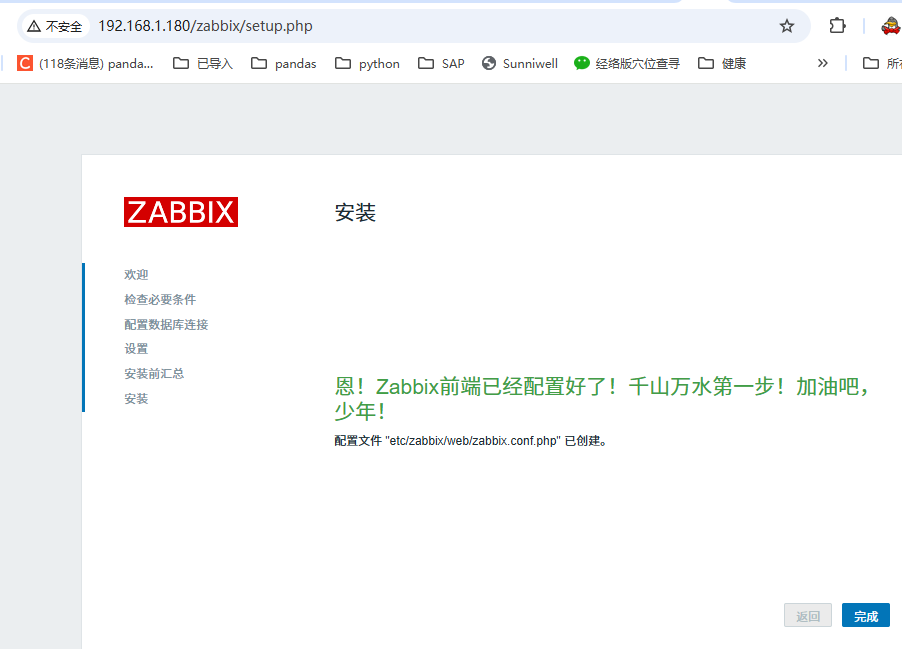
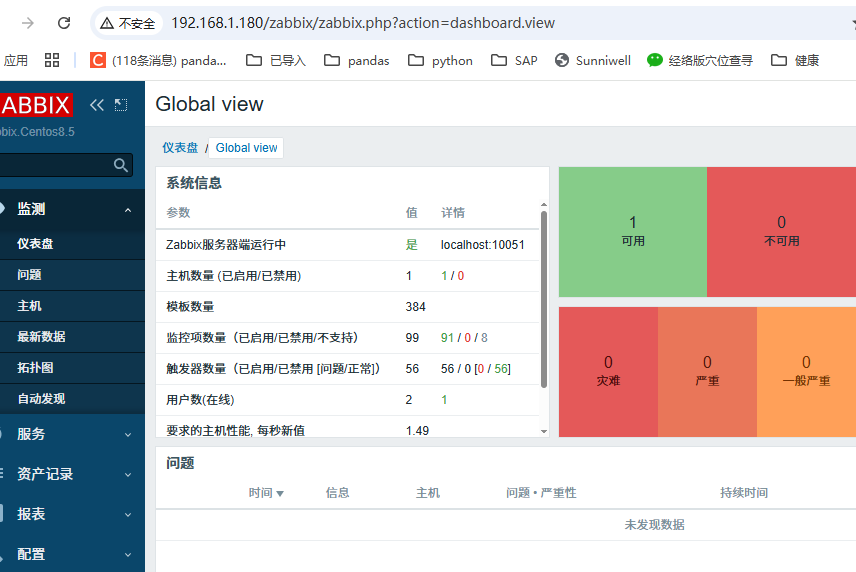
9、打开zabbix:
http://192.168.1.180/zabbix
用户名:Admin
密码:zabbix
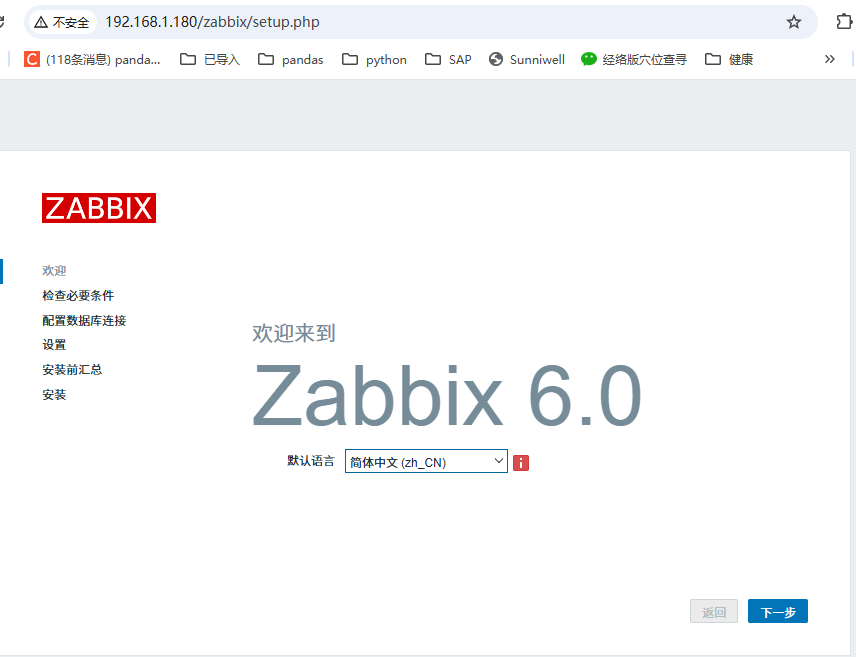
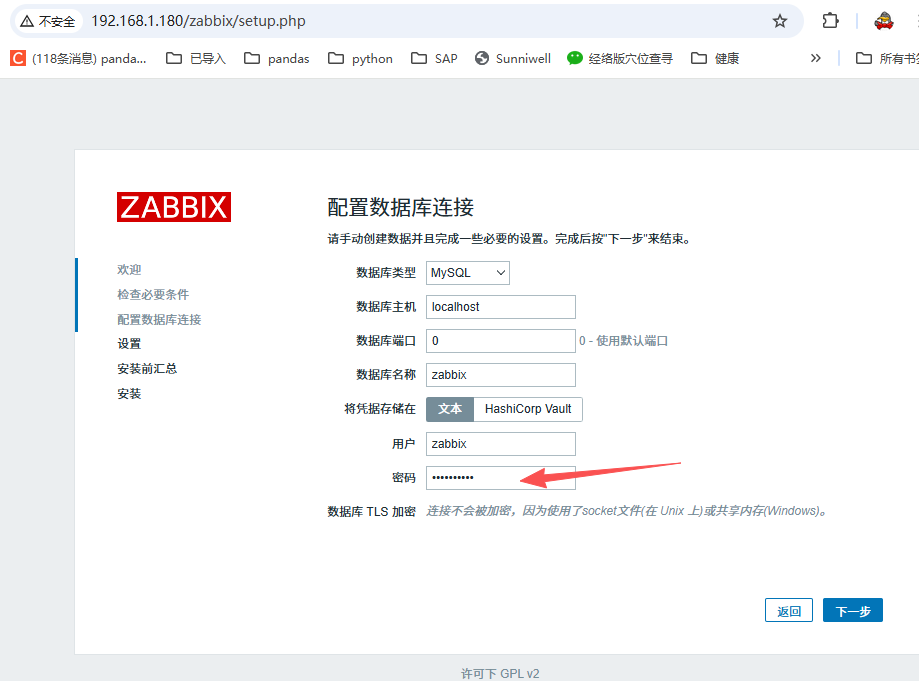
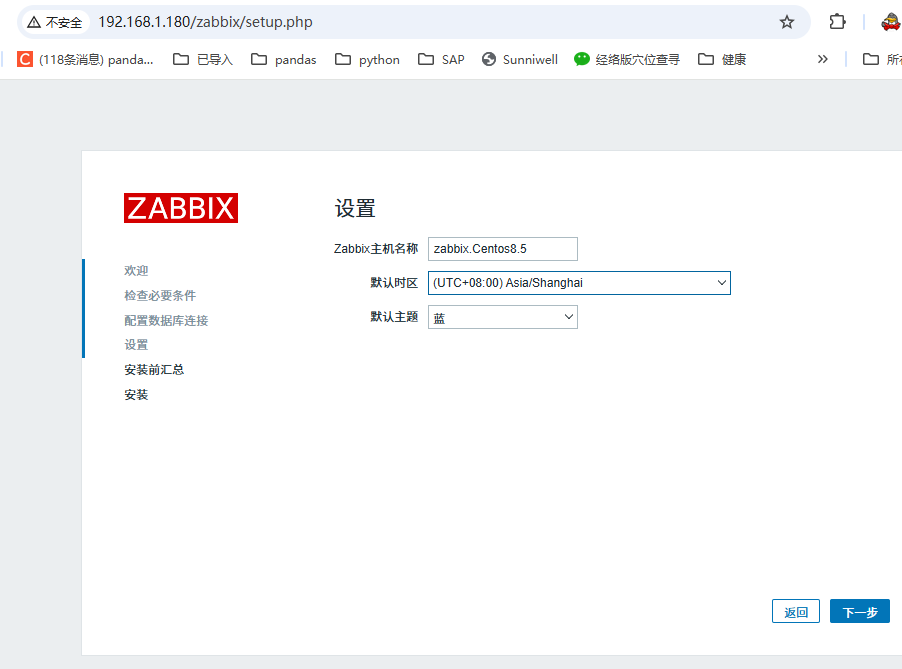
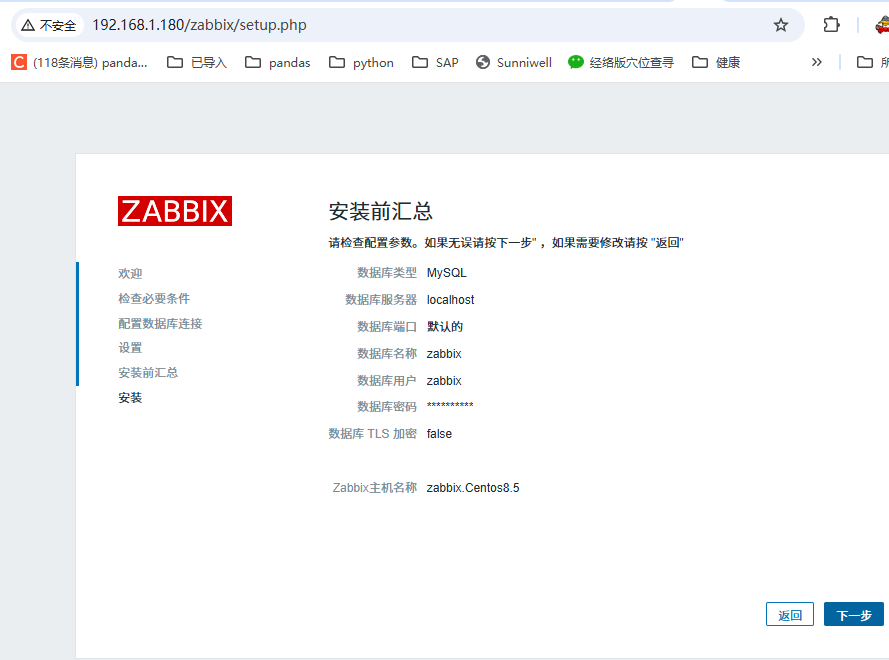



![洛谷 P11345 [KTSC 2023 R2] 基地简化 题解](https://www.itfaba.com/wp-content/themes/kemi/timthumb.php?src=https://www.itfaba.com/wp-content/themes/kemi/img/random/1.jpg&w=218&h=124&zc=1)
